

PayTappy
Prabhat Gupta Finance iPhoneiPadiPod touch
PayTappy is a free Finance app for iPhone and iPad by Prabhat Gupta. Requires iOS 16.4. Updated September 18, 2026.
- Price
- Free
- on the App Store
- Size
- 46 MB
- Age 4+
- Updated
- Sep 18
- 2026 · v1.1.0
Screenshots


About PayTappy
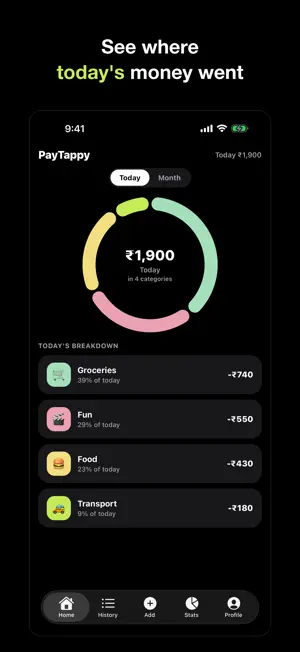
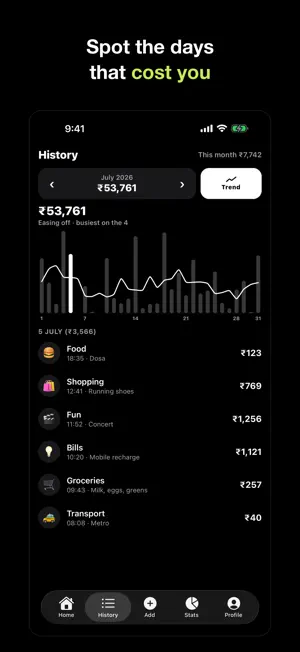
Most expense trackers lose you at the third tap. PayTappy is built around one number and one tap. Type the amount. Tap a category. It is saved. No form, no save button, no date picker, no confirmation screen. FAST BY DESIGN - A keypad is the first thing you see, not a menu - Tapping a category saves instantly, with an Undo if you fumbled - Eight categories ready to go, and you can add your own with any emoji - Today's total sits in the header, always WITHOUT OPENING THE APP Nothing to install. PayTappy adds itself to the Shortcuts app, so you can reach it from: - Back Tap, by double-tapping the back of your iPhone - Siri: "Hey Siri, log an expense in PayTappy" - A Lock Screen widget - Spotlight search KNOW WHERE THE MONTH WENT - A ring that breaks your spending down by category, for today or the month - Set a monthly budget and the ring measures against it, so the arc left open is what you have not spent yet - Daily average, projected month-end, and last month, side by side - A calendar of daily totals, or a trend line across the month - Tap any slice to focus it and see its share YOURS, ON YOUR DEVICE PayTappy works with no account at all. Your expenses are stored on your phone, and nothing is uploaded unless you choose to. If you want a backup, sign in with Apple or Google and turn backup on. Then, and only then, your expense data is copied to a private row readable by nobody but your account. You can delete that data, and your account, from inside the app. - Export everything to CSV or JSON at any time - Works fully offline - Pure black and white, in light and dark - Rupee, dollar, euro and pound No ads. No tracking. No newsletter.
What’s new
Version 1.1.0 · Updated September 18, 2026
Backup you can rely on. • Signing in now turns backup on automatically, so your expenses are saved from the very first one. • Fixed a problem where backup could quietly switch itself off and stay off. • Clear your app storage or restore your phone, and your expenses now come back on their own. • Restoring no longer resets your categories, budget or currency. • Confirmation messages moved to the bottom of the screen, so they no longer cover your totals.
App privacy
The developer, Prabhat Gupta, reported these privacy practices to Apple.
Data Linked to You
The following data, which may be collected and linked to your identity, may be used for the following purposes:
- Financial Info: Other Financial Info
- Contact Info: Email Address, Name
- Identifiers: User ID
Used for: App Functionality
Alternatives to PayTappy
Looking for apps like PayTappy? Here are 6 similar apps on the App Store. The highest rated is NorthLedger: Budget & Wealth (5.0/5), and all 6 are free to download.
-
 NorthLedger: Budget & Wealth
5.0
-
 Finzo Money
-
 Spendrift: Expense Tracker
-
 YooToo: UAE Budget Tracker
-
 Saveplan
-
 Account & Expense Manager Pro
| App | Rating | Price | Last updated | Compare |
|---|---|---|---|---|
| PayTappy | – | Free | September 18, 2026 | |
| NorthLedger: Budget & Wealth | 5.0 / 5 (1) | Free | Sep 14, 2026 | Compare |
| Finzo Money | – | Free | Jul 14, 2026 | Compare |
| Spendrift: Expense Tracker | – | Free | Oct 19, 2026 | Compare |
| YooToo: UAE Budget Tracker | – | Free | Jul 8, 2026 | Compare |
| Saveplan | – | Free | Dec 17, 2025 | Compare |
| Account & Expense Manager Pro | – | Free | Sep 24, 2026 | Compare |
Compare PayTappy with the top alternatives: ratings, updates, ASO score and keyword gaps →