

Omni-Auth
David Ivan Perez Salazar Utilities iPhoneiPadiPod touch
Omni-Auth is a free Utilities app for iPhone and iPad by David Ivan Perez Salazar. Requires iOS 18.0. Updated October 17, 2026.
- Price
- Free
- on the App Store
- Size
- 3 MB
- Age 12+
- Updated
- Oct 17
- 2026 · v1.1.3
Screenshots


About Omni-Auth
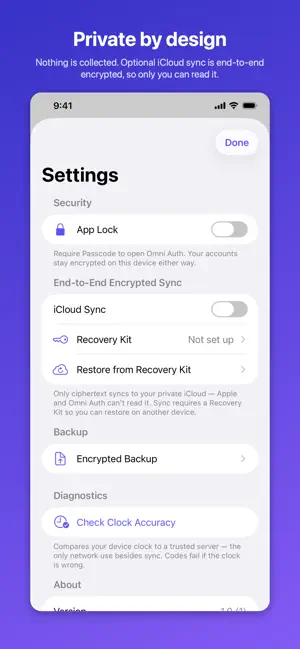
Omni Auth generates the two-factor codes that protect your accounts — quickly, and without giving anything away. There is no account to create, because there is no server to create one on. Your secrets are encrypted on your device and stay there unless you choose to sync them. PRIVATE BY DESIGN • Nothing is collected. No analytics, no tracking, no advertising, no third-party SDKs. • Your secrets are encrypted with AES-256-GCM under a key held in the iOS Keychain, on top of the system's own file protection. • Optional iCloud sync is end-to-end encrypted: only ciphertext is uploaded, to your own private iCloud database. Apple can't read it, and neither can we. • Works fully offline. The only other network request is a clock-accuracy check you trigger yourself. BUILT FOR DAILY USE • Tap an account to copy its code. The clipboard entry stays on this device and expires on its own. • A countdown ring on every account, and the next code appears in the final seconds so a code never expires mid-login. • Folders, tags, favourites, search, and manual or alphabetical ordering. • Siri and Shortcuts support. EXTRA PROTECTION WHEN YOU WANT IT • App Lock with Face ID, Touch ID, or your passcode. • Per-account Face ID — mark a sensitive account and its code stays hidden until you authenticate. Those accounts never appear in Shortcuts. • Content is blurred in the App Switcher and while the screen is being recorded, and you're warned when a screenshot is taken. MOVING IN IS EASY Import from Google Authenticator, 2FAS, Aegis, FreeOTP, CSV files, or an Omni Auth backup — including password-protected 2FAS and Aegis vaults. Scan a QR code, pick one from your photos, paste a link, or type it in by hand. Supports TOTP and HOTP, SHA-1/SHA-256/SHA-512, and 6–8 digit codes. YOU STAY IN CONTROL OF RECOVERY Because nothing is stored on a server, recovery is yours to arrange — so Omni Auth makes it straightforward: • Encrypted backups, protected by a password only you know. • A Recovery Kit — a recovery key plus a kit file — that restores your vault on a new device. If you lose your device without either, the codes cannot be recovered by anyone, including us. That trade-off is what keeps the rest of it private. Privacy policy: https://pod32g.github.io/omni-auth/privacy/ Support: https://pod32g.github.io/omni-auth/support/
What’s new
Version 1.1.3 · Updated October 17, 2026
Fixes opening the app with iCloud sync on, and improves sync. • If Omni Auth wouldn't open after the last update and you have iCloud sync turned on, this update fixes it. Your codes and accounts are exactly as you left them. • Edits you make to an account — a new name, a colour, a counter-based code moving forward — now reach your other devices, not just the account itself. • If iCloud isn't ready on a device yet, Omni Auth now says so under Settings instead of waiting quietly. Your codes, accounts and settings are untouched by this update.
App privacy
The developer, David Ivan Perez Salazar, reported these privacy practices to Apple.
Data Not Collected
The developer does not collect any data from this app.
Alternatives to Omni-Auth
Looking for apps like Omni-Auth? Here are 6 similar apps on the App Store. The highest rated is Beaconchain Dashboard (4.9/5), and all 6 are free to download.


| App | Rating | Price | Last updated | Compare |
|---|---|---|---|---|
| Omni-Auth | – | Free | October 17, 2026 | |
| SGT GPS | – | Free | Nov 9, 2025 | Compare |
| Guardian JAC | – | Free | Oct 15, 2026 | Compare |
| Beaconchain Dashboard | 4.9 / 5 (108) | Free | Feb 2, 2026 | Compare |
| Deblex | 4.9 / 5 (21) | Free | Jan 2, 2024 | Compare |
| Network Utility | 4.6 / 5 (626) | Free | Sep 23, 2026 | Compare |
| Auna Seguros MX | 1.7 / 5 (6) | Free | Sep 26, 2026 | Compare |
Compare Omni-Auth with the top alternatives: ratings, updates, ASO score and keyword gaps →