

Sleep Slope
Tomoe Tsubota Lifestyle iPhoneiPadiPod touch
Sleep Slope is a free Lifestyle app for iPhone and iPad by Tomoe Tsubota. Requires iOS 16.4. Updated November 27, 2026.
- Price
- Free
- on the App Store
- Size
- 44 MB
- Age 4+
- Updated
- Nov 27
- 2026 · v1.0.2
Screenshots
Save to Pinterest


About Sleep Slope
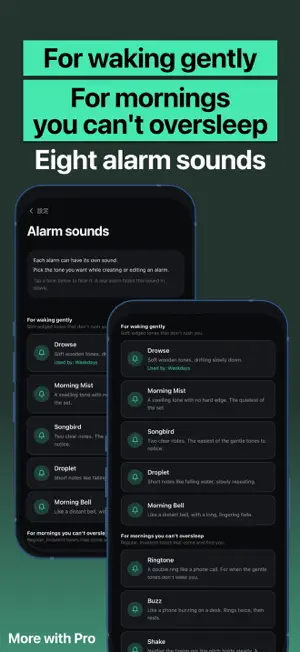
【Set and cancel several alarms in one go】 How many alarms did you set for tomorrow morning? Ten? That isn't weak willpower. Waking up simply has an ideal time and a limit. Six would be ideal. Seven is the last moment you can stay in bed. Somewhere in that range — let tomorrow morning's version of you decide. Sleep Slope is built for people who think that way. The stock Clock app cannot hold a range. So you lay down alarms every ten minutes. And you switch them on every night, and off every morning. With Sleep Slope, one alarm is all you set. ■ You decide two things. Ideal, and limit. The time you'd like to wake, and the time you absolutely have to be up. Set those two, and Sleep Slope creates every alarm in between. Ideal at six, limit at seven. Ask for seven alarms, and the first rings at six, every ten minutes, and the last lands exactly on seven. Adding them one at a time is over. ■ As many as you want, as close together as you want Three alarms or ten. Five minutes apart or twenty. No limit on the count, the spacing, or the deadline — for free. Repeat by weekday, too. ■ It rings through the silent switch and through Focus Sleep Slope uses AlarmKit, the operating system's own alarm facility, from iOS 26. It rings with the silent switch on. It rings during Do Not Disturb. You can stop it, or snooze it, from the Lock Screen. On iOS versions before 26, it rings through notifications: it follows your silent switch and Focus settings, and the sound stops after a few dozen seconds. And once your limit has passed, it rings again every five minutes until you stop it. That is what not betting the morning on one alarm actually means. ■ A harder sound, for the limit only Gentle for the alarms along the way. Something that will not be slept through once your limit has passed. Per alarm, and free. ■ The moment you're up, the rest disappear The mornings you woke early were always the ones with alarms left behind. Up at six, and still ringing at 6:20, 6:40, 7:00. The better the morning went, the more it punished you. Sleep Slope clears the rest the moment you're up. No opening the settings screen, no deleting them one by one. Mornings are busy enough without that. Stop the alarm, tap "I'm up", and the rest of the day's alarms are off. ■ It remembers which alarm, and what time Sleep Slope records which alarm you got up on, and at what time. It keeps how much room you had left before your limit, too, so you can see whether your mornings are improving or quietly slipping. Recording runs on its own. There is nothing to switch on and nothing to do later. ■ Not only for waking up Medicine. A baby's feed. Water. Getting up from your desk. Anything you want telling about several times a day works the same way. Set a start and an end, and it rings evenly across the span. ■ On your wrist, if you wear an Apple Watch There is no Watch app, but the iPhone alarm reaches your Apple Watch. You feel it on your wrist, and you can stop it from there. ■ Sleep Slope Pro Pro is available as an auto-renewing subscription (monthly or yearly) or as a one-time lifetime purchase, and adds: - As many alarms as you need (weekdays and weekends, early shifts, and so on) - Your full history, with trends over time - Eight sounds to choose from, instead of two - A nudge when it's time to go to bed, counted back from your wake time Without Pro, there is still no limit on how many times it rings. Pro is for having more of it, not for unlocking the basics. Price, duration, and any free trial are shown on the purchase screen in the app. Payment is charged to your Apple Account at confirmation of purchase. Subscriptions renew automatically unless cancelled at least 24 hours before the period ends. You can cancel any time in Settings > your name > Subscriptions. Lifetime is charged once and does not renew. Privacy Policy: https://sleepslope.mellowy.site/en/privacy.html Terms of Use: https://sleepslope.mellowy.site/en/terms.html
What’s new
Version 1.0.2 · Updated November 27, 2026
- When the deadline alarm is set to the warning sound, its alarm card now shows a speaker icon. - The snooze button on the Lock Screen is now clearer.
App privacy
The developer, Tomoe Tsubota, reported these privacy practices to Apple.
Data Not Linked to You
The following data, which may be collected but is not linked to your identity, may be used for the following purposes:
- Identifiers: User ID
- Usage Data: Product Interaction
- Purchases: Purchase History
Used for: Analytics, App Functionality
Alternatives to Sleep Slope
Looking for apps like Sleep Slope? Here are 6 similar apps on the App Store.
-
 Single Bundle
-
 SAYDAY: Today Says Hi
-
 Nook Letter -思い出の手紙
-
 ASOBICOM: Family Activities
-
 Shabelog - Baby & Kid's Words
-
 保険簿|保険管理アプリ
| App | Rating | Price | Last updated | Compare |
|---|---|---|---|---|
| Sleep Slope | – | Free | November 27, 2026 | |
| Single Bundle | – | Free | Jun 14, 2026 | Compare |
| SAYDAY: Today Says Hi | – | Free | Nov 5, 2026 | Compare |
| Nook Letter -思い出の手紙 | – | Free | Nov 6, 2026 | Compare |
| ASOBICOM: Family Activities | – | Free | Nov 20, 2026 | Compare |
| Shabelog - Baby & Kid's Words | – | Free | Nov 10, 2026 | Compare |
| 保険簿|保険管理アプリ | – | Free | Sep 28, 2026 | Compare |
Compare Sleep Slope with the top alternatives: ratings, updates, ASO score and keyword gaps →