

What Stays: Private Journal
DEVECTOR CONSULTING LIMITED Lifestyle iPhoneiPadiPod touch
What Stays: Private Journal is a free Lifestyle app for iPhone and iPad by DEVECTOR CONSULTING LIMITED. Requires iOS 15.0. Updated October 22, 2026.
- Price
- Free
- on the App Store
- Size
- 24 MB
- Age 4+
- Updated
- Oct 22
- 2026 · v1.0.5
Screenshots

About What Stays: Private Journal
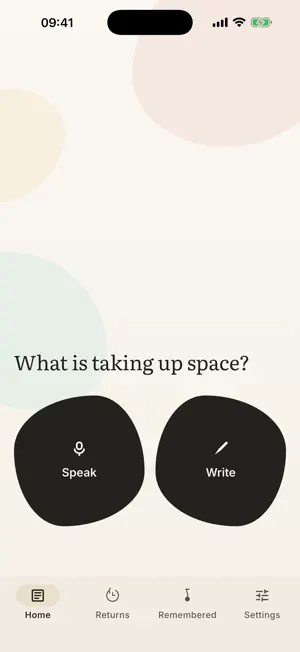
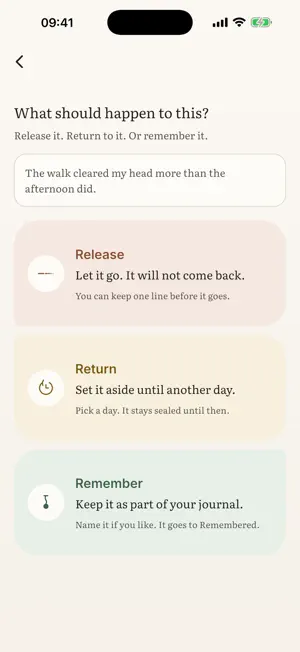
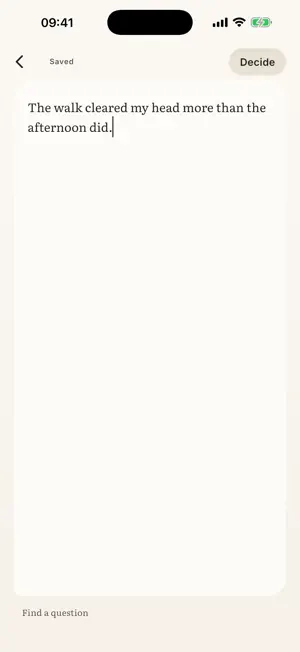
Not every thought needs a permanent home. What Stays is a journal built around one question: what should happen to this? Write an entry, or speak one. Then choose its ending. RELEASE: let it go. The key that opens the entry is destroyed, and nothing from it will be shown again. RETURN: set it aside, sealed, until a day you choose. It stays sealed even from you, and then it comes back. REMEMBER: keep it deliberately. Only what you choose to keep becomes part of your journal. The point of writing something down is the writing, not always the keeping. This is a journal that agrees. PRIVATE BY ARCHITECTURE • No account, no sign-up, no server. • Your entries are encrypted on this iPhone, each with its own key (AES-256-GCM). Devector cannot read them: no copy exists. • Nothing leaves this phone unless you send it. It works with no network: iOS moves the sealed files, not the app. • No analytics, no tracking, no ads, and no analytics code in the app at all. • Notifications never show what you wrote, and the app hides its contents from the app switcher. • It can lock itself: Face ID, Touch ID or your passcode before it opens. • A copy of the app’s files is not a copy of your journal. The key that opens it stays in this iPhone’s Keychain, marked to this device only. SPEAKING, AND WHAT BECOMES OF IT You can speak an entry instead of writing one. The recording is encrypted like everything else, and it is what is kept: if anything else fails, the audio is saved. Some iPhones turn speech into text on the device. Where yours can, the app adds a written version, live or from a saved recording, using the phone’s own recogniser with the network path refused. Where it cannot, recordings stay as audio and the app says so. Either way it is free. REFLECTION, IF YOU ASK Part of Plus, experimental, off by default. On a recent iPhone that can run Apple’s on-device model, it can offer a line worth keeping, a suggested title, or one question about an entry. Only when you ask, never written into your journal on its own. Your words go to Apple’s own model: outside this app, on the same phone, nothing over the network and nothing kept. Every answer is checked against your words, and one that falls short is not shown. Where an iPhone cannot run it, none of this appears. YOUR DEVICES, WITHOUT A SERVICE Sync puts the same journal on your iPhone and your iPad, and on Apple devices it is one switch: it uses the app's own folder in your iCloud Drive. What lands there is sealed with a passphrase this iPhone makes and keeps for you, which we never see and cannot reset, so nobody holding the folder can read a word. You see it once, when you add a second device. If your other phone is not an Apple one, pick a shared folder: iCloud cannot reach it. WHAT IT COSTS The journal itself (writing, speaking, transcription, the three endings, encrypted export and restore, Delete everything, and reading what you already wrote) is free forever. A paywall here will never take away, hide, or degrade anything that exists. What Stays Plus is one purchase, made once, with no subscription. Plus is sync between your devices, and reflection. Every new install starts with fourteen days of the full product, so you decide with everything in your hands. The price is shown in your own currency first. When the fourteen days end, nothing is taken away. Plus only declines to start new premium work. BEFORE YOU DEPEND ON IT Unless you turn sync on, your journal lives on this iPhone and nowhere else. That is the point, and it has a consequence: losing this phone loses your entries. Sync keeps a sealed copy in your own folder and on your other device. Settings also makes an encrypted backup: one file, locked with a passphrase only you know. The app cannot make it on its own, because your passphrase is stored nowhere. Either way a copy leaves this phone. Encrypted, but it does travel. From Devector. Pay once. It stays.
What’s new
Version 1.0.5 · Updated October 22, 2026
Ready for iPhone Duo. - On the outer screen, the tabs now sit beside the camera, where iPhone Duo keeps its own controls. - Release, Return and Remember keep their words clear of the camera.
App privacy
The developer, DEVECTOR CONSULTING LIMITED, reported these privacy practices to Apple.
Data Not Collected
The developer does not collect any data from this app.
Alternatives to What Stays: Private Journal
Looking for apps like What Stays: Private Journal? Here are 6 similar apps on the App Store. The highest rated is Gharpar – Beauty Services (4.7/5), and all 6 are free to download.
-
 Deenify - Ad-free Muslim App
1.0
Deenify - Ad-free Muslim App
1.0
-
 absorvia: AI Voice Journal
-
 GetGo Operator
-
 NAC Jewellers
1.0
NAC Jewellers
1.0
-
 Gharpar – Beauty Services
4.7
Gharpar – Beauty Services
4.7
-
 Trace Me Smart ID
1.0
Trace Me Smart ID
1.0
| App | Rating | Price | Last updated | Compare |
|---|---|---|---|---|
| What Stays: Private Journal | – | Free | October 22, 2026 | |
| Deenify - Ad-free Muslim App | 1.0 / 5 (1) | Free | Jun 19, 2026 | Compare |
| absorvia: AI Voice Journal | – | Free | Sep 29, 2026 | Compare |
| GetGo Operator | – | Free | Jun 9, 2026 | Compare |
| NAC Jewellers | 1.0 / 5 (1) | Free | Oct 14, 2026 | Compare |
| Gharpar – Beauty Services | 4.7 / 5 (130) | Free | Feb 19, 2025 | Compare |
| Trace Me Smart ID | 1.0 / 5 (1) | Free | Jul 14, 2026 | Compare |