

InForm: Video Analysis
Sean Ericson Health & Fitness iPhoneiPadiPod touch
InForm: Video Analysis is a free Health & Fitness app for iPhone and iPad by Sean Ericson. Requires iOS 15.1. Updated October 26, 2026.
- Price
- Free
- on the App Store
- Size
- 196 MB
- Age 4+
- Updated
- Oct 26
- 2026 · v2.0.0
Screenshots
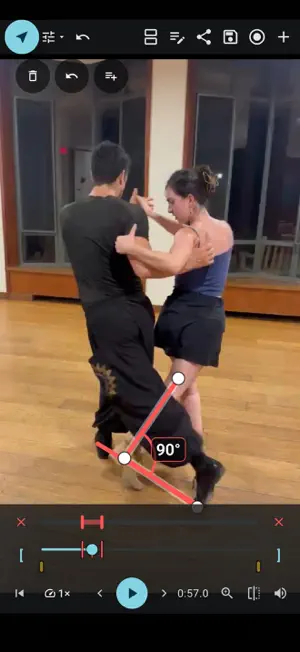
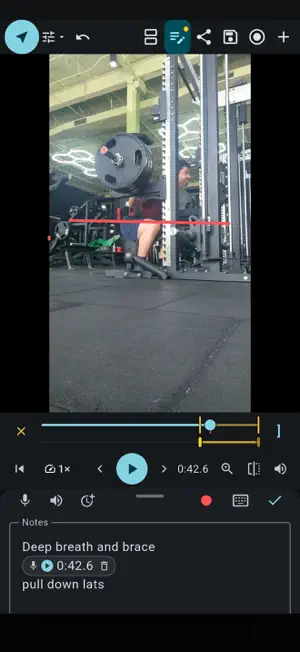


About InForm: Video Analysis
InForm brings slow motion, drawings, notes and recorded analysis together in a single simple to use app. Study a movement, compare attempts and turn what you see into useful feedback. Simple to use interface means you spend less time fighting your app and more time coaching your clients Free Version Packed with Features - Film in the app or open videos and photos from your device. - Slow playback, step frame by frame and loop the moment that matters. - Zoom and mirror the view to study technique. - Draw lines, arrows, shapes and text. Measure angles directly on the picture. - Track points, paths, angles and body movement on local videos. - Compare two videos, synchronize playback and review matching sections. - Keep typed notes, timestamps and voice notes with your clips. - Record your analysis with spoken feedback for someone to revisit between sessions. - Export annotated videos Premium Features Perfect for Coaches - Seamlessly share video feedback with students - Track progress over time - Shared space for full class - Cloud storage so you never lose your progress Subscriptions Personal, Coach and Coach Plus memberships are available monthly or annually. Prices and included storage and sharing limits are shown in the app before purchase. Payment is charged to your Apple Account at confirmation. Subscriptions renew automatically unless canceled at least 24 hours before the current period ends. Your account is charged for renewal within 24 hours before the period ends. Manage or cancel in App Store subscriptions. Restore purchases is available in Account > Plans and usage > Purchase options. Terms of Use (EULA): https://www.apple.com/legal/internet-services/itunes/dev/stdeula/ Privacy Policy: https://www.informmotion.com/privacy.html
What’s new
Version 2.0.0 · Updated October 26, 2026
Personal and Shared spaces bring your practice and feedback together. - Keep videos and notes in dated practice sessions. - Join shared spaces for free with an account. - Free includes one personal space with up to eight videos and editable file sharing. - Explore the updated Videos, Spaces, Guide and Account navigation. - Follow guided tutorials for playback, drawing, comparison and notes. - Stopping a feedback recording now pauses the playing videos, including both comparison panels. - Recording and notification reliability improvements.
App privacy
The developer, Sean Ericson, reported these privacy practices to Apple.
Data Linked to You
The following data, which may be collected and linked to your identity, may be used for the following purposes:
- Health & Fitness: Fitness
- Contact Info: Email Address, Name
- User Content: Other User Content, Emails or Text Messages, Photos or Videos, Audio Data
- Purchases: Purchase History
- Location: Coarse Location
- Identifiers: Device ID, User ID
- Usage Data: Product Interaction
- Contacts: Contacts
Used for: Developer’s Advertising or Marketing, Analytics, App Functionality
Alternatives to InForm: Video Analysis
Looking for apps like InForm: Video Analysis? Here are 6 similar apps on the App Store. The highest rated is Wolf Pack Coaching (5.0/5), and all 6 are free to download.
-
 Water Warrior
4.0
Water Warrior
4.0
-
 Wolf Pack Coaching
5.0
Wolf Pack Coaching
5.0
-
 The DynaFlow
5.0
The DynaFlow
5.0
-
 Gait Analysis Vision
-
 PTSuite
5.0
PTSuite
5.0
-
 Reaction Time Test: Reflex
5.0
Reaction Time Test: Reflex
5.0
| App | Rating | Price | Last updated | Compare |
|---|---|---|---|---|
| InForm: Video Analysis | – | Free | October 26, 2026 | |
| Water Warrior | 4.0 / 5 (4) | Free | Aug 19, 2026 | Compare |
| Wolf Pack Coaching | 5.0 / 5 (3) | Free | Sep 10, 2026 | Compare |
| The DynaFlow | 5.0 / 5 (2) | Free | May 1, 2026 | Compare |
| Gait Analysis Vision | – | Free | Apr 15, 2026 | Compare |
| PTSuite | 5.0 / 5 (2) | Free | Jun 30, 2026 | Compare |
| Reaction Time Test: Reflex | 5.0 / 5 (1) | Free | Oct 22, 2026 | Compare |