

ARC Score
sang hoon lee Music iPhoneiPadiPod touch
ARC Score is a free Music app for iPhone and iPad by sang hoon lee. Requires iOS 18.0. Updated October 7, 2026.
- Price
- Free
- on the App Store
- Size
- 15 MB
- Age 4+
- Updated
- Oct 7
- 2026 · v1.2.17
Screenshots

About ARC Score
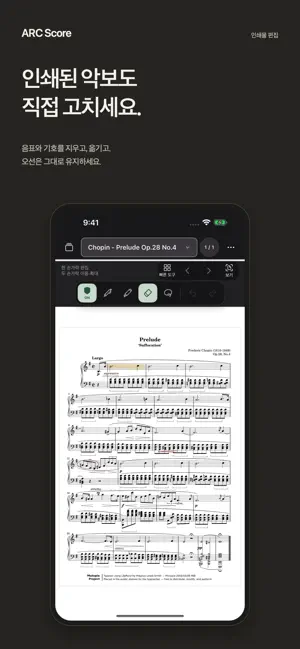
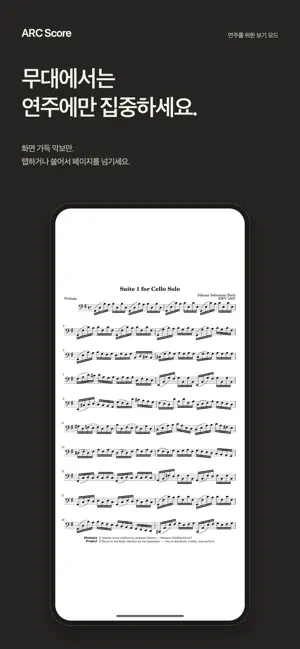
ARC Score is a sheet music app for editing printed notation, adding annotations, and reading scores while you play. Edit with Apple Pencil on iPad or your finger on iPhone. On iPhone, use one finger to write, erase, and select, and two fingers to pan and zoom. Import PDF or image scores, or create a score from blank staff paper. Turn on printed-content editing to erase or move printed markings while preserving staff lines. Annotate with the pen and highlighter, and save your favorite colors and widths as quick tools. Write notes and rests on the staff of a new or imported score with Music Pen. Recognized handwriting becomes printed notation based on where you wrote it. Add dots or flags to revise it, or use Undo to return to the original handwriting. This does not automatically transcribe an entire existing score. Recognition results depend on handwriting and score quality. Key features • Import PDF and image scores • Staff-paper templates with or without a title area • Save personal PDFs as templates: repeat one selected page or use the complete PDF • Edit printed content while preserving staff lines • Convert handwritten notes and rests with Music Pen • Ordinary pen, highlighter, eraser, freeform and rectangular selection • Undo and Redo • Folders and setlists • Add, duplicate, reorder, and delete pages • Portrait, landscape, and two-page reading • Automatic saving and work recovery Hide the tools in reading mode while keeping system information such as the time and battery visible. Tap or swipe to turn pages, and use performance lock to reduce unintended actions. ARC Score supports Korean, English, and Japanese. Open App Language in settings to change the language in system settings. Printed-content editing and staff detection work best with clear PDFs and images. Results may vary with low-resolution scans and photographs. Access plans Keep up to five library scores for free, with viewing, ordinary annotations, basic management, saving, and export. A multi-page score counts as one library item. Tutorial scores do not count toward the free limit. No ARC Score account or login is required. Monthly and lifetime access provide the same current benefits: printed-content editing, Music Pen, and unlimited library scores. Prices vary by country or region. Check the price and terms shown in the app and Apple's purchase confirmation before buying. Monthly access is an auto-renewable subscription. Eligible subscribers receive a 14-day free trial, followed by the monthly charge unless cancelled. To avoid renewal, cancel in your Apple Account subscription settings at least 24 hours before the next billing date. Lifetime access is a one-time purchase with no automatic renewal. Buying lifetime access does not automatically cancel an existing monthly subscription. After a trial or subscription ends, existing scores and edits remain available for viewing, ordinary annotations, saving, and export. Scores above the free limit are retained. In free access, you can add a new score only when fewer than five library scores are stored. New printed-content editing and Music Pen use require active access. Use Restore Purchases to verify an existing purchase. Privacy Policy: https://arc-score-support.jzrtcmkrj4.chatgpt.site/privacy Terms of Use (Apple Standard EULA): https://www.apple.com/legal/internet-services/itunes/dev/stdeula/
What’s new
Version 1.2.17 · Updated October 7, 2026
• Update notices no longer cover your score while you play. They now appear as a single line at the bottom of the Library. • Switching between Edit and View now responds the moment you tap, so you know your tap registered. • The Library, Quick Tools and staff detection results are cleaner. You can import scores right from an empty Library. • When importing from the Files app, the "Choose where to save" sheet opens full size, so folders are easier to find. • Ending the tutorial now closes it right away without a confirmation, and the resume card and topic list are simpler. • Fixed a white line that could appear at the edge of the screen while turning pages in View with the Soft Ivory paper color.
App privacy
The developer, sang hoon lee, reported these privacy practices to Apple.
Data Not Collected
The developer does not collect any data from this app.
Alternatives to ARC Score
Looking for apps like ARC Score? Here are 6 similar apps on the App Store. The highest rated is Band Session Note (5.0/5), and 3 of the 6 are free to download.
-
 OpenScore
-
 Realbook Master
1.0
Realbook Master
1.0
-
 Band Session Note
5.0
Band Session Note
5.0
-
 Ultimate Drum Tune
5.0
Ultimate Drum Tune
5.0
-
 ttuner: tuner & metronome
5.0
ttuner: tuner & metronome
5.0
-
 BluePick
| App | Rating | Price | Last updated | Compare |
|---|---|---|---|---|
| ARC Score | – | Free | October 7, 2026 | |
| OpenScore | – | Free | Oct 12, 2026 | Compare |
| Realbook Master | 1.0 / 5 (1) | 9.99 USD | Aug 26, 2026 | Compare |
| Band Session Note | 5.0 / 5 (1) | 9.99 USD | Oct 12, 2026 | Compare |
| Ultimate Drum Tune | 5.0 / 5 (1) | 9.99 USD | Dec 21, 2025 | Compare |
| ttuner: tuner & metronome | 5.0 / 5 (2) | Free | Sep 17, 2026 | Compare |
| BluePick | – | Free | Oct 11, 2026 | Compare |
Compare ARC Score with the top alternatives: ratings, updates, ASO score and keyword gaps →