

Last Seen Up
Timothy Murphy Developer Tools iPhoneiPadiPod touchApple Watch
Last Seen Up is a free Developer Tools app for iPhone and iPad by Timothy Murphy. Rated 5.0/5 from 1 ratings. Requires iOS 18.0. Updated October 21, 2026.
- Rating
- 5.0
- 1 ratings
- Price
- Free
- on the App Store
- Size
- 15 MB
- Age 4+
- Updated
- Oct 21
- 2026 · v2.0.1
Screenshots

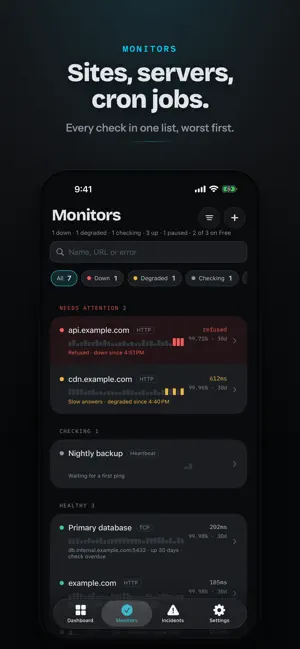


About Last Seen Up
Know the moment it stops answering. Last Seen Up watches your servers, sites, queues and cron jobs, and wakes you when something stops responding. Checks run on our servers around the clock, so the alert reaches you whether or not your phone is awake. ONE GLANCE, ONE ANSWER Open the app and the dashboard tells you in a single line whether everything is fine. When something is down, the dashboard becomes the incident: how long it has been down, what failed, a countdown to the next escalation step, and Acknowledge right there. Thirty days of history and upcoming renewals sit underneath. ADD ANYTHING BY PASTING IT Paste a website, an IP address or a host and port, and Last Seen Up works out what kind of check it needs and tests it while you type. A website is one monitor, not three: we check that it answers and keep an eye on its SSL certificate and domain registration, so the renewal you forgot is a reminder weeks out instead of an outage on a Saturday. CATCH THE JOBS THAT DIDN'T RUN A cron job that stops running fails silently. Give it a heartbeat URL to call when it finishes, and if the call never comes we tell you. The alert shows the last several runs at a glance, so a job that has been failing every other night for a week looks different from one that broke tonight. WILL IT ACTUALLY WAKE YOU? "Can we wake you?" checks whether this iPhone will really ring at 3am, and opens the right setting to fix anything that would stop it. Send yourself a test alert, or have us call you, to be sure. ALERTS BUILT FOR 3AM Alerts arrive as Time Sensitive notifications, so they break through a Focus. Long-press one to see how long it has been down and what failed, then acknowledge or snooze without opening the app. If nobody answers, escalation moves to the next person on your list, and the last step can be an actual phone call to a number you have verified. Quiet hours and do not disturb keep the rest of the night yours. ANYONE CAN SAY "I'M ON IT" Acknowledge from any iPhone you are signed in on, even when the alert went to a teammate. Everyone sees who has it, and escalation stops. WATCH IT UNFOLD An open incident puts a live counter on your Lock Screen and in the Dynamic Island, showing who is on it and what happens next, then ends with how long the outage lasted. Home Screen and Lock Screen widgets keep your worst monitor in view. ON YOUR WRIST The Apple Watch app carries the full roster. Acknowledge an incident or run a check with your phone in another room, and put your fleet's state on the watch face with complications. YOUR TEAM, FROM YOUR PHONE Invite teammates, switch workspaces, and set how often new monitors are checked, how many failures it takes to alert, and which alert policy they follow. BUILT NOT TO LIE TO YOU If the app cannot reach our servers it says so plainly rather than showing you a reassuring green screen. Status is never colour alone, so it reads correctly on a watch face, in sunlight, and with VoiceOver. FREE TO START Three monitors and everything above, free, with no trial and no card. Pro raises the account to 50 monitors and lets you bring up to 10 people onto the team, each seeing only the monitors you assign them. - iPhone, iPad and Apple Watch - Sign in with Apple, Google, a passkey, or an emailed code - Full VoiceOver and Dynamic Type support Add the first one in about thirty seconds. SUBSCRIPTION Last Seen Up Pro is an auto-renewable subscription, sold monthly at $5.99 or yearly at $59.99. It raises the account to 50 monitors and 10 people on the team, and unlocks nothing else. Payment is charged to your Apple Account on confirming the purchase, and the subscription renews automatically at the then-current price unless it is cancelled at least 24 hours before the period ends. Manage or cancel it in Settings on your iPhone, under your name, then Subscriptions. Privacy policy: https://lastseenup.com/privacy Terms of Use (EULA): https://lastseenup.com/terms
What’s new
Version 2.0.1 · Updated October 21, 2026
Thanks for using Last Seen Up! What's new: - Fixed the Live Activity for an incident, which in 2.0 could appear as an empty card on the lock screen and with only the monitor's name when you long-pressed it in the Dynamic Island. The card now shows how long the monitor has been down, its recent history and the Acknowledge button again. - Send a test alert now leaves the proof to the real notification arriving on your iPhone, instead of also showing a copy of it inside the app. - The dashboard no longer jumps up a moment after the app opens. - Pull to refresh only appears when you pull, not when a scroll bounces at the top, and the dashboard settles back as quickly as the other tabs. Bug fixes and performance improvements.
App privacy
The developer, Timothy Murphy, reported these privacy practices to Apple.
Data Linked to You
The following data, which may be collected and linked to your identity, may be used for the following purposes:
- Contact Info: Email Address, Name
- Identifiers: User ID, Device ID
Used for: App Functionality
Alternatives to Last Seen Up
Looking for apps like Last Seen Up? Here are 5 similar apps on the App Store. The highest rated is Google Play Console (4.7/5), and all 5 are free to download.


| App | Rating | Price | Last updated | Compare |
|---|---|---|---|---|
| Last Seen Up | 5.0 / 5 (1 rating) | Free | October 21, 2026 | |
| Pulzor | – | Free | Oct 27, 2026 | Compare |
| Uptime-monitor | – | Free | Oct 7, 2026 | Compare |
| Uptime Mate | – | Free | Apr 23, 2026 | Compare |
| a-Shell | 4.6 / 5 (566) | Free | Oct 24, 2026 | Compare |
| Google Play Console | 4.7 / 5 (203) | Free | Oct 10, 2025 | Compare |
Compare Last Seen Up with the top alternatives: ratings, updates, ASO score and keyword gaps →