

Lunevo - Offline Subtitles
Ming Che Yang Photo & Video iPhoneiPadiPod touch
Lunevo - Offline Subtitles is a free Photo & Video app for iPhone and iPad by Ming Che Yang. Requires iOS 17.0. Updated October 5, 2026.
- Price
- Free
- on the App Store
- Size
- 331 MB
- Age 4+
- Updated
- Oct 5
- 2026 · v1.0
Screenshots

About Lunevo - Offline Subtitles
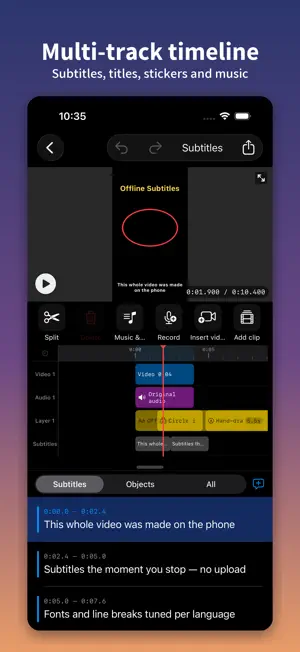
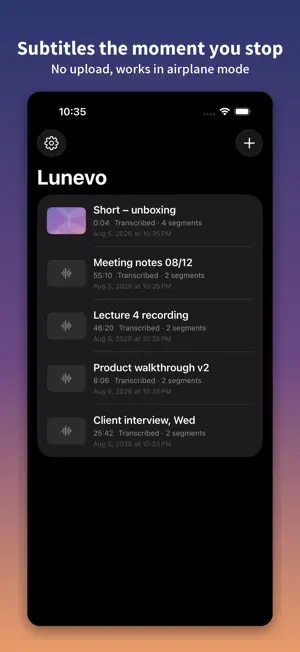
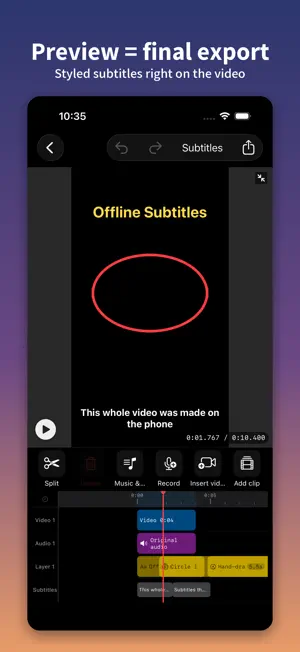
Try it free, then pay once for unlimited exports forever. No subscription, no account. Subtitles appear while you record. Open the camera and the words show up on screen as you speak; when you stop, you go straight into the editor to fix wording, style it and export — no separate transcription round trip. Lunevo runs the entire subtitling workflow on your phone — speech recognition, subtitle editing and video export all happen on device. Your footage and recordings never leave the phone, because there is no server here to receive them. It works in airplane mode. ■ Why offline matters A lawyer's client interview. A journalist's source. A doctor's dictation. These recordings cannot be uploaded anywhere. Every other captioning service sends your file to someone else's data centre first. Lunevo doesn't — and can't, because that data centre doesn't exist. ■ Record inside the app — the transcript is already there when you stop Record video or audio inside Lunevo and the subtitles appear on screen as you speak; the moment you stop, the transcript exists. And it stays editable: ・Fix wording — tap a misheard word and correct it; the timing follows ・Adjust timing — nudge a line earlier or later, merge two lines, split one in two ・Add vocabulary — put names, company names and technical terms into Custom Vocabulary (in Settings) and recognition picks them up next time ・It learns — corrections you make are remembered and applied automatically afterwards Interviews, lectures, meetings and depositions are exactly where proper nouns matter most — and where getting them wrong matters most. ■ No waiting between hitting go and having a video Cloud services upload the whole file and queue it — uploading a 4K clip often takes longer than the recognition itself. Lunevo runs on your phone: press go and it starts. Recognition runs at 2–5× real time (measured on an iPhone 14 Pro), so a ten-minute video has subtitles in two to five minutes. ■ Export without downgrading Burned-in subtitles keep your original resolution and frame rate. Nothing is quietly re-encoded down to 1080p. If you want a smaller file, choose it yourself in export settings — we don't decide for you. ■ Recognition languages Chinese (Taiwan / China), Cantonese, English, Japanese, Korean, French, German, Spanish, Italian, Portuguese. ■ Draw right on the video — the drawing process is the content Every stroke remembers the video time you drew it at and replays in order — not a flat image pasted on top, but a hand-drawn animation that follows the video. ・Draw while it plays, or pause and take your time ・Reopen the canvas later and add strokes Artists filming their process, teachers at a board, walkthroughs: this used to need dedicated animation software. ■ Smart cut: delete a line, the video skips it Long-press a line and choose "skip this clip" — **picture, sound and subtitle all leave the export and everything after moves up**. Red hatching marks the cut on the timeline, tapping again brings it back whole, and re-transcribing does not forget it. ■ Features ・Automatic subtitles from speech, with word-level timing ・Subtitle editing: change text, adjust timing, merge and split segments ・Multi-track timeline (video, audio, overlays): trim, delete, split, reorder, move across tracks ・Record audio and video inside the app ・Subtitle styles, animated borders, end cards ・Hand-drawn animation on the video, with adjustable replay speed ■ Free allowance ・5 video exports, up to 5 minutes each ・20 subtitle file exports ・Original quality, no watermark When the allowance runs out you have two options: unlock it, or add a Lunevo end card and keep exporting for free. ■ Unlimited exports One payment, unlocked permanently, no export limit. Not a subscription. Nothing is charged monthly. ■ Privacy No data collected. No account, no sign-in, no ads, no trackers. The app connects to the network only when you choose to download a language model, or when a purchase is processed.
App privacy
The developer, Ming Che Yang, reported these privacy practices to Apple.
Data Not Collected
The developer does not collect any data from this app.
Alternatives to Lunevo - Offline Subtitles
Looking for apps like Lunevo - Offline Subtitles? Here are 6 similar apps on the App Store. The highest rated is LiveBloom - Live Photo Maker (5.0/5), and all 6 are free to download.
-
 Eacut: Offline Video Editor
-
 Jimakuru: Auto Captions
-
 Mosaic - Face Blur Photo App
2.0
-
 Photo Tools HD: Image Editor
-
 CapiCap: Video Captions
4.6
-
 LiveBloom - Live Photo Maker
5.0
| App | Rating | Price | Last updated | Compare |
|---|---|---|---|---|
| Lunevo - Offline Subtitles | – | Free | October 5, 2026 | |
| Eacut: Offline Video Editor | – | Free | Nov 1, 2026 | Compare |
| Jimakuru: Auto Captions | – | Free | Oct 6, 2026 | Compare |
| Mosaic - Face Blur Photo App | 2.0 / 5 (1) | Free | Oct 27, 2026 | Compare |
| Photo Tools HD: Image Editor | – | Free | Jul 27, 2026 | Compare |
| CapiCap: Video Captions | 4.6 / 5 (12) | Free | Oct 29, 2026 | Compare |
| LiveBloom - Live Photo Maker | 5.0 / 5 (1) | Free | Oct 27, 2026 | Compare |