

ACCESS — Screen Time Locks
Jamir Shaikh Productivity iPhoneiPadiPod touch
ACCESS — Screen Time Locks is a free Productivity app for iPhone and iPad by Jamir Shaikh. Rated 5.0/5 from 6 ratings. Requires iOS 17.0.
- Rating
- 5.0
- 6 ratings
- Price
- Free
- on the App Store
- Size
- 6 MB
- Age 4+
- Updated
- Sep 28
- 2026 · v1.4.0
Screenshots


About ACCESS — Screen Time Locks
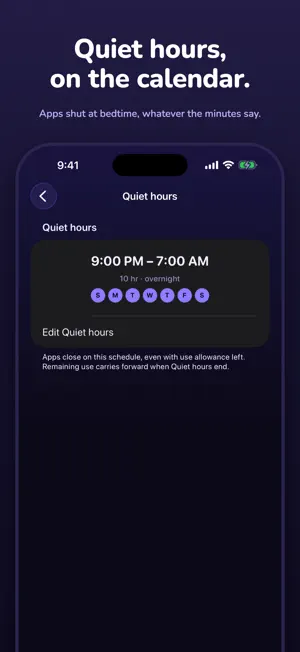
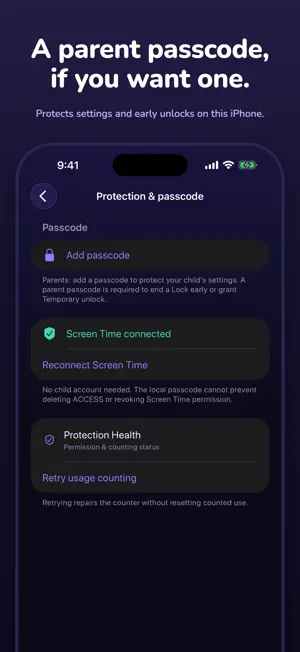
ACCESS — the scroll has a bottom. Set clearer screen-time boundaries on one iPhone, for yourself or with a parent. Choose your apps, decide when they should pause, and keep the rules together in one place. THREE WAYS TO SET A BOUNDARY • Quiet hours: close your selected apps at scheduled times, such as bedtime, even when use allowance remains. • Regular Lock: iOS counts actual use across your selected apps. When their shared allowance runs out, they lock for the duration you chose. There is no session to start. • Daily limit: set one combined daily allowance for the selected apps, not a separate allowance per app. It resets at 4 AM. Use the features separately or together. A Lock ending does not override Quiet hours or a reached Daily limit. Home keeps the clock and current restriction visible, with quick links to the same controls in Settings. A PASSCODE WHEN YOU NEED ONE Parents can add a six-digit ACCESS passcode during setup or later in Settings. It protects changes to the app's settings and early-release actions on this phone. During a restriction, tap Unlock now and enter the passcode to open the selected apps for 15 minutes, when Temporary unlock is enabled. A running Lock pauses and resumes with its remaining time. End Lock early is a separate passcode-protected action; Quiet hours and the Daily limit still apply. The passcode is optional for personal use. Without one, settings are not parent-protected; an early release requires creating a passcode first. Normal scheduled endings remain automatic. You can also start a voluntary Lock now without entering the passcode when no restriction is already active. ACCESS uses individual Screen Time permission. Its local passcode cannot prevent deleting ACCESS or revoking that permission. No child account is required for local setup. Remote monitoring and remote unlock are not included. BASIC, PRO AND PRO FAMILY Basic is free and covers one selected app with the core Lock, Quiet hours and Daily limit controls. Individual Pro covers up to 50 individually selected apps on your Apple Account, with their use counted together. It also adds extended event history and widgets. Pro Family includes the same Pro features, shared with up to five other members of your Apple Family Sharing group. Only the subscription is shared: apps, rules, passcodes, Screen Time permission and usage remain separate on each device. To share Pro Family, enable Share with Family for ACCESS in iPhone Settings → Family → Subscriptions → Manage Subscriptions. Each member installs ACCESS with their own Apple Account and sets up Screen Time locally. If Pro has not appeared, use Restore Purchases in ACCESS. Purchase Sharing is not required for subscription sharing. Individual Pro is not shareable. Subscriptions are available monthly or yearly and renew automatically unless cancelled at least 24 hours before the period ends. Apple shows the local price and renewal terms before confirmation. Manage or cancel in Apple's subscription settings. A three-day trial is shown only when Apple confirms eligibility; introductory eligibility is shared across the ACCESS Pro subscription group. PRIVATE, LOCAL AND STRAIGHTFORWARD Stats shows iOS Screen Time information and events ACCESS recorded, not invented "time saved." Settings → Advanced → Activity log lists protection events. Protection Health helps check permission and counting status. No ACCESS account, advertising, analytics or ACCESS server. ACCESS does not upload selected-app tokens, passcodes or usage history. Local passcode credentials use the device-only Keychain. Terms of Use: https://shaikhjamir.github.io/access-legal/terms.html Privacy Policy: https://shaikhjamir.github.io/access-legal/privacy.html
Ratings & reviews
5.0
6 ratings
What’s new
Version 1.4.0 · Updated September 28, 2026
Clearer boundaries, with the ACCESS clock you know. • Quiet hours, Regular Lock and Daily limit controls are together in Settings, with quick edits from Home. • Optional parent passcode for protected settings and early unlocks on this iPhone. • Unlock now opens selected apps for 15 minutes after passcode approval, then your rules resume. • Four-page setup with adjustable recommendations and the passcode step last. • Activity log in Advanced settings, clearer protection status, and improvements to usage counting and Lock timing. This update manages the current phone only. Remote unlock is not included. The local passcode cannot prevent deleting ACCESS or revoking Screen Time permission.
App privacy
The developer, Jamir Shaikh, reported these privacy practices to Apple.
Data Not Collected
The developer does not collect any data from this app.
Alternatives to ACCESS — Screen Time Locks
Looking for apps like ACCESS — Screen Time Locks? Here are 6 similar apps on the App Store. The highest rated is Tally: Minimal Todo List (5.0/5), and all 6 are free to download.
-
 Screen Time Log: Usage Diary
-
 OneTask: Planner
-
 Tally: Minimal Todo List
5.0
Tally: Minimal Todo List
5.0
-
 Smart24x7-User
-
 Cute Pomodoro
4.2
Cute Pomodoro
4.2
-
 FeatherNotes: Journal & Diary
| App | Rating | Price | Last updated | Compare |
|---|---|---|---|---|
| ACCESS — Screen Time Locks | 5.0 / 5 (6 ratings) | Free | September 28, 2026 | |
| Screen Time Log: Usage Diary | – | Free | Oct 6, 2026 | Compare |
| OneTask: Planner | – | Free | Jun 26, 2026 | Compare |
| Tally: Minimal Todo List | 5.0 / 5 (5) | Free | Sep 5, 2026 | Compare |
| Smart24x7-User | – | Free | Sep 1, 2026 | Compare |
| Cute Pomodoro | 4.3 / 5 (4) | Free | Sep 28, 2026 | Compare |
| FeatherNotes: Journal & Diary | – | Free | Aug 9, 2026 | Compare |