

weatherfeels
Kevin Holland Weather iPhoneiPadiPod touchMac
weatherfeels is a free Weather app for iPhone and iPad by Kevin Holland. Rated 5.0/5 from 2 ratings. Requires iOS 17.0. Updated September 2, 2026.
- Rating
- 5.0
- 2 ratings
- Price
- Free
- on the App Store
- Size
- 16 MB
- Age 4+
- Updated
- Sep 2
- 2026 · v1.2
Screenshots


About weatherfeels
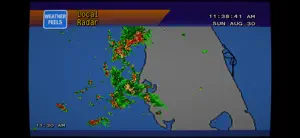
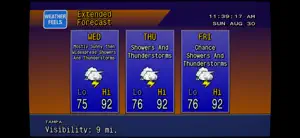
A local forecast channel for your television, rebuilt for Apple platforms. weatherfeels puts a continuous, rotating weather broadcast on your screen — the kind that used to run between programmes on cable, with a slow crawl of conditions along the bottom and music playing over the top. Every forecast is live from the US National Weather Service. Leave it running on a TV, a monitor, or in a window while you work. WHAT IT SHOWS • Current Conditions — temperature, humidity, dew point, wind, ceiling and visibility • Local Forecast and Extended Forecast — the next several days at a glance • Hourly Forecast and Hourly Graph — temperature, dew point, cloud cover and precipitation chance • Local Radar — animated regional radar composites • Regional Observations and Regional Forecast — nearby cities on a state map • Travel Forecast — conditions for cities down the road • Almanac — sunrise, sunset, moon phases and records • Hazards and SPC Outlook — active alerts and convective risk when there is any Displays rotate on their own, or step through them yourself. Turn off any you do not care about. YOUR OWN MUSIC Play music behind the weather, the way the original did: • Files on the device • A folder on a server you host • A playlist from your Apple Music library (requires an Apple Music subscription) DRAWN, NOT SCALED Nothing here is a screenshot of a 640×480 web page stretched to fit. The backgrounds are redrawn as vector gradients and shapes, the type is real outline fonts rasterised at your display's resolution, and the weather icons are pixel art kept crisp with nearest-neighbour scaling. On an Apple TV 4K it renders at native 2160p. If you want the era rather than just the layout, there is a CRT mode: barrel-curved glass, phosphor bloom, colour fringing and scanlines that drift, all on the GPU. Or keep plain scanlines. Or none at all. BUILT FOR A SCREEN THAT STAYS ON • Burn-in protection nudges the picture a few pixels every 90 seconds, so a static header cannot etch itself into an OLED panel • The screen saver is held off while the rotation is running • Adjustable pace, from brisk to very slow ON EVERY SCREEN YOU OWN Apple TV, iPhone, iPad and Mac, all included. FREE, AND OPEN SOURCE No price, no in-app purchases, no subscription, and no advertising. Built by fans of the era, and the whole thing is on GitHub under the MIT licence — read it, fork it, or send a fix. NO ACCOUNTS, NO TRACKING There is no sign-in, no analytics and no third-party SDKs of any kind. Your location is sent to the National Weather Service to fetch your forecast and is used for nothing else. Your music library is read on the device and never leaves it. FORECASTS ARE US ONLY Data comes from the US National Weather Service, so forecasts are available for United States locations. You can follow your device's location or pick a city by name or ZIP code. Weather data from NOAA / the National Weather Service. Radar composites from the Iowa Environmental Mesonet. Convective outlooks from the NOAA Storm Prediction Center. An independent, unofficial tribute to the local forecast units of the 1990s, made by fans and given away. Not affiliated with, endorsed by, or connected to any broadcast network, weather service trademark or media company.
What’s new
Version 1.2 · Updated September 2, 2026
• The television now makes the noise a CRT makes. Switching the set on or off sounds like the real thing — the flyback whine, the degauss thump, and the anode cracking into the tube face — synthesised rather than sampled. • Mute has joined the buttons on the cabinet, and the floating controls now stay out of the way while the television is on screen. They were a second set of controls competing with the set's own; they still appear when the television is switched off, which is when you need them. • Turning an iPhone upside down shows the television. That orientation was unsupported, so rotating the phone that way left the app facing whichever way it had been before. • The Hourly forecast's columns stay inside the blue panel. The hour and the wind speed hung off either edge onto the orange field behind them.
App privacy
The developer, Kevin Holland, reported these privacy practices to Apple.
Data Not Collected
The developer does not collect any data from this app.
Alternatives to weatherfeels
Looking for apps like weatherfeels? Here are 6 similar apps on the App Store. The highest rated is Yesterweather - Past Weather (5.0/5), and 5 of the 6 are free to download.
-
 RemoteWeather
-
 WeatherNote - Simple Weather
-
 Trident Weather
-
 Yesterweather - Past Weather
5.0
Yesterweather - Past Weather
5.0
-
 Dashboard for ECOWITT Weather
4.7
Dashboard for ECOWITT Weather
4.7
-
 StormBase
5.0
StormBase
5.0
| App | Rating | Price | Last updated | Compare |
|---|---|---|---|---|
| weatherfeels | 5.0 / 5 (2 ratings) | Free | September 2, 2026 | |
| RemoteWeather | – | Free | Jul 7, 2026 | Compare |
| WeatherNote - Simple Weather | – | Free | Apr 28, 2026 | Compare |
| Trident Weather | – | Free | Mar 5, 2026 | Compare |
| Yesterweather - Past Weather | 5.0 / 5 (1) | Free | Jul 9, 2026 | Compare |
| Dashboard for ECOWITT Weather | 4.7 / 5 (3) | Free | Oct 13, 2026 | Compare |
| StormBase | 5.0 / 5 (4) | 0.99 USD | Jun 1, 2026 | Compare |
Compare weatherfeels with the top alternatives: ratings, updates, ASO score and keyword gaps →