

Lumen: Photo & Video Studio
Moritz Maximilian Fricke Photo & Video iPhoneiPadiPod touch
Lumen: Photo & Video Studio is a free Photo & Video app for iPhone and iPad by Moritz Maximilian Fricke. Requires iOS 16.4. Updated October 27, 2026.
- Price
- Free
- on the App Store
- Size
- 71 MB
- Age 4+
- Updated
- Oct 27
- 2026 · v1.2
Screenshots


About Lumen: Photo & Video Studio
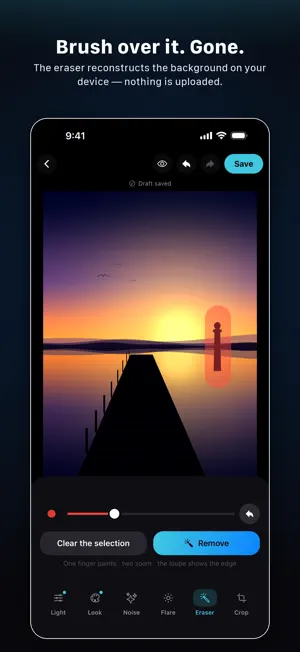
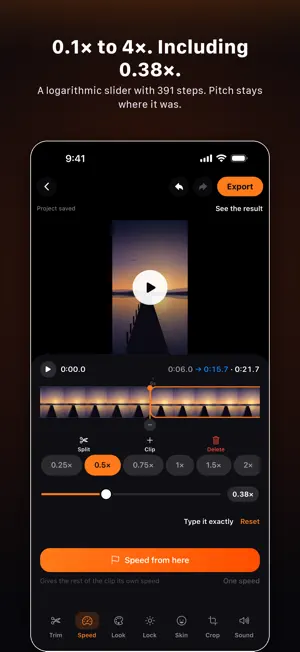
Lumen is a private photo and video studio for iPhone and iPad. Your media stays on your device: no account, no media upload, no ads. SCENE LOCK — STEADY COLOUR, WITHOUT THE FLICKER Lumen analyses a clip scene by scene and evens out wandering exposure and colour casts over time. Preview the result live, choose the strength, and export that exact correction. Hard cuts stay intact; every scene is stabilised independently. FOR VIDEO • Scene Lock: temporal exposure and colour-balance stabilisation • Speed: 0.1× to 4× in steps of 0.01, with pitch preserved • Audio: metering, limiter, gain and spectral noise reduction • Looks: live film colour on the moving image, continuously adjustable • Trim: set in and out points against real frames FOR PHOTOS • Light: exposure, contrast, saturation, warmth, tint and fade • Looks: nine presets, from Cine and Film to B&W and Noir • Flare: generated prisms, streaks, haze and sun • Noise: reduces grain while protecting edges • Crop: free, 1:1, 4:5 and 9:16, plus angle correction • Eraser: locally repair small distractions on simple backgrounds NON-DESTRUCTIVE AND PRIVATE Each project keeps its own copy of the original and stores settings separately from the pixels. Return later with every control where you left it; your original remains untouched until you export. Photo and video editing runs entirely on your device and works in airplane mode. LUMEN PRO The free version exports at full resolution with no watermark. Lumen Pro unlocks Scene Lock, every look, advanced photo and audio tools, and an unlimited library. Lumen Pro is available as an auto-renewable monthly or annual subscription. The app shows the price, period and any available trial before purchase. You can manage or cancel the subscription at any time in your Apple Account settings. Purchases can be restored in the app. Terms of Use (EULA): https://www.apple.com/legal/internet-services/itunes/dev/stdeula/ Privacy Policy: https://lumen.aimoxyz.xyz/privacy Note: the app's interface is in German.
What’s new
Version 1.2 · Updated October 27, 2026
Lumen now speaks English, and follows whichever language your iPhone is set to. • English throughout: every screen, every control, every message • HDR stays HDR: clips shot in HLG keep their colour and contrast instead of being quietly flattened to Rec. 709 on export • A crop you drew but never applied is no longer dropped in silence — Lumen asks before saving • Undo in the photo editor steps back through everything now, sliders included • Smooth skin works on skin tones alone — eyes, lashes and edges stay sharp • Cut any passage straight out of the timeline, with softly blended edges • Lumen finds silent stretches and removes them with one tap • A smoother preview and steadier handling while trimming and editing
App privacy
The developer, Moritz Maximilian Fricke, reported these privacy practices to Apple.
Data Not Collected
The developer does not collect any data from this app.
Alternatives to Lumen: Photo & Video Studio
Looking for apps like Lumen: Photo & Video Studio? Here are 6 similar apps on the App Store.
-
 Patina Film: Photo Editor
-
 SpeedUPSI
-
 AI Photo Generator - Morphia
-
 LumosFlash Film Camera
-
 Aestiqa Aesthetic Photo Editor
-
 Photochan - Resize & Compress
| App | Rating | Price | Last updated | Compare |
|---|---|---|---|---|
| Lumen: Photo & Video Studio | – | Free | October 27, 2026 | |
| Patina Film: Photo Editor | – | Free | Sep 29, 2026 | Compare |
| SpeedUPSI | – | Free | Apr 28, 2026 | Compare |
| AI Photo Generator - Morphia | – | Free | Dec 4, 2025 | Compare |
| LumosFlash Film Camera | – | Free | Oct 15, 2026 | Compare |
| Aestiqa Aesthetic Photo Editor | – | Free | Sep 16, 2026 | Compare |
| Photochan - Resize & Compress | – | Free | Oct 23, 2026 | Compare |