

Tino: Budget & Spending
Nahuel Borromeo Finance iPhoneiPadiPod touch
Tino: Budget & Spending is a free Finance app for iPhone and iPad by Nahuel Borromeo. Requires iOS 17.0. Updated October 21, 2026.
- Price
- Free
- on the App Store
- Size
- 5 MB
- Age 4+
- Updated
- Oct 21
- 2026 · v1.7
Screenshots
About Tino: Budget & Spending
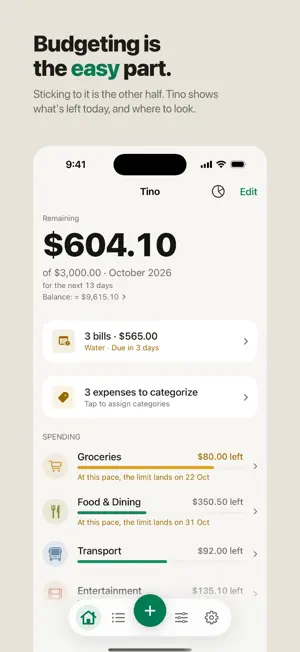
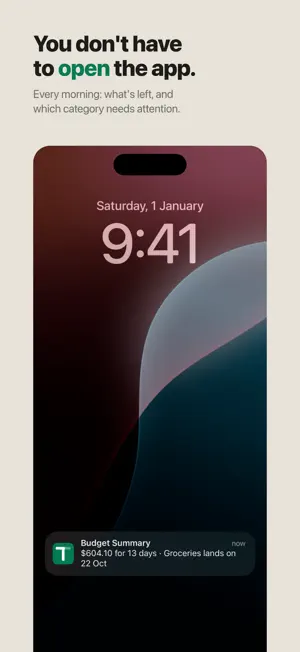
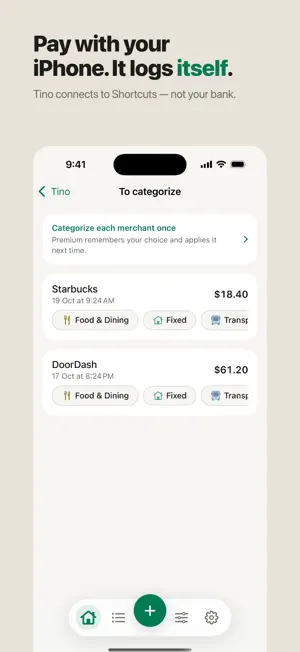
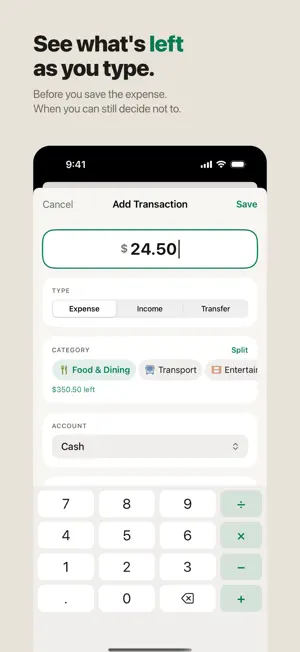
Tino answers one question: how much can I spend right now? Most budgeting apps hand you a dashboard and leave the interpreting to you. Tino leads with a single number — what's left this month — and sorts your categories by which one needs attention first. WORKS THE WAY MONTHS ACTUALLY WORK Rent isn't a spending decision. Neither is your phone bill. Tino keeps committed costs in their own category that fills itself from your recurring bills, so the money you see left over is money you can actually choose how to spend. NO BANK LOGIN. NO ACCOUNT. NO SERVER. Tino never asks for your bank credentials, because it never connects to one. There's no sign-up, no email, no cloud. Everything lives on your iPhone and nowhere else — which also means it works on a plane, in a basement, and anywhere with no signal. TWO TAPS TO LOG A PURCHASE Amount, category, done — and Tino shows you what's left in that category before you save. Add from the app, the Home Screen widget, Control Center, or by asking Siri. When an expense arrives through Siri or a Shortcut, Tino remembers where you shop and files it in the right category on its own. WHAT YOU GET • A budget that tells you where you stand at a glance, sorted by urgency • Committed costs separated from discretionary spending • Recurring bills and subscriptions, with reminders before they charge • Multiple accounts — checking, cash, credit cards — with real balances • Savings goals • Spending charts and a monthly budget-vs-actual comparison • Alerts when a category runs low, before it's too late to act • Home Screen widget, Control Center control, and Siri Shortcuts • Face ID lock • Full support for Dynamic Type, Dark Mode, and VoiceOver • English and Spanish FREE, WITH AN OPTIONAL UPGRADE Everything above is free, with room for 6 categories, 3 accounts, and 3 months of history. Tino Premium removes those limits: unlimited categories and accounts, unlimited history, unlimited savings goals, bill reminders, and the subscription audit that shows what your recurring charges add up to. Premium is available as a monthly or annual subscription, or as a one-time lifetime purchase. Tino collects no data. There is no analytics, no tracking, and no account. Read the privacy policy — it's short. Terms of Use (EULA): https://www.apple.com/legal/internet-services/itunes/dev/stdeula/
What’s new
Version 1.7 · Updated October 21, 2026
Tino 1.7 — the purchase you didn't see, and the dollars that weren't soles. • A new look: a new icon, category icons in each category's colour (emoji still there if you prefer), a Budget tab of its own, and a calmer Home with your balance one tap away. • Setup in four screens: your budget, your fixed costs, a suggested split you can change, done. "Last day of the month" is now a start day, for salaries paid on the 30th or 31st. • Logging is faster: the keyboard is up when the sheet opens, your most-used categories come first, and the rest waits under "More options". • Every expense your Wallet automation logs now leaves a notification: the store, the amount, the category it went to, and what's left. Tap it to open that category. Logged with no category? It says so, and opens Tino on the card to fix it. • A dual-currency card charged in dollars no longer lands as the same number in soles. Tino keeps the currency the charge arrived in, converts it with the rate your dollar account already knows, and shows the original amount next to the entry — the one your statement will show. • Paid in dollars with your soles card? Pick the currency as you log it. Tino works out the soles with the rate it knows, remembers the rate you confirm for next time, and your card statement says how much of it is due in dollars. • Your fixed costs no longer take one of your six free categories. The six are the ones you choose. • Tino asks for notification permission after your first expense, not before you've seen a single number — and says exactly what will arrive: one summary each morning, and a heads-up when a category runs low. • Lifetime now says what it is worth: how many years of Annual it pays for. Fixed • The paywall promised a 7-day free trial to anyone, including people who had already used it. It now only promises a trial Apple will actually give you.
App privacy
The developer, Nahuel Borromeo, reported these privacy practices to Apple.
Data Not Collected
The developer does not collect any data from this app.
Alternatives to Tino: Budget & Spending
Looking for apps like Tino: Budget & Spending? Here are 6 similar apps on the App Store.
-
 Michi - Budget & Expenses
-
 Quick Expense Tracker: Private
-
 Ant: Expense Tracker & Budget
-
 Balu - Finanzas con IA
-
 Pecunia - Personal Finances
-
 daWallet: Finanzas Personales
| App | Rating | Price | Last updated | Compare |
|---|---|---|---|---|
| Tino: Budget & Spending | – | Free | October 21, 2026 | |
| Michi - Budget & Expenses | – | Free | Jul 4, 2026 | Compare |
| Quick Expense Tracker: Private | – | Free | Oct 12, 2026 | Compare |
| Ant: Expense Tracker & Budget | – | Free | Oct 22, 2026 | Compare |
| Balu - Finanzas con IA | – | Free | Jun 30, 2026 | Compare |
| Pecunia - Personal Finances | – | Free | Sep 2, 2026 | Compare |
| daWallet: Finanzas Personales | – | Free | Sep 25, 2026 | Compare |