

Quat: Notes & Flashcard Maker
Yugwinderpal Singh Education iPhoneiPadiPod touch
Quat: Notes & Flashcard Maker is a free Education app for iPhone and iPad by Yugwinderpal Singh. Requires iOS 15.1. Updated October 15, 2026.
- Price
- Free
- on the App Store
- Size
- 44 MB
- Age 4+
- Updated
- Oct 15
- 2026 · v2.3.0
Screenshots



About Quat: Notes & Flashcard Maker
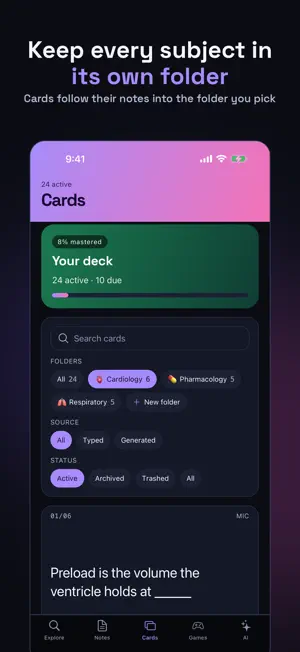
Most study apps start after the hard part. They assume the material is already typed in, already organised, already yours. Quat starts at the lecture. Record it, photograph it, paste a link, or pick a file. Quat reads what you captured and turns it into flashcards that test you on it. CAPTURE, FOUR WAYS Audio — record a lecture, a seminar, or yourself talking through a topic. Quat transcribes it and pulls out what is worth remembering. Photo — point your camera at a textbook page, a whiteboard, a handout, or your own handwriting. Quat reads the text off it. Link — paste a URL. Quat fetches the page, reads it, and summarises what matters. It reads the actual page, so it cannot invent what is not there. File — choose a PDF, Word, PowerPoint or Excel document. Quat reads it and turns it into a note and cards. EVERY CARD KNOWS WHERE IT CAME FROM Cards carry their origin — MIC, JUL 28, CARDIO LECTURE. Weeks later, when a card surfaces and you cannot place it, you can go back to the thing it came from. REVIEW THAT ENDS Spaced repetition that schedules each card for the day you are about to forget it. When the day's cards are done, the session ends and tells you so. It does not invent more work to keep you in the app. Each rating button prints what pressing it will do — now, 1d, 3d, 4d — before you press it. No guessing what "Good" means. BUILT TO BE READ Every number is set in a monospaced face with tabular figures, so counts and intervals stay legible at a glance. It celebrates what you actually did — a finished session, a level earned — never the mere fact that you opened the app, and nothing is locked behind a streak. ALSO INSIDE - A tutor that answers from your own notes, and cites which one - Self-scored exam mode, separate from your review schedule - Matching, speed round, quiz and a study timer - Folders, tags and search - Send a folder to a classmate in one message — they open it in Quat with one Paste - Card content in 21 languages - Works offline for everything except capture PRIVATE BY DEFAULT No account. No sign-up. Your notes and cards are stored on your device, not on a server. Nothing leaves your device unless you ask for it: a capture sends what you handed it, a tutor question sends the notes it answers from, and a shared deck is sealed on your device before it goes. No analytics, no tracking, no advertising. Quat is for anyone preparing for something — a degree, a licence, a recertification, a driving theory test, a language. SUBSCRIPTION Everything on your device — reviewing, exams, games, notes, cards — is free without limit. A subscription raises the monthly ceilings on the parts that call a model: capture, the tutor, and card generation. Monthly or Annual, billed through your App Store account; it renews until cancelled, which you can do at any time in your account settings. Terms of Use: https://www.apple.com/legal/internet-services/itunes/dev/stdeula/ Privacy Policy: https://yuvibabbar-dev.github.io/quat/privacy/
What’s new
Version 2.3.0 · Updated October 15, 2026
Choose how many cards to make. Tap Generate on a note, or From image, and Quat suggests a number first — about one card for every 40 words of the note, or 10 for a photo — and you can type any number from 1 to 50. If a note already has cards, it suggests how many more, and tries not to repeat the questions you already have.
App privacy
The developer, Yugwinderpal Singh, reported these privacy practices to Apple.
Data Not Linked to You
The following data, which may be collected but is not linked to your identity, may be used for the following purposes:
- Purchases: Purchase History
- User Content: Photos or Videos, Audio Data, Other User Content
- Identifiers: User ID, Device ID
- Usage Data: Product Interaction
Used for: App Functionality
Alternatives to Quat: Notes & Flashcard Maker
Looking for apps like Quat: Notes & Flashcard Maker? Here are 6 similar apps on the App Store.
-
 RepeatFlow
-
 Lotli - Study Smarter
-
 Preg: estudar sem preguiça
-
 Socratic AI-AI Homework Helper
-
 ThinkBud: AI PDF to Flashcards
-
 Repeto: AI Flashcards
| App | Rating | Price | Last updated | Compare |
|---|---|---|---|---|
| Quat: Notes & Flashcard Maker | – | Free | October 15, 2026 | |
| RepeatFlow | – | Free | Oct 14, 2026 | Compare |
| Lotli - Study Smarter | – | Free | Oct 1, 2026 | Compare |
| Preg: estudar sem preguiça | – | Free | Oct 21, 2026 | Compare |
| Socratic AI-AI Homework Helper | – | Free | Sep 15, 2026 | Compare |
| ThinkBud: AI PDF to Flashcards | – | Free | Oct 19, 2026 | Compare |
| Repeto: AI Flashcards | – | Free | Oct 16, 2026 | Compare |