

Booknest: Home Library
Jinwoo Kim Book iPhoneiPadiPod touch
Booknest: Home Library is a free Book app for iPhone and iPad by Jinwoo Kim. Requires iOS 18.0. Updated September 22, 2026.
- Price
- Free
- on the App Store
- Size
- 20 MB
- Age 4+
- Updated
- Sep 22
- 2026 · v1.3.0
Screenshots

About Booknest: Home Library
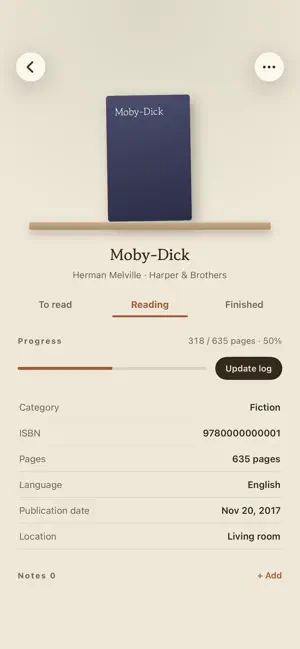
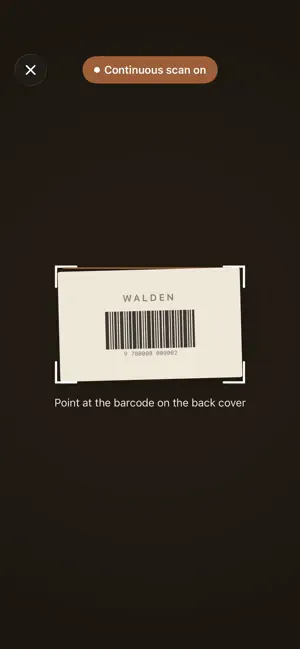
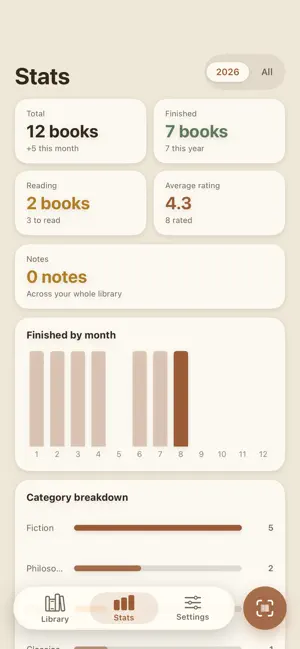
A quiet home for the books you own. Scan the back cover — no typing. Every feature is free. No account, no ads. Three ways to fill your nest Pull any book off your shelf and point the camera at the barcode on the back. Or search by title or author. Or type it in yourself, for the old paperback that never had a barcode — and pick a cover from your own photos while you're there. Looking a book up does ask the internet: Booknest queries public book services (Kakao, Open Library, Google Books) for the title, author, and cover, and tells you which one answered. You see what came back before you decide to shelve it. Working through a stack? Keep scanning. Booknest collects the books as you go, flags anything already in your library, and shelves the batch once you've looked it over. Your shelf, the way it stands at home Books sit spine out on a shelf you can flick through; tap one to open it. Switch to a grid of covers or a plain list whenever you'd rather see everything at once. Search and sort — by title, author, date added, publication date, rating, or date finished — or narrow the shelf by category, publisher, rating, language, or where the book is kept. A record of your reading Mark a book to read, reading, or finished. Save the page you're on and watch the progress fill. Add a rating, the day you started and the day you closed it, and notes for whatever stayed with you. None of it is required — log as much or as little as you like. Watch the year take shape How many books you own, how many you added this month, how many you finished this year. A chart of your finishes month by month, the categories you lean toward, your average rating. Yours to take with you Export the whole library to CSV or XLSX. Or make a ZIP backup — your records and every cover image — and keep it wherever you keep your own files, ready to restore onto your next iPhone. Free, and staying that way The statistics, the exports, the backups: all of it is free, and no feature is locked. There is a tip jar if you'd like to leave something for the developer. Tipping is purely a kindness — it unlocks nothing. Your nest stays off the grid There's no sign-in, because there's nothing to sign in to. No account, no server of ours, no ads, no analytics, nothing collected about you. Your library, your notes, and your covers live on your iPhone, and everything already on your shelf is there whether or not you have a signal. Made to be read Booknest speaks English, Korean, Japanese, Simplified Chinese, French, German, and Spanish. It follows Dynamic Type and works with VoiceOver — at accessibility text sizes the cover grid drops to two columns and offers you a list instead. iPhone only. Shall we shelve your first book?
What’s new
Version 1.3.0 · Updated September 22, 2026
Your current book, outside the app Booknest now comes with widgets. On the Home Screen, the small one shows the cover of the book at the top of your library with its progress bar; the medium one adds the title, the author, and how many books you've finished this year. On the Lock Screen there's a rectangle with the title and progress, and a circle with just the percentage. Tap any of them to open that book. The widgets take their picture of your library each time you leave the app, so what they show is where things stood when you last closed it. There's also a Control Center button: Scan barcode. Add it and it opens the scanner straight away. The dates you logged, now on the page Start date and Date finished sit at the top of a book's details. To correct the finished date, open Update log on a finished book — there's a date field there now. If you pick a day earlier than the start date, the start date moves back to match. Reading a book again Move a finished book back to Reading and Booknest starts a new round instead of erasing the old one. The first time you finished it is kept, and once a second round has begun the page shows Times read and First finished. Notes you can change Touch and hold a note on a book's page to edit it or delete it. Deleting asks first. Editing changes the words only — the page number and the date stay. A goal for the year Settings › General has a Reading goal: the number of books you'd like to finish this year. Set one and the Finished card in Stats shows a bar toward it, with Goal and the number underneath. The medium widget shows it too, as finished / goal. The goal is for the calendar year; in January it starts fresh. Months by name The Finished by month chart in Stats labels its axis with month names instead of numbers. On a narrow screen in a longer language, a label or two is skipped so they don't run into each other. The scanner now focuses on the center box and on close range, so a book held up to the camera comes into focus instead of whatever is behind it. Fixed: turning on the flash while scanning froze the camera picture on recent iOS versions. Fixed: on narrow screens in the longer languages, the titles of the manual entry, edit details and add note sheets were cut off. They now wrap onto two lines. Fixed: the batch confirmation screen showed an "Add manually" line that looked tappable but did nothing. It's gone.
App privacy
The developer, Jinwoo Kim, reported these privacy practices to Apple.
Data Not Collected
The developer does not collect any data from this app.
Alternatives to Booknest: Home Library
Looking for apps like Booknest: Home Library? Here are 6 similar apps on the App Store.
-
 Al Quran: Read & Listen
-
 Yomitai! 読書記録とAIおすすめ
-
 うちの本棚
うちの本棚
-
 Shelfieline
-
 Book Catalog: Shelf Scanner
-
 Kamigokochi: 3D Book Tracker
| App | Rating | Price | Last updated | Compare |
|---|---|---|---|---|
| Booknest: Home Library | – | Free | September 22, 2026 | |
| Al Quran: Read & Listen | – | Free | Sep 9, 2026 | Compare |
| Yomitai! 読書記録とAIおすすめ | – | Free | Jun 12, 2026 | Compare |
| うちの本棚 | – | Free | Sep 21, 2026 | Compare |
| Shelfieline | – | Free | Aug 5, 2026 | Compare |
| Book Catalog: Shelf Scanner | – | Free | Aug 18, 2026 | Compare |
| Kamigokochi: 3D Book Tracker | – | Free | Jul 28, 2026 | Compare |