

Vidsmith: Video Converter,GIF
小杉 储 Photo & Video iPhoneiPadiPod touch
Vidsmith: Video Converter,GIF is a free Photo & Video app for iPhone and iPad by 小杉 储. Requires iOS 17.0. Updated September 22, 2026.
- Price
- Free
- on the App Store
- Size
- 5 MB
- Age 4+
- Updated
- Sep 22
- 2026 · v1.2
Screenshots


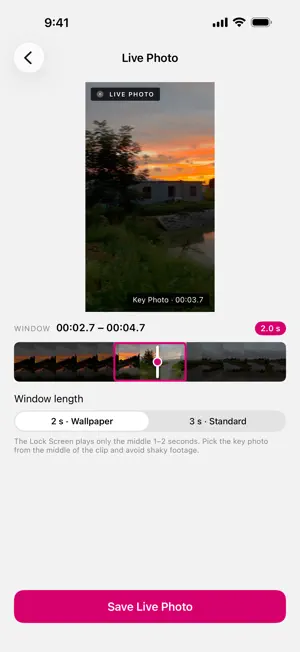

About Vidsmith: Video Converter,GIF
No ads · No upload · No watermark · Pay once available All your video tools in one place — and your videos never leave your iPhone. Vidsmith compresses, converts, trims, crops, extracts audio, and turns videos into GIFs and Live Photos — entirely on-device. No uploads, no servers, no waiting for a cloud. COMPRESS TO A TARGET SIZE — pick a size like 16 MB or 25 MB and Vidsmith chooses the resolution and quality to fit VIDEO TO LIVE PHOTO — turn any 2 or 3 seconds of a video into a Live Photo. Some clips can also be set as a Lock Screen wallpaper CONVERT — MP4/MOV, H.264/HEVC, up to 4K, with a live size estimate. One-tap compatibility mode for older devices, Windows & the web TRIM — Lossless fast cut in seconds, or frame-accurate precise mode CROP & ROTATE — 9:16, 4:5, 1:1, 16:9, 4:3 presets, plus rotate & flip (rotation is lossless) AUDIO — extract the audio track as M4A, or mute a video losslessly VIDEO TO GIF — turn videos and Live Photos into GIFs with custom speed, reverse and loop-back. No watermark, ever PRIVATE BY DESIGN Processing happens 100% on your iPhone. Nothing is uploaded, ever. Vidsmith only asks to add to your Photos — it sees only the videos you pick and can never delete anything from your library. Exports keep the original capture date and location. Open videos from Photos or the Files app. VIDSMITH PRO Batch processing, 4K export, custom target sizes, unlimited exports, and high-fps wide GIFs. Weekly, yearly — or unlock forever with a one-time purchase. Terms: https://xs-albus.github.io/vidsmith/terms.html Privacy: https://xs-albus.github.io/vidsmith/privacy.html
What’s new
Version 1.2 · Updated September 22, 2026
NEW in 1.2 • Compress to a target size — pick a size, Vidsmith does the rest • Video to Live Photo — some clips also work as Lock Screen wallpapers • Open videos from the Files app • Exports keep the original capture date and location • New 4:5 crop preset • Faster imports — videos now open in their original quality • Vidsmith now only asks to add to Photos; the "Delete original" option has been removed
App privacy
The developer, 小杉 储, reported these privacy practices to Apple.
Data Not Collected
The developer does not collect any data from this app.
Alternatives to Vidsmith: Video Converter,GIF
Looking for apps like Vidsmith: Video Converter,GIF? Here are 6 similar apps on the App Store. The highest rated is Compress: Photos & Videos (5.0/5), and all 6 are free to download.
-
 Cut Away Pro
-
 SNS Video Fixer - FPSuke -
-
 ReadyPost: Story Video Resizer
-
 Recolor: Restore Old Photos
-
 Compress: Photos & Videos
5.0
-
 Comprimo - Video Converter
| App | Rating | Price | Last updated | Compare |
|---|---|---|---|---|
| Vidsmith: Video Converter,GIF | – | Free | September 22, 2026 | |
| Cut Away Pro | – | Free | Aug 21, 2026 | Compare |
| SNS Video Fixer - FPSuke - | – | Free | Oct 14, 2026 | Compare |
| ReadyPost: Story Video Resizer | – | Free | Sep 12, 2026 | Compare |
| Recolor: Restore Old Photos | – | Free | Aug 17, 2026 | Compare |
| Compress: Photos & Videos | 5.0 / 5 (1) | Free | Sep 29, 2026 | Compare |
| Comprimo - Video Converter | – | Free | Aug 18, 2026 | Compare |