

Melody Eraser
Daiichiro Fukumoto Music iPhoneiPadiPod touch
Melody Eraser is a free Music app for iPhone and iPad by Daiichiro Fukumoto. Requires iOS 16.0. Updated November 7, 2026.
- Price
- Free
- on the App Store
- Size
- 28 MB
- Age 4+
- Updated
- Nov 7
- 2026 · v2.5
Screenshots


About Melody Eraser
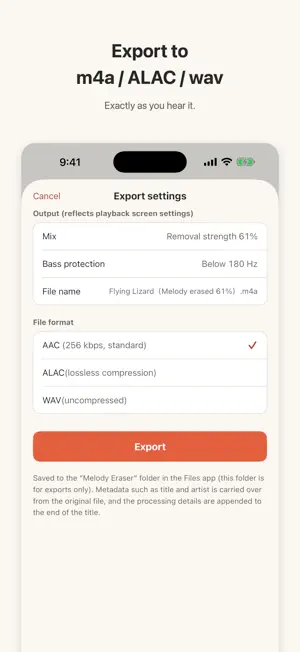
Turn your favorite songs into your own practice backing tracks (minus one). Works on vocals - and on lead instruments like violin or saxophone. The stereo image stays intact. Your music never turns mono. # WHO IT'S FOR - Instrument players who want play-along backing tracks without the lead melody - Anyone transcribing music who wants to isolate the melody and learn it by ear - Singers who want vocal-free tracks for karaoke practice # FEATURES - Just move the slider while the song plays: fade the melody anywhere from 0 to 100% - Keeps the stereo field of the original. Unlike classic "left minus right" cancellers, the result never collapses to mono - Melody Solo mode: listen to just the removed melody - a big help for transcription - New TYPE-I+PF engine: removes the melody while protecting the drums, so snare and hi-hat stay in the mix for a more natural backing track (devices with 6 GB of memory or more) - Seek bar, plus adjustable bass protection that keeps the kick and bass line safe - Everything runs on your device. Your music never leaves your phone # EXPORT Save the result as m4a / ALAC / wav, exactly as you hear it. Title and other track info are carried over from the original file. # MELODY ERASER PRO (one-time in-app purchase) - No ads - Unlimited exports - Background playback (keeps playing with the screen off, with lock screen controls) - TYPE-I+PF without ads # SUPPORTED AUDIO - Your own music files (m4a / mp3 / wav / ALAC / AIFF / FLAC) - Stereo (2-channel) files only - DRM-free files only - Songs purchased from the iTunes Store work as-is (they are DRM-free) - Songs downloaded from music subscription services will not work (DRM-protected) # PLEASE NOTE Results vary by song and mix. If the melody sits off to one side of the stereo field, the effect may be limited. Try the free demo track first. TYPE-I+PF converts each song once (this takes from tens of seconds to a few minutes). In the free version, the conversion runs in the background while one ad plays. With Pro there are no ads, and the conversion runs in the background while you listen.
What’s new
Version 2.5 · Updated November 7, 2026
Export can now also save the melody on its own as a separate file, alongside the track with the melody erased. On iPhone Duo, the Sound breakdown graph is now finer and larger when unfolded.
App privacy
The developer, Daiichiro Fukumoto, reported these privacy practices to Apple.
Data Used to Track You
The following data may be used to track you across apps and websites owned by other companies:
- Identifiers: Device ID
- Usage Data: Advertising Data
Data Linked to You
The following data, which may be collected and linked to your identity, may be used for the following purposes:
- Location: Coarse Location
- Identifiers: Device ID
- Usage Data: Product Interaction, Advertising Data
- Diagnostics: Performance Data
Used for: Third-Party Advertising, Analytics
Data Not Linked to You
The following data, which may be collected but is not linked to your identity, may be used for the following purposes:
- Diagnostics: Crash Data
Used for: Analytics
Alternatives to Melody Eraser
Looking for apps like Melody Eraser? Here are 6 similar apps on the App Store. The highest rated is Stemzel (4.5/5), and all 6 are free to download.
-
 Homeoke: Singing Practice
4.0
-
 Stemix: Vocal Remover
-
 Stemzel
4.5
-
 DjAI: Personal Music Assistant
2.0
-
 Stavely: Guitar, Piano Chords
-
 Vocal remover: Audio separator
| App | Rating | Price | Last updated | Compare |
|---|---|---|---|---|
| Melody Eraser | – | Free | November 7, 2026 | |
| Homeoke: Singing Practice | 4.0 / 5 (1) | Free | Nov 7, 2026 | Compare |
| Stemix: Vocal Remover | – | Free | Oct 20, 2026 | Compare |
| Stemzel | 4.5 / 5 (2) | Free | Jul 21, 2026 | Compare |
| DjAI: Personal Music Assistant | 2.0 / 5 (1) | Free | Oct 21, 2026 | Compare |
| Stavely: Guitar, Piano Chords | – | Free | Nov 2, 2026 | Compare |
| Vocal remover: Audio separator | – | Free | Sep 25, 2026 | Compare |
Compare Melody Eraser with the top alternatives: ratings, updates, ASO score and keyword gaps →