

Superhive: tasks and goals
FRANCISCO VEIRAS Productivity iPhoneiPadiPod touch
Superhive: tasks and goals is a free Productivity app for iPhone and iPad by FRANCISCO VEIRAS. Requires iOS 17.0. Updated October 21, 2026.
- Price
- Free
- on the App Store
- Size
- 88 MB
- Age 4+
- Updated
- Oct 21
- 2026 · v1.1.1
Screenshots


About Superhive: tasks and goals
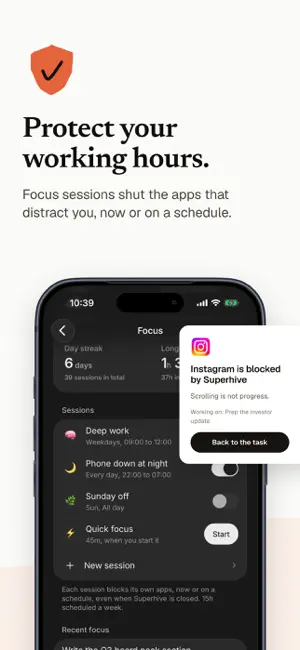
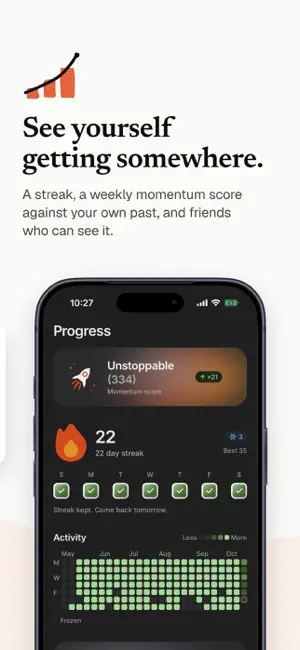
Being busy is not the same as getting somewhere. Superhive ties every task to a goal, so your day moves you closer to what you actually want. TASKS IN PLAIN WORDS Type "call Ana tomorrow 5pm p1" and the date, the time, the priority and the goal are read off the sentence. No forms, no fields. EVERY TASK POINTS AT A GOAL Set a goal and get a path: milestones, a pace, and the tasks that get you there. Your inbox holds the rest until you decide where it belongs. YOUR DAY, PLANNED FOR YOU Tasks land on the calendar as blocks, in the free time you actually have. Your phone's calendar and Google Calendar show up alongside them. BLOCK THE APPS THAT DISTRACT YOU Start a focus session and Super focus keeps the apps you choose shut until the timer ends. One task, a timer, and a clear screen. REMINDED AT THE RIGHT TIME A brief in the morning with your day ready, a nudge before each task is due, and a wrap up at night. Not one notification more. ON YOUR HOME SCREEN Widgets show what is left today and your streak without opening the app. SEE YOURSELF GETTING SOMEWHERE A streak, a weekly momentum score against your own past, and friends who can see it. SUPERHIVE PRO Superhive is free to use. Pro is an optional monthly subscription for AI goal planning, with a 7-day free trial for eligible Apple accounts. The price and billing period are shown before purchase. If you start a free trial, payment is charged to your Apple ID account when the trial ends unless you cancel. The subscription renews automatically unless cancelled at least 24 hours before the end of the current period. Manage or cancel it in your App Store account settings. The free app remains available without Pro. Privacy policy: https://www.superhive.app/privacy Terms of use: https://www.superhive.app/terms
What’s new
Version 1.1.1 · Updated October 21, 2026
Fixes in 1.1.1 - Every task due today or overdue now shows on the timeline, including ones whose time block had moved. - Changing a task's date or time moves its block on your calendar too. - No more duplicate blocks in Google Calendar after moving a repeating task. - Completed now lists each finished turn of your repeating tasks. - Undoing a repeating task's tick gives you back that day's turn.
App privacy
The developer, FRANCISCO VEIRAS, reported these privacy practices to Apple.
Data Linked to You
The following data, which may be collected and linked to your identity, may be used for the following purposes:
- Contact Info: Email Address, Name
- Identifiers: User ID
- Usage Data: Product Interaction
- Health & Fitness: Health, Fitness
- Purchases: Purchase History
- User Content: Photos or Videos, Other User Content
Used for: Analytics, App Functionality
Data Not Linked to You
The following data, which may be collected but is not linked to your identity, may be used for the following purposes:
- Purchases: Purchase History
- Usage Data: Product Interaction
Used for: Developer’s Advertising or Marketing
Alternatives to Superhive: tasks and goals
Looking for apps like Superhive: tasks and goals? Here are 6 similar apps on the App Store. The highest rated is RawDot (5.0/5), and all 6 are free to download.
-
 Solund: Alarm & App Blocker
-
 RawDot
5.0
RawDot
5.0
-
 Wellsite Report
-
 Couplist - Couple To Do List
5.0
Couplist - Couple To Do List
5.0
-
 El Dojo
5.0
El Dojo
5.0
-
 finit: Screen Time & Life
4.0
finit: Screen Time & Life
4.0
| App | Rating | Price | Last updated | Compare |
|---|---|---|---|---|
| Superhive: tasks and goals | – | Free | October 21, 2026 | |
| Solund: Alarm & App Blocker | – | Free | Oct 24, 2026 | Compare |
| RawDot | 5.0 / 5 (1) | Free | Feb 26, 2026 | Compare |
| Wellsite Report | – | Free | Feb 13, 2025 | Compare |
| Couplist - Couple To Do List | 5.0 / 5 (3) | Free | Oct 18, 2026 | Compare |
| El Dojo | 5.0 / 5 (11) | Free | Sep 13, 2026 | Compare |
| finit: Screen Time & Life | 4.0 / 5 (1) | Free | Oct 15, 2026 | Compare |