

Meshwork: Gradient Wallpapers
Moin Pate Graphics & Design iPhoneiPadiPod touch
Meshwork: Gradient Wallpapers is a free Graphics & Design app for iPhone and iPad by Moin Pate. Requires iOS 15.1. Updated August 13, 2026.
- Price
- Free
- on the App Store
- Size
- 49 MB
- Age 4+
- Updated
- Aug 13
- 2026 · v1.0
Screenshots


About Meshwork: Gradient Wallpapers
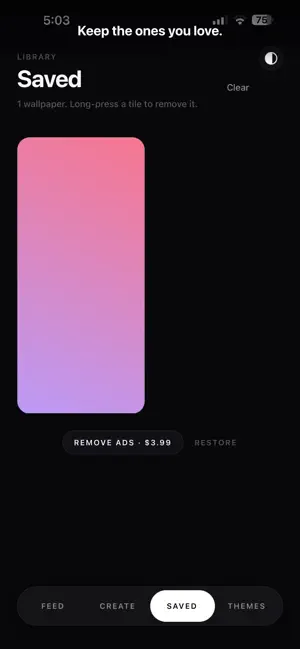
Meshwork makes wallpapers on your phone. Not a gallery of downloads — a generator. Every wallpaper you see was drawn the moment you opened the app, and no two are ever the same. THREE FAMILIES Gradients — soft mesh blobs, directional colour fields with visible folds, clean linear fades, and radial glows. Geometry — faceted bars, triangles, rings, waves, and grids, each tile coloured from the gradient beneath it. Lines — dense fields of lit strokes bending across black, with the moiré that comes from drawing them densely. THIRTEEN CURATED PALETTES Tokyo Night, Peach Sunset, Vaporwave, Pastel Dream, Deep Ocean, Ember, Mint Fresh, Midnight, Citrus Pop, Orchid Haze, and three dark sets built for Lines. Colours are chosen, never random, which is the difference between a wallpaper and noise. DESIGN YOUR OWN Open Create and build one from scratch. Pick two to six colours from sixty swatches, choose a style, then tune it — blob count, softness, angle, pattern density, light position. The preview updates as you drag. SEE IT BEFORE YOU SET IT Preview any wallpaper full screen behind a mock Lock or Home screen, so you can judge whether the clock and your icons stay readable. That is what actually decides if a wallpaper works. EXPORTS AT YOUR SCREEN'S TRUE SIZE Downloads render at your device's native resolution, not a scaled-up preview. Choose PNG, WebP, or JPEG. Watch an ad to unlock 4K export. KEEP WHAT YOU LIKE Tap the heart, or press and hold any thumbnail. Saved wallpapers are stored as a recipe rather than an image, so they cost almost nothing and still export at full size whenever you come back. NO ACCOUNT, NO SERVER There is nothing to sign up for. Meshwork has no backend, and your wallpapers never leave your phone unless you save them yourself. A NOTE ON SETTING WALLPAPERS iOS does not let any app change your wallpaper for you — that is an Apple restriction, not our choice. Meshwork saves to Photos at full resolution and shows you the two taps that finish the job. Remove ads with a single payment. It is not a subscription.
App privacy
The developer, Moin Pate, reported these privacy practices to Apple.
Data Used to Track You
The following data may be used to track you across apps and websites owned by other companies:
- Location: Coarse Location
- Identifiers: Device ID
- Usage Data: Product Interaction, Advertising Data
Data Linked to You
The following data, which may be collected and linked to your identity, may be used for the following purposes:
- Location: Coarse Location
- Identifiers: Device ID
- Usage Data: Product Interaction, Advertising Data
- Purchases: Purchase History
Used for: Third-Party Advertising, Analytics, App Functionality
Alternatives to Meshwork: Gradient Wallpapers
Looking for apps like Meshwork: Gradient Wallpapers? Here are 6 similar apps on the App Store. The highest rated is Shuffle Wall: Wallpaper Maker (5.0/5), and all 6 are free to download.
-
 gradeful - Gradient Wallpaper
-
 Gradient Maker: CSS Code
-
 Gradient"o - Wallpaper
-
 Blend Gradient Wallpaper Maker
-
 Shuffle Wall: Wallpaper Maker
5.0
Shuffle Wall: Wallpaper Maker
5.0
-
 Lumora: Wallpaper Studio
| App | Rating | Price | Last updated | Compare |
|---|---|---|---|---|
| Meshwork: Gradient Wallpapers | – | Free | August 13, 2026 | |
| gradeful - Gradient Wallpaper | – | Free | Sep 30, 2026 | Compare |
| Gradient Maker: CSS Code | – | Free | Aug 19, 2026 | Compare |
| Gradient"o - Wallpaper | – | Free | Oct 19, 2026 | Compare |
| Blend Gradient Wallpaper Maker | – | Free | Oct 24, 2026 | Compare |
| Shuffle Wall: Wallpaper Maker | 5.0 / 5 (3) | Free | Jan 16, 2026 | Compare |
| Lumora: Wallpaper Studio | – | Free | Oct 30, 2026 | Compare |