

Ordo: Brain Dump
DANIEL LAREDO Productivity iPhoneiPadiPod touch
Ordo: Brain Dump is a free Productivity app for iPhone and iPad by DANIEL LAREDO. Rated 5.0/5 from 2 ratings. Requires iOS 15.0. Updated September 30, 2026.
- Rating
- 5.0
- 2 ratings
- Price
- Free
- on the App Store
- Size
- 6 MB
- Age 4+
- Updated
- Sep 30
- 2026 · v1.3
Screenshots



About Ordo: Brain Dump
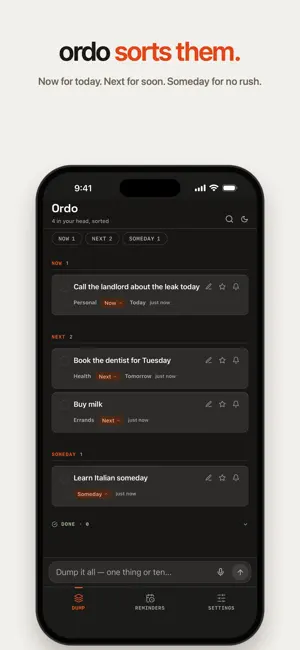
Your head is full. Ordo empties it. Type or say everything on your mind, in any order, all at once. Ordo turns it into a clean list, sorted into three places: NOW — for today NEXT — for soon SOMEDAY — for no rush Most apps want you to get organized before you can start. Ordo works the other way: dump it as messy as it is, and get back a list that makes sense. No folders, no projects, no setup. DUMP IT • One box for everything. Type it, or tap the mic and say it as it comes. • One thing or ten: “call the landlord today, book the dentist for Tuesday, buy milk” becomes three cards, each in its place. • Add from anywhere: share text from another app, or ask Siri to “Dump to Ordo”. MAKE IT YOURS • Move any card between Now, Next and Someday with a tap. • Rename it, add notes, star what matters. • Swipe to delete. Deleted things wait 30 days in case you change your mind. • Tick things off. Keep them where they are, or send them to Done: everything you finished, in one place. Your choice in Settings. WHEN IT MATTERS • Say a time, like “call the dentist at 4” or “wake me up at 7”, and Ordo sets a reminder. • Choose how each one reaches you: a notification, or an alarm that rings like the Clock app (iOS 26). • See your reminders in Apple Reminders too, if you like. Alerts come from Ordo, so you never get two. • A home screen widget shows what’s Now. Tick things off right there. MADE FOR • The end of a long day, when everything is still in your head. • Leaving a meeting or a class with five new things to do. • Ideas that show up at the wrong moment. • Anyone who has tried a planner and given up on the setup. CALM BY DESIGN • No account. No sign-up. Your list lives on your phone. • Light or dark, each designed with care. Ordo follows your phone, or you pick one in Settings. • Back up and restore anytime. To sort a dump, its words go to Ordo’s sorting service, so sorting needs a connection. Offline? Ordo keeps your dump and sorts it when you’re back.
What’s new
Version 1.3 · Updated September 30, 2026
A calmer, clearer Ordo. Say it the way you’d say it Times work with or without am/pm: “gym at 5”, “call mom at 7:30”. Dictation keeps up too: fix a word while you talk, and anything you typed first stays. Notification or alarm Choose how each reminder reaches you. “Wake me up at 7” sets an alarm that rings like the Clock app (iOS 26). If notifications are off, the card says so. Reminders, your way Pick the default, what “Tomorrow” means, snooze length, and whether notifications break through Focus. Show them in Apple Reminders too, and Ordo tells you if one didn’t make it. Plus a new first screen that shows how Ordo works in a few seconds, and smaller fixes and polish.
App privacy
The developer, DANIEL LAREDO, reported these privacy practices to Apple.
Data Not Linked to You
The following data, which may be collected but is not linked to your identity, may be used for the following purposes:
- Identifiers: Device ID
- Usage Data: Product Interaction, Advertising Data
- User Content: Other User Content
- Diagnostics: Crash Data, Other Diagnostic Data
Used for: Analytics, App Functionality
Alternatives to Ordo: Brain Dump
Looking for apps like Ordo: Brain Dump? Here are 6 similar apps on the App Store. The highest rated is Plans: Notes & To-Do Lists (5.0/5), and 5 of the 6 are free to download.
-
 Sotto - Offline Auto Notetaker
-
 Task Tabs
-
 Vibelist: Sequential Todolist
-
 Inkoum: Tasks, Notes & Focus
-
 Plans: Notes & To-Do Lists
5.0
Plans: Notes & To-Do Lists
5.0
-
 DocuBox
| App | Rating | Price | Last updated | Compare |
|---|---|---|---|---|
| Ordo: Brain Dump | 5.0 / 5 (2 ratings) | Free | September 30, 2026 | |
| Sotto - Offline Auto Notetaker | – | Free | Aug 24, 2026 | Compare |
| Task Tabs | – | Free | May 28, 2026 | Compare |
| Vibelist: Sequential Todolist | – | Free | Aug 18, 2026 | Compare |
| Inkoum: Tasks, Notes & Focus | – | 0.49 USD | Aug 13, 2026 | Compare |
| Plans: Notes & To-Do Lists | 5.0 / 5 (2) | Free | Oct 19, 2026 | Compare |
| DocuBox | – | Free | May 28, 2026 | Compare |
Compare Ordo: Brain Dump with the top alternatives: ratings, updates, ASO score and keyword gaps →