

RanPlan: Daily Planner & Todo
RANDEVOS Productivity iPhoneiPadiPod touchApple Watch
RanPlan: Daily Planner & Todo is a free Productivity app for iPhone and iPad by RANDEVOS. Requires iOS 16.4. Updated September 2, 2026.
- Price
- Free
- on the App Store
- Size
- 84 MB
- Age 4+
- Updated
- Sep 2
- 2026 · v1.0.4
Screenshots
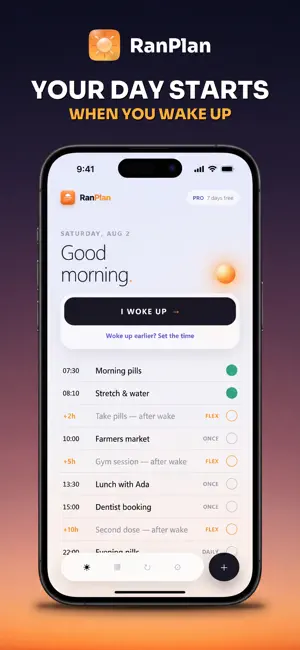


About RanPlan: Daily Planner & Todo
Most planners assume you get up at the same time every day. RanPlan schedules from the moment you actually wake. Set a task for two hours after waking instead of 9:00, tap I WOKE UP when you get up, and every flexible task resolves to a real time. Pills two hours after waking becomes 9:20 today and 11:40 tomorrow. "Take these two hours after you wake." "Second dose eight hours after the first." Instructions like these are relative to waking, and a calendar cannot hold them, because a calendar only knows clock times. The usual workarounds are an alarm that fires at the wrong time, or doing the arithmetic yourself every morning. Built for shift workers, anyone on timed medication, people whose sleep does not keep to a schedule, and new parents. Free Fixed-time tasks, daily and custom repeats, one-off reminders, notifications and the full calendar. No time limit. RanPlan Pro Wake-relative scheduling Reusable routines I WOKE UP on the Lock Screen and in Control Centre Widgets, Shortcuts and Siri Alarm sounds that play through Silent Mode on iOS 26 and later Free for seven days, then Monthly $4.99, Yearly $29.99 which is $2.50 per month, or Lifetime $59.99 paid once. No account, no server Your tasks stay on the device and the app works in Airplane Mode. There are no ads on any plan, free or paid. RanPlan does measure whether its own ads worked, which means a device identifier and whether you subscribed can be shared with the ad platform. iOS asks your permission for that, and saying no changes nothing about how the app works. Subscriptions renew automatically unless cancelled at least 24 hours before the end of the period. Cancel any time in Settings. Payment is charged to your Apple Account on confirmation of purchase. Any unused portion of a free trial is forfeited when a subscription is purchased. Terms of Use: https://ranplan.app/terms Privacy Policy: https://ranplan.app/privacy
What’s new
Version 1.0.4 · Updated September 2, 2026
Repeats can now count from the moment you mark one done. Take something at 11 that was due at 8, and everything after it moves with you instead of the gap quietly shrinking. Tasks also show the time you actually ticked them. If Pro ends, the tasks that need it pause rather than disappear: nothing is deleted, and they run again when it is back.
App privacy
The developer, RANDEVOS, reported these privacy practices to Apple.
Data Used to Track You
The following data may be used to track you across apps and websites owned by other companies:
- Purchases: Purchase History
- Identifiers: Device ID
Data Linked to You
The following data, which may be collected and linked to your identity, may be used for the following purposes:
- Purchases: Purchase History
- Identifiers: Device ID
Used for: Third-Party Advertising, App Functionality
Data Not Linked to You
The following data, which may be collected but is not linked to your identity, may be used for the following purposes:
- Identifiers: User ID
Used for: App Functionality
Alternatives to RanPlan: Daily Planner & Todo
Looking for apps like RanPlan: Daily Planner & Todo? Here are 6 similar apps on the App Store. The highest rated is Oriio: AI Calendar Assistant (5.0/5), and all 6 are free to download.
-
 Dayly: Planner & Habit Tracker
-
 ChronoPlan: AI Coach & Planner
-
 Oriio: AI Calendar Assistant
5.0
Oriio: AI Calendar Assistant
5.0
-
 Gift Hound
4.2
Gift Hound
4.2
-
 Niyyah: Athan Prayer Lock
-
 My Mirror
| App | Rating | Price | Last updated | Compare |
|---|---|---|---|---|
| RanPlan: Daily Planner & Todo | – | Free | September 2, 2026 | |
| Dayly: Planner & Habit Tracker | – | Free | Sep 16, 2026 | Compare |
| ChronoPlan: AI Coach & Planner | – | Free | Aug 11, 2026 | Compare |
| Oriio: AI Calendar Assistant | 5.0 / 5 (4) | Free | Oct 11, 2026 | Compare |
| Gift Hound | 4.2 / 5 (5) | Free | Jan 6, 2026 | Compare |
| Niyyah: Athan Prayer Lock | – | Free | Jul 3, 2026 | Compare |
| My Mirror | – | Free | Sep 14, 2026 | Compare |