

Chatch: AI Reply Keyboard
Louis Derrien Lifestyle iPhoneiPadiPod touch
Chatch: AI Reply Keyboard is a free Lifestyle app for iPhone and iPad by Louis Derrien. Requires iOS 16.4. Updated October 22, 2026.
- Price
- Free
- on the App Store
- Size
- 79 MB
- Age 17+
- Updated
- Oct 22
- 2026 · v1.2.6
Screenshots

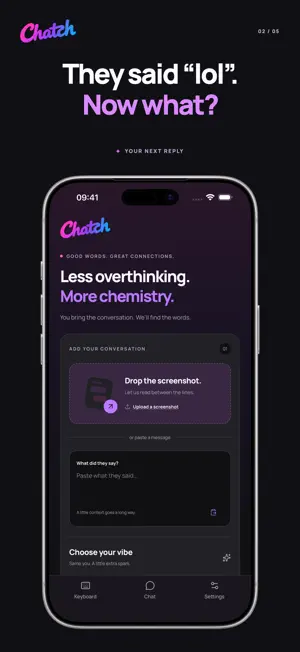


About Chatch: AI Reply Keyboard
Good words. Great connections. A chat goes quiet. Your crush sends “lol”. You have a reply in mind, then delete it. Chatch helps you find something natural to say and make it your own. KEEP THE CONVERSATION GOING Get a playful question, a funny twist, or a little flirt that fits the context. Chatch helps you give a quiet conversation a fresh opening without putting pressure on the other person. REPLIES IN YOUR KEYBOARD Add the Chatch keyboard in Settings. Copy the message you want to answer, switch to Chatch, and tap the logo for a suggestion. Insert it, edit it, and send it when you are ready. Available in apps that support custom keyboards. BRING THE CONTEXT Paste a message or choose a conversation screenshot in the app. Compare two suggestions, copy your favourite, or regenerate an option for another angle. CHOOSE YOUR VIBE Funny, flirty, or confident. Find a tone that fits the moment, from a first message to a conversation that already has a spark. TALK IT THROUGH Ask your AI wingman about a message, a match, or how to suggest a date. Get ideas for respectful conversations, then decide what feels right for you. ENGLISH, FRENCH, SPANISH AND GERMAN Choose your interface language. Replies follow the language of the conversation you provide, and the wingman answers in the language of your question. YOU CHOOSE WHAT TO SEND Chatch does not send messages for you. AI suggestions can be inaccurate, so review them before sending. The keyboard needs Full Access for online AI replies. Text and screenshots you submit are processed by our AI service providers to generate responses. AI features require Chatch Pro. Subscriptions renew automatically. Plans, prices and any eligible trial are shown in the app before purchase. Manage or cancel subscriptions in your Apple account settings. Restore Purchases is available in Chatch Settings. Support: [email protected] Privacy Policy: https://arcticsgroup.com/privacy-policy-chatch Terms of Use: https://arcticsgroup.com/terms-of-use-chatch
What’s new
Version 1.2.6 · Updated October 22, 2026
Small minor fixes and app enhancements.
App privacy
The developer, Louis Derrien, reported these privacy practices to Apple.
Data Used to Track You
The following data may be used to track you across apps and websites owned by other companies:
- Purchases: Purchase History
- Identifiers: Device ID
- Usage Data: Product Interaction
Data Linked to You
The following data, which may be collected and linked to your identity, may be used for the following purposes:
- Identifiers: Device ID, User ID
- Purchases: Purchase History
- Diagnostics: Performance Data, Other Diagnostic Data
- Contact Info: Email Address
- User Content: Emails or Text Messages, Photos or Videos, Customer Support, Other User Content
- Usage Data: Product Interaction
Used for: Developer’s Advertising or Marketing, Analytics, App Functionality
Data Not Linked to You
The following data, which may be collected but is not linked to your identity, may be used for the following purposes:
- Purchases: Purchase History
- Usage Data: Product Interaction
Used for: Developer’s Advertising or Marketing, Analytics