

MPEdie - MPE Controller
Diego Capoccitti Entertainment iPhoneiPadiPod touch
MPEdie - MPE Controller is a free Entertainment app for iPhone and iPad by Diego Capoccitti. Rated 4.9/5 from 8 ratings. Requires iOS 15.0.
- Rating
- 4.9
- 8 ratings
- Price
- Free
- on the App Store
- Size
- 10 MB
- Age 4+
- Updated
- Sep 7
- 2026 · v1.1.3
Screenshots

About MPEdie - MPE Controller
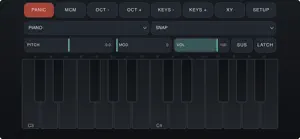
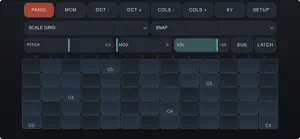
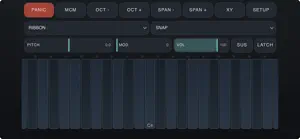
MPEdie is an MPE keyboard controller for iPhone and iPad. It makes no sound: it plays whatever instrument you send it to, and it gives every note its own MIDI channel — so every note bends, breathes and changes timbre on its own. On an ordinary keyboard a bend moves the whole chord. Here it moves one note. APP AND AUv3 Run it standalone and send MIDI to other apps on the device, to Bluetooth gear or over Wi-Fi. Or load it as an AUv3 MIDI plugin in your host and route it straight to an MPE instrument. FOUR PLAYING SURFACES • PIANO — the keyboard your hands know. Sliding follows the pitch under the finger, not the width of the key. • ISOMORPHIC — a grid where a chord shape is the same in every key. Rows, columns and row interval are yours to set. • RIBBON — one continuous strip, nothing to land on. You choose how many semitones fit across it. • SCALE GRID — the same grid, with only the notes of the chosen scale. Nothing out of key by accident. Fourteen scales, any root, split the surface in two with its own layout and octave on the right. EVERY FINGER MOVEMENT IS ROUTABLE A matrix of seven destinations — bend, timbre, pressure, strike, lift and two free CCs — and eight sources: sideways glide, absolute or relative position in the key, contact area, force, time held, or a fixed value. Each link has a curve, a gain, an offset and an invert. And an honest answer about pressure: iOS glass does not measure how hard you press. It measures contact area. MPEdie can send that, and it says so instead of pretending — it is one tap away in the matrix, and the factory default is a gesture you can predict. BUILT TO AGREE WITH THE RECEIVER Lower, upper or split zones. Member channel counts. Per-note and master bend ranges. RPN sent to every member channel when your instrument needs it. Channel pressure or poly aftertouch. Any timbre CC. Channel stealing by oldest or quietest, with a cooldown. One button resends the MPE zone setup to an instrument loaded after you. UNDER THE HANDS PANIC that also lifts the pedal. Octave and key count. Four glide modes — continuous, snap, locked, per-note lock. Pitch, modulation and volume strips, with a spring you can switch off. Two assignable XY pads. Sustain, momentary or latching. Latch, with held notes drawn apart so a stuck note never looks like a played one. Bank select and program change, sent when you ask and never behind your back. TWENTY-SIX PRESETS Seven folders: keyboards, grids, ribbons, splits, scales, and a Targets family that answers the same question — what does the receiver actually understand? — five different ways. Save your own; they are plain files you can move and share. A FREE COMPANION FOR MAC AND WINDOWS MPEdie Desktop receives the iPad over the network and republishes it as a virtual MIDI port, so your DAW sees MPEdie in its list of MIDI inputs, exactly like a hardware controller. That is the point: an input gets recorded. Arm a track and the DAW writes down the per-note expression — every note's own bend, pressure and timbre — and plays it back. Nothing is installed on the iPad, and no driver on Windows. Free download from the developer's site. The full manual is inside the app. MPE (MIDI Polyphonic Expression) is an open standard published by the MIDI Association and AMEI. MPEdie is MPE-compatible. Diego Capoccitti · 34Audiovisuals · www.diegocapoccitti.it
Ratings & reviews
4.9
8 ratings
What’s new
Version 1.1.3 · Updated September 7, 2026
What's New • Bugfix: Custom scales can use accidentals. • Update: The keys of that octave are now named by degree — 1, b2, 2, b3, 3, 4, #4, 5, b6, 6, b7, 7 —
App privacy
The developer, Diego Capoccitti, reported these privacy practices to Apple.
Data Not Collected
The developer does not collect any data from this app.
Alternatives to MPEdie - MPE Controller
Looking for apps like MPEdie - MPE Controller? Here are 6 similar apps on the App Store. The highest rated is Matcha — Lofi Chord Studio (5.0/5), and 5 of the 6 are free to download.
-
 Ear Engineer Mobile
-
 Matcha — Lofi Chord Studio
5.0
Matcha — Lofi Chord Studio
5.0
-
 Yaba Sanshiro 2
4.4
Yaba Sanshiro 2
4.4
-
 Fjord IPTV Player
-
 BloopTags
-
 AerioTV
5.0
AerioTV
5.0
| App | Rating | Price | Last updated | Compare |
|---|---|---|---|---|
| MPEdie - MPE Controller | 4.9 / 5 (8 ratings) | Free | September 7, 2026 | |
| Ear Engineer Mobile | – | 9.99 USD | Aug 31, 2026 | Compare |
| Matcha — Lofi Chord Studio | 5.0 / 5 (1) | Free | Aug 6, 2026 | Compare |
| Yaba Sanshiro 2 | 4.4 / 5 (29) | Free | Aug 30, 2026 | Compare |
| Fjord IPTV Player | – | Free | Oct 17, 2026 | Compare |
| BloopTags | – | Free | Aug 11, 2026 | Compare |
| AerioTV | 5.0 / 5 (11) | Free | Oct 12, 2026 | Compare |