

Stop Me: Quit Doomscrolling
Muhammad Yousuf Khan Productivity iPhoneiPadiPod touch
Stop Me: Quit Doomscrolling is a free Productivity app for iPhone and iPad by Muhammad Yousuf Khan. Requires iOS 26.5. Updated September 12, 2026.
- Price
- Free
- on the App Store
- Size
- 37 MB
- Age 4+
- Updated
- Sep 12
- 2026 · v1.2.13
Screenshots

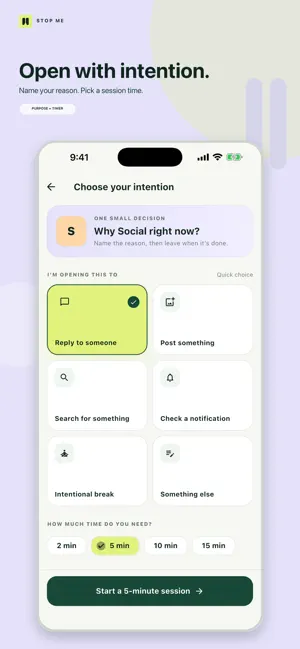


About Stop Me: Quit Doomscrolling
You open an App to check one notification. Twenty minutes later, you're still scrolling. Stop Me changes what happens before an app opens. For every app you choose, Stop Me becomes the entry point. Before you enter, answer two simple questions: Why are you opening this app? How long do you need? Choose your purpose, choose your session, and then use the app normally. When your session ends, Stop Me becomes the entry point again—so the next time you open that app, you make the decision again. Stop Me isn't about keeping useful apps away from you. It's about stopping mindless entry, doomscrolling, and those sessions that begin with one purpose and turn into wasted time. HOW IT WORKS • Choose the apps you want Stop Me in front of • Create the reasons you normally open them • Choose your purpose before entering • Set how long you need • Use the app normally during your session • Decide again the next time you enter Use Stop Me with social media, video, shopping, news, or any app you tend to open without thinking. Your apps are useful. Your attention is valuable. Know why you're going in. Privacy Policy: https://khueonstudios.com/products/stop-me/privacy Terms: https://khueonstudios.com/products/stop-me/terms
What’s new
Version 1.2.13 · Updated September 12, 2026
bug fix
App privacy
The developer, Muhammad Yousuf Khan, reported these privacy practices to Apple.
Data Not Linked to You
The following data, which may be collected but is not linked to your identity, may be used for the following purposes:
- Purchases: Purchase History
Used for: Analytics, App Functionality