

SightPiano
Original Device LLC Education iPhoneiPadiPod touchMac
SightPiano is a free Education app for iPhone and iPad by Original Device LLC. Requires iOS 15.0. Updated October 14, 2026.
- Price
- Free
- on the App Store
- Size
- 503 MB
- Age 4+
- Updated
- Oct 14
- 2026 · v1.9.3
Screenshots
Save to Pinterest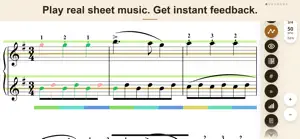
About SightPiano
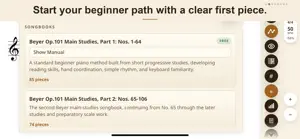
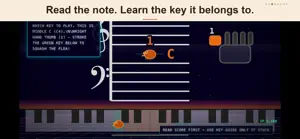
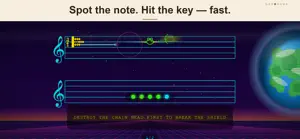
SightPiano is a notation-first piano-learning app for beginners. Learn from real sheet music on a digital piano or MIDI keyboard, with instant feedback on every note and its timing. Build core piano skills as you learn from music — not by following falling-note games. Choose structured method courses, train one hand at a time, and see exactly where your playing needs work. Start free with about a month of real method repertoire — often more — across three classical method paths. No account, no trial clock; every feature is permanently unlocked at no cost during the free foundation. WHY IT’S DIFFERENT Real notation, not diagrams. Every piece is full sheet music, read the way a musician reads it. The beat never stops. Metronome on by default; every note is judged for timing as well as pitch. You track your own position on the page. No bouncing ball, no auto-scroll — the skill a real sight-reader needs. No upsell modals, no locked-until-you-pay progression on the free foundation. Payment expands content, not the practice system. THE SIGHT- PRACTICE PIPELINE Sight-reading is five skills in sequence, and SightPiano trains all five, in order: Hear it first — SightPlay highlights each note as reference audio plays, with a visible beat and human (non-mechanical) timing. Play it through, off the clock — SightTrace colors every note green or red the instant you strike it, looping until you clear the passage. Read ahead, off the clock — SightPeek lets you preview the next measure at your own pace. Read ahead, at tempo — SightAhead runs the same drill under real tempo pressure. Get the truth immediately — SightMark and SightError show exactly what landed and where the misses went. A PROGRESSIVE CURRICULUM Choose from three historical method paths to intermediate playing — the balanced German Path (Beyer, Burgmüller, Czerny), the lyrical French Path (Le Couppey), or the technical Viennese Path (Czerny) — plus Hanon, SightJazz, and SightPops. The beginner foundation of every path is free, permanently, with every feature enabled — about a month of practice for most learners, often more. BUILT-IN PRACTICE TOOLS SightMastery and SightTrend track real progress across months, not minutes. SightRight/SightLeft isolate a hand. SightDyna shows touch evenness. SightJuke turns a songbook into a jukebox — pick a first and last piece and SightPiano performs the whole range hands-free, with optional repeat. SightCade turns nine retro arcade games into focused drills on rhythm, pitch, hand independence, dynamics, memory, and chord leaps — including ChordRally, which steers with block chords. SightMaestro is an optional AI practice coach — bring your own API key and pay your provider directly, at wholesale, instead of a subscription markup. A NOTE ON HARDWARE For the full real-keyboard feedback experience, connect a digital piano or MIDI keyboard by wired USB. Bluetooth MIDI and acoustic-piano input are not currently supported. The app also includes a virtual piano for a quick try without MIDI hardware. Built and maintained by one person. Feedback goes straight to the developer, not a support queue.
What’s new
Version 1.9.3 · Updated October 14, 2026
What's New in 1.9.3 Piano sound — one choice per part • Settings > Audio has three independent lanes: My playing, SightPlay, and SightDuet • Each lane plays the Salamander grand piano, the built-in synth, or an external MIDI device; My playing can also be Silent • The metronome sound settings now use the same layout MIDI keyboards • New "Automatic" input follows the keyboard you are actually playing, so a keyboard that appears more than once no longer goes silent • When the same keyboard is available over USB and another connection, USB is preferred • The device list shows each connection type, such as "(USB)" SightDuet and heatmaps • The SightDuet band and the bass heatmaps now cover the whole piece, no matter which measures you are practicing • The first-run guide explains the colorful band and the optional piece guide Practice and sharing • The share-ready notice is bigger, shows a summary of your achievement, and sits at the bottom left of the score • Beyer now opens on Main Studies Part 1, No. 1, with Finger Exercises right after it Fixes • The free preview stops at the first locked measure; a repeat that crossed the preview boundary no longer replays earlier measures • The first-run guide's cards stay fully on screen after you rotate or resize the window • Held-note highlights now clear correctly when the input source changes Thank you for practicing with SightPiano!
App privacy
The developer, Original Device LLC, reported these privacy practices to Apple.
Data Not Collected
The developer does not collect any data from this app.
Alternatives to SightPiano
Looking for apps like SightPiano? Here are 6 similar apps on the App Store. The highest rated is PianoAI Tutor (5.0/5), and all 6 are free to download.
-
 Pianeer - Sight Reading
-
 PlayPiano Smart Practice Coach
3.0
-
 Day Skipper Theory Prep
-
 Noteon - Current Note Detector
1.0
-
 ClefMastery
-
 PianoAI Tutor
5.0
| App | Rating | Price | Last updated | Compare |
|---|---|---|---|---|
| SightPiano | – | Free | October 14, 2026 | |
| Pianeer - Sight Reading | – | Free | Oct 24, 2026 | Compare |
| PlayPiano Smart Practice Coach | 3.0 / 5 (2) | Free | Sep 26, 2026 | Compare |
| Day Skipper Theory Prep | – | Free | Oct 11, 2026 | Compare |
| Noteon - Current Note Detector | 1.0 / 5 (1) | Free | Oct 23, 2026 | Compare |
| ClefMastery | – | Free | Mar 22, 2026 | Compare |
| PianoAI Tutor | 5.0 / 5 (2) | Free | Jun 18, 2026 | Compare |
Compare SightPiano with the top alternatives: ratings, updates, ASO score and keyword gaps →