

WakeTok
CHENWEI GAN Photo & Video iPhoneiPadiPod touch
WakeTok is a free Photo & Video app for iPhone and iPad by CHENWEI GAN. Requires iOS 18.0. Updated October 22, 2026.
- Price
- Free
- on the App Store
- Size
- 23 MB
- Age 4+
- Updated
- Oct 22
- 2026 · v1.0.1
Screenshots


About WakeTok
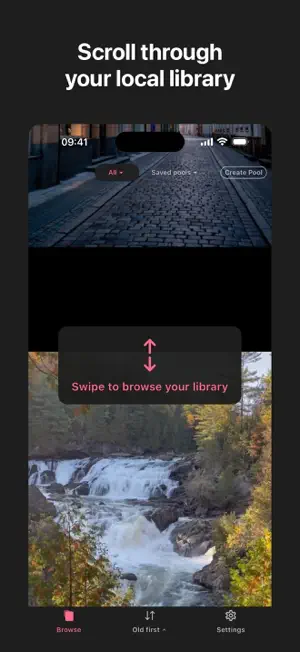
Wake what you saved — A local-first vertical scrolling app for rediscovering your own photo and video library. Years of photos and videos can sit in your library, rarely seen again. WakeTok brings them back: swipe up and down through them full screen, one at a time, Live Photos included. On your device. No account. Nothing uploaded to WakeTok. CHOOSE WHAT TO BROWSE, AND IN WHAT ORDER • Browse your whole library, only photos, or only videos — there is no limit on how many items you can browse. • Or build a pool from the albums you choose and browse just those. Save the pool and come back to it whenever you like. • Choose the order: Shuffle, Newest → Oldest, or Oldest → Newest. Shuffle your whole library and you will come across photos and videos you'd forgotten were there. Reach the end and WakeTok starts a fresh round. ORGANISE, SHARE OR DELETE AS YOU GO • Swipe left to add what you are looking at to the WakeTok album in Photos — a bookmark for later. Nothing is moved or copied. • Add to Favourites, or add to one of your own albums. • Share through the iOS share sheet. • Delete with the usual iOS confirmation; items go to Recently Deleted. MADE FOR YOUR LIBRARY • Live Photos, videos and animated GIFs play full screen. Tap a video to pause or resume, scrub to any moment, and long-press a Live Photo to replay it. • Pinch to zoom into a photo. • See when each item is from: 3 months ago, 11 years ago. • Works with iCloud Photos. PRIVATE BY DESIGN • No account, no sign-in. • No ads, no analytics, no tracking. • Nothing is uploaded to WakeTok. • WakeTok stores your pools and settings on your iPhone. Privacy policy: https://dennycgan.github.io/waketok-site/privacy/
What’s new
Version 1.0.1 · Updated October 22, 2026
• Third-party licences page in Settings. • Clearer Photos permission button layout on smaller iPhones. • App name no longer breaks awkwardly in the interface. • App text size is now fixed, independent of accessibility text settings. • Single-item feeds now support rubber-band scrolling (previously could not be dragged at all).
App privacy
The developer, CHENWEI GAN, reported these privacy practices to Apple.
Data Not Collected
The developer does not collect any data from this app.