

My Playlist - Songs You Made
Daisuke Iwamoto Music iPhoneiPadiPod touchMac
My Playlist - Songs You Made is a free Music app for iPhone and iPad by Daisuke Iwamoto. Requires iOS 18.0. Updated September 6, 2026.
- Price
- Free
- on the App Store
- Size
- 4 MB
- Age 4+
- Updated
- Sep 6
- 2026 · v1.2.1
Screenshots
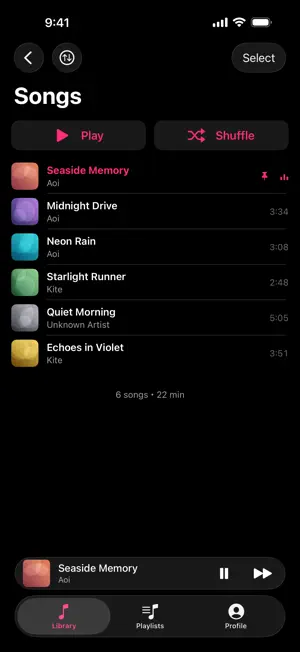
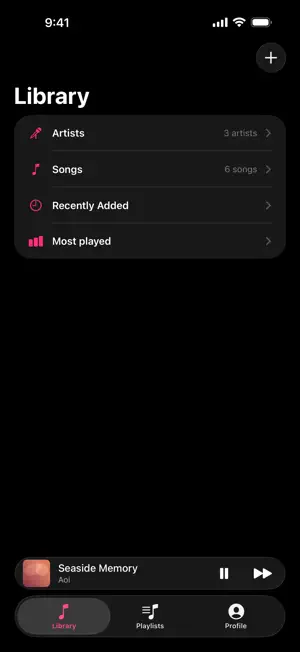
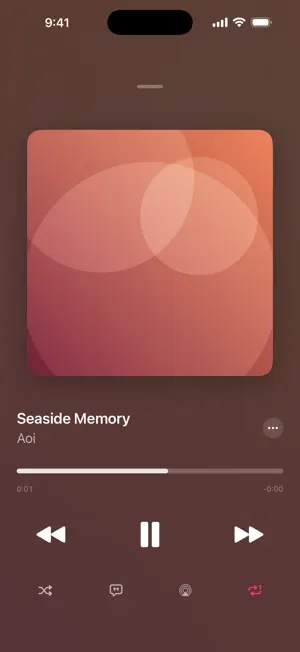

About My Playlist - Songs You Made
A simple music player that holds only the songs you made yourself. Songs you make with AI music services are worth listening to even if you never release them. That is what this app is for, so there is nothing here for finding other people's music, and no following or commenting either. It does three things. ■ Import your songs Just put the audio files you made into the app. Three ways to do it. ・Tap "+" in the app and pick a file from Files or iCloud Drive ・Choose My Playlist from another app's share menu ・Drop files straight into the My Playlist folder in the Files app Works with mp3, m4a, aac, wav, aiff, FLAC and anything else iPhone can play. Title, artist and artwork are read from the file, and you can correct them inside the app. If you import the same song twice, it tells you instead of adding a duplicate. Imported songs are copied into the app, so they keep playing even if you delete the original file, and even in airplane mode. ■ Build playlists Group songs however you like to listen to them. Pick a cover from your photos or from the Files app, or leave it and the cover is built from the artwork of the songs inside. ■ Listen in your library Your library opens four ways. ・Artists (grouped by name) ・Songs (everything, sorted by date added, title or artist, with search) ・Recently added ・Most played Pin the songs you play most and they stay at the top. Tap "Select" to tick several songs at once and remove them together, or give them all the same artwork from one image — handy when you import an album's worth of files. Playlists can be removed in bulk the same way. ― Lyrics ― Keep the lyrics with the song and read them from the player. If the audio file carries lyrics, they are read in when you import it. If not, paste them in on the song's info screen. ― Playback ― ・Control it from the Lock Screen, Control Centre and your headphones ・Keeps playing in the background while you use other apps ・Shuffle, repeat, play next ・AirPlay ・Pauses for an incoming call and picks up again afterwards ・Stops when you unplug your headphones ・Matches the device output to each song's sample rate, avoiding needless conversion ― About you ― Set a name and photo in your profile. That name is used automatically for songs whose files carry no artist. You can also see what you have been listening to — how many songs, how long, and your most played. ― Premium (one-time purchase) ― Make the app look the way you want. One payment, no charges after that. ・Theme colour (8 of them, including a moving rainbow) ・Font (5 typefaces) ・Text colour (pick any colour) ・Mini player colour (8 of them; frosted glass by default) ・List layout (rows or grid) Playing and collecting your music are free. ― iCloud sync (optional) ― Turn it on in your profile and your iPhone, iPad and Mac share one library. Songs, playlists, lyrics and your listening record all come along. ・Off by default. Until you turn it on, your songs stay on this device ・Syncing happens inside your own iCloud. Your songs never leave it ・A song added on another device is fetched when you play it, so it does not fill up your storage all at once ― Share a playlist with friends (optional) ― Show a playlist you made to the friends you invite, and no one else. ・By default, only the people you invite can see it ・You can switch a share to "anyone with the link" when you want to send it through a messaging app (remember that a link can be forwarded) ・Your friend needs this app and an iCloud account too ・You can stop sharing at any time ・Shared songs use your own iCloud storage ・Friends can listen, but cannot change your playlist ― What this app is careful about ― ・No account ・It collects nothing about you ・No ads while you listen. The only one sits under Artist Tools on the Profile tab
What’s new
Version 1.2.1 · Updated September 6, 2026
Fixed a crash that could prevent the app from launching when iCloud sync was turned on.
App privacy
The developer, Daisuke Iwamoto, reported these privacy practices to Apple.
Data Not Collected
The developer does not collect any data from this app.
Alternatives to My Playlist - Songs You Made
Looking for apps like My Playlist - Songs You Made? Here are 6 similar apps on the App Store.



| App | Rating | Price | Last updated | Compare |
|---|---|---|---|---|
| My Playlist - Songs You Made | – | Free | September 6, 2026 | |
| SoundR | – | Free | May 31, 2026 | Compare |
| StemsRoom | – | Free | Sep 24, 2026 | Compare |
| TuneGenie | – | Free | Sep 24, 2026 | Compare |
| Spinly Music – Vinyl Player | – | Free | Apr 10, 2026 | Compare |
| Musiclatte - Music Player | – | Free | Sep 20, 2026 | Compare |
| Album Ally | – | Free | Sep 26, 2025 | Compare |