

Beastform
Nathan Scadlock Reference iPhoneiPadiPod touch
Beastform is a free Reference app for iPhone and iPad by Nathan Scadlock. Rated 5.0/5 from 7 ratings. Requires iOS 17.0. Updated October 21, 2026.
- Rating
- 5.0
- 7 ratings
- Price
- Free
- on the App Store
- Size
- 25 MB
- Age 9+
- Updated
- Oct 21
- 2026 · v2.0.1
Screenshots
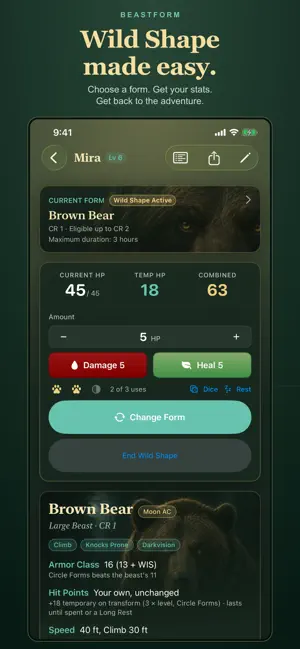


About Beastform
Keep your Druid's Wild Shape ready for the table. Choose an eligible beast form, roll attacks and damage, and track hit points and Wild Shape uses in one place. Beastform supports both the 2024 (5.5e) and 2014 (5e) rules. Each druid plays by the edition you choose when you create it, and the numbers follow that edition's rules. FIND YOUR FORM Browse 82 beast forms from SRD 5.2.1 for 2024 Druids, or 84 beasts and 4 elementals from SRD 5.1 for 2014 Druids. Eligible forms are filtered by level and Circle. Search by name or capability, sort by roles such as damage, armor, or scouting, and see why a form you searched for isn't available yet. KNOW YOUR BEAST Read attacks, damage, movement, senses, and traits alongside the mental ability scores your Druid keeps. See how Armor Class, hit points, saving throws, skills, and Wild Shape uses are worked out for your Druid. ROLL RIGHT ON THE SHEET Tap Attack or Damage to roll. Press and hold for Advantage, Disadvantage, or critical damage. Tap an ability score for a check, or press and hold it for a saving throw or Initiative. Choose from six dice styles, or use the Dice Tray to roll d4, d6, d8, d10, d12, and d20 with a count and modifier. KEEP COMBAT MOVING Track damage and healing under your edition's hit point rules: Temporary Hit Points in 2024, the beast's own hit points in 2014. Manage Wild Shape uses, heal with spell slots as a 2014 Circle of the Moon Druid, and take Short or Long Rests. Undo a change when you need to correct a tap. EXPLORE BETWEEN SESSIONS Browse the Compendium for either edition without creating a character. Keep multiple Druids, write notes for individual forms, and share a readable stat block with your DM or fellow players. BACK UP YOUR DRUIDS Export characters to Files and import them on another device. Imports create separate copies without overwriting existing Druids. BUILT FOR IPHONE AND IPAD Choose light or dark appearance, adjust text size, play in portrait or landscape, and use an iPad layout that places your combat tracker beside the stat block. Works offline. No account, ads, analytics, or tracking. Characters are stored on your device; you choose when to share or export them. Beastform is an independent companion and is not affiliated with, endorsed by, or sponsored by Wizards of the Coast.
Ratings & reviews
5.0
7 ratings
What’s new
Version 2.0.1 · Updated October 21, 2026
Beastform is ready for iPhone Duo. It fills the outer and inner displays, and folding or unfolding keeps you on the druid you're playing. • On wider screens the druid page shows two columns sooner, with the stat block and the combat card side by side. • New dark and tinted app icons for your Home Screen.
App privacy
The developer, Nathan Scadlock, reported these privacy practices to Apple.
Data Not Collected
The developer does not collect any data from this app.
Alternatives to Beastform
Looking for apps like Beastform? Here are 6 similar apps on the App Store. The highest rated is PhilosophizeMe (4.8/5), and all 6 are free to download.
-
 Card Value Scanner for Lorcana
4.0
Card Value Scanner for Lorcana
4.0
-
 Defenders of Faith
4.1
Defenders of Faith
4.1
-
 PhilosophizeMe
4.8
PhilosophizeMe
4.8
-
 Circuit-Design
1.0
Circuit-Design
1.0
-
 DB Museum
-
 BioSnap: Animal Identifier
4.7
BioSnap: Animal Identifier
4.7
| App | Rating | Price | Last updated | Compare |
|---|---|---|---|---|
| Beastform | 5.0 / 5 (7 ratings) | Free | October 21, 2026 | |
| Card Value Scanner for Lorcana | 4.0 / 5 (14) | Free | Jul 28, 2026 | Compare |
| Defenders of Faith | 4.1 / 5 (11) | Free | Jun 29, 2026 | Compare |
| PhilosophizeMe | 4.8 / 5 (40) | Free | Sep 25, 2026 | Compare |
| Circuit-Design | 1.0 / 5 (2) | Free | Jul 7, 2025 | Compare |
| DB Museum | – | Free | Jan 28, 2025 | Compare |
| BioSnap: Animal Identifier | 4.7 / 5 (675) | Free | Oct 25, 2026 | Compare |
Compare Beastform with the top alternatives: ratings, updates, ASO score and keyword gaps →