

Triply: Travel Map & Stamps
Junhyuk Lee Travel iPhoneiPadiPod touch
Triply: Travel Map & Stamps is a free Travel app for iPhone and iPad by Junhyuk Lee. Requires iOS 16.0. Updated November 15, 2026.
- Price
- Free
- on the App Store
- Size
- 106 MB
- Age 4+
- Updated
- Nov 15
- 2026 · v1.1.3
Screenshots
Save to Pinterest


About Triply: Travel Map & Stamps
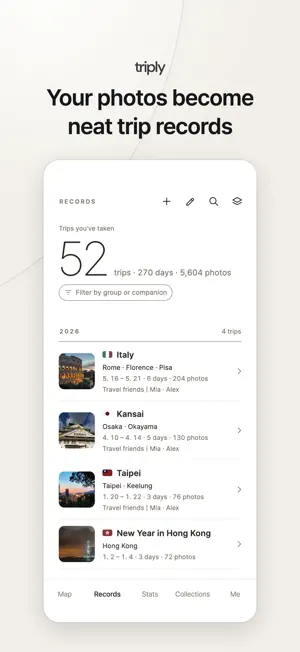
How many countries have you been to? Triply is a travel tracker that works from your photos: it reads the dates and places already saved in them, finds your past trips and colors them in on a world map. No typing, no check-ins: your travel map fills in by itself, and the landmarks you visit collect like stamps in a passport. ■ A travel map that fills itself in · Allow photo access and Triply finds the countries and regions you've visited. · Every country is colored in by region (states, provinces, prefectures). Korea goes down to districts. · Photos taken near home or work don't count as trips. You can adjust the area anytime. · New photos are checked too, so the map keeps filling in. ■ Map themes worth choosing Dots, Passport, Pixel, Pen sketch, Watercolor, Colored pencil, Paper cutout and Illustrated. The same trips become a completely different map in each one. Center the world map on the Atlantic or the Pacific, or show only the places you've been. Some themes also come in a night version. ■ Collect landmark stamps Sights near the places you've been are collected automatically. No photo? Mark a place as visited yourself. · Americas: US National Parks (all 63), Canada's National Parks, South America Highlights · Europe: Royal Palaces of Europe, Great Cathedrals of the World, Camino de Santiago, Swiss Alps Viewpoints · Everywhere: UNESCO World Heritage, Ancient Egypt, African National Parks · Asia: Castles of Japan, Joseon Palaces, Korea's 100 Famous Mountains and more Browse everything you've collected, with illustrations, and fill in the rest one stamp at a time. ■ Your trips, already recorded · Trips found in your photos are organized by year and by country. · Look back at the photos from each trip and search by title, place or year. · Dates and times show in the destination's local time, so time zones never push a day out of place. · Add trips without photos by hand. ■ Replay the routes you took · Tap Replay and the path you took on a trip is drawn on the map in the order you traveled it. · Import a location history (timeline) file exported from your phone to draw your real route, even between photos. You can also pick a period, like the last week, month or this year, and replay it. · Imported location history is stored only on this phone. ■ Photo map Each trip's photos gather on the map right where you took them. Zoom in to split them by place, then tap a group to see its photos by date and city. ■ Travel stats See how many trips you've taken, how many days you've spent away and how often you've been to each country. Each year is laid out day by day, with your travel days lit up. ■ Share cards Turn your world map or a country map into an image in the theme you like and send it to friends. ■ Your photos never leave your phone Photo analysis happens only on your device. Original photos are never uploaded. Only the dates and places needed for your trips are saved to your account, so your map comes with you when you switch phones. Imported location history is never uploaded at all. ■ Good to know · Try every feature free for 7 days after you sign up. · The free plan includes the Dots theme and up to 5 trips. Trips you've added stay after the trial ends. · The Lifetime pass is a one-time purchase, not a subscription: no auto-renewal, nothing to cancel. It unlocks every theme, unlimited trips, every collection, the Badge, Clay and Sticker stamp styles, and future features at no extra cost. · Available in 11 languages, with dark mode. Terms of Use (EULA): https://www.apple.com/legal/internet-services/itunes/dev/stdeula/
What’s new
Version 1.1.3 · Updated November 15, 2026
Fixed a crash that could happen when several notifications appeared in a row.
App privacy
The developer, Junhyuk Lee, reported these privacy practices to Apple.
Data Linked to You
The following data, which may be collected and linked to your identity, may be used for the following purposes:
- Purchases: Purchase History
- Location: Coarse Location
- Contact Info: Email Address
- User Content: Other User Content
- Identifiers: User ID
Used for: App Functionality
Data Not Linked to You
The following data, which may be collected but is not linked to your identity, may be used for the following purposes:
- Usage Data: Product Interaction
- Diagnostics: Crash Data, Other Diagnostic Data
- Search History: Search History
Used for: Analytics, App Functionality
Alternatives to Triply: Travel Map & Stamps
Looking for apps like Triply: Travel Map & Stamps? Here are 6 similar apps on the App Store.
-
 Vestigio - Color Your Travels
-
 Viatu: Travel Map & Tracker
-
 Seen: Art Tracker
-
 Joyzr Map - Custom Travel Maps
-
 Aviasurf Passport: Travel Map
-
 SpotPix - Photo Map Album
| App | Rating | Price | Last updated | Compare |
|---|---|---|---|---|
| Triply: Travel Map & Stamps | – | Free | November 15, 2026 | |
| Vestigio - Color Your Travels | – | Free | Nov 19, 2026 | Compare |
| Viatu: Travel Map & Tracker | – | Free | Nov 5, 2026 | Compare |
| Seen: Art Tracker | – | Free | Nov 6, 2026 | Compare |
| Joyzr Map - Custom Travel Maps | – | Free | Oct 28, 2026 | Compare |
| Aviasurf Passport: Travel Map | – | Free | Nov 15, 2026 | Compare |
| SpotPix - Photo Map Album | – | Free | Jun 2, 2026 | Compare |