

CodeConnect Remote
Faisal Mumtaz Developer Tools iPhoneiPadiPod touch
CodeConnect Remote is a free Developer Tools app for iPhone and iPad by Faisal Mumtaz. Requires iOS 17.0. Updated November 3, 2026.
- Price
- Free
- on the App Store
- Size
- 7 MB
- Age 4+
- Updated
- Nov 3
- 2026 · v1.1.14
Screenshots



About CodeConnect Remote
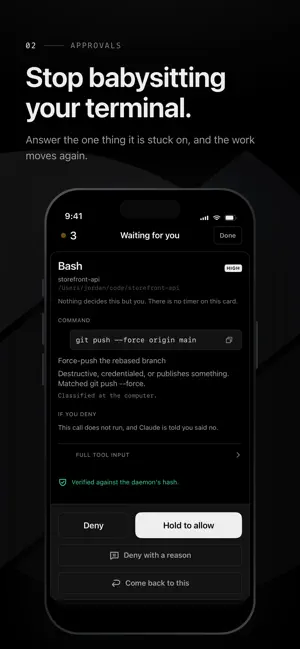
CodeConnect puts every coding-agent session running on your own computer into your hand. Works with Claude Code and OpenAI Codex. Steer an agent mid-run, answer the permission prompt it is blocked on, review its diff, or take over its terminal outright. Your sessions travel directly between the app and the CodeConnect daemon on your own machine. No server sits in between, and your code never leaves your own devices. The single CodeConnect-operated service is a content-free push relay, described in full in the privacy policy. WHAT IT DOES • A fleet view. Every agent, what it is asking for, and how long it has been waiting. • Approvals that show the real command. Risk-tiered: a read is one tap, while a destructive command needs a deliberate hold and a biometric confirmation. The command is never truncated or faded, because a hidden suffix is exactly where a dangerous argument hides. • Codex, with its own options. A Codex request is answered with the choices Codex actually offered, including the exact scope of "don't ask again". Stop a running turn, or send a message that starts a turn when Codex is idle and joins the running one when it is busy. • Nothing decides without you. A prompt is held open until you answer it. If the daemon cannot be reached, the decision falls back to your keyboard rather than being silently answered on your behalf. • Diff review that works on a small screen. Unified, monospace, word-level highlighting, and a comment back to the agent on any hunk. • Talk to it. The compose bar stages text into the agent's prompt; template chips insert rather than send. Dictation is handled by the system speech recognizer, and a transcript is always staged for your review, never sent automatically. • A real terminal. Attach to the live session over the connection the app is already paired on, and take over completely. • It never lies about state. Every fact shows its age, a stale link disables actions and says why, and "answered at the keyboard" is a state the app renders rather than a guess. WHAT YOU NEED • A computer running macOS 13 or later, with the free CodeConnect daemon installed from codeconnect.sh (0.7.0 or later for Codex). Apple silicon and Intel are both supported. • tmux on that machine. • A network path from your phone to it — the same Wi-Fi, or any private network you operate. Tailscale is a common choice, and is optional. • iOS 17 or later. CodeConnect is an independent tool and is not affiliated with, sponsored by, or endorsed by the vendors of the coding agents it supervises.
What’s new
Version 1.1.14 · Updated November 3, 2026
• At the largest text sizes, long names (agents, tools and commands in the timeline, and the tool on an approval card) now stay whole on their own line instead of breaking mid-word. • After you send a message, the conversation moves once, to your message, and stays there. It no longer jumps up to an earlier reply a few seconds later. • The newest message stays in view above the message box when the keyboard opens or closes. • If the connection drops just as you send, your message no longer stays in the box: once the app reconnects and your computer confirms it arrived, the box clears, and nothing is sent twice. • If your computer stops answering, for example when Tailscale drops, the app notices within about 30 seconds and connects again, instead of waiting minutes. • A cleaner session screen with more room for the conversation. The project and its path now sit in the top bar, the Timeline / Terminal switch is gone, and the "…" menu opens the terminal and brings you back. Your uncommitted changes and the connection's health are in the same menu. • One text size throughout the conversation: tool steps, your messages and notes now match the agent's replies, and each tool call reads as a single line. • A refreshed message box: slightly taller, with a soft glow along its edge. • A cleaner Changes screen: changed lines read like a code editor's, with whole lines tinted and the exact words that changed highlighted, a short summary at the top, and tab-indented files that line up properly. Pop-up buttons are evenly spaced and their titles centred. • Icons now line up with the middle of the text beside them, everywhere in the app. • New icons throughout the app, with softer, rounder shapes. Status icons keep their filled look, so a finished, failed or waiting session still reads at a glance.
App privacy
The developer, Faisal Mumtaz, reported these privacy practices to Apple.
Data Not Collected
The developer does not collect any data from this app.
Alternatives to CodeConnect Remote
Looking for apps like CodeConnect Remote? Here are 6 similar apps on the App Store. The highest rated is CoderPulse (5.0/5), and 4 of the 6 are free to download.
-
 CoderPulse
5.0
-
 CoreAI Zoo
-
 Ledge Notebook
5.0
-
 Harbour - Docker Manager
5.0
-
 T3 Code - Remote Claude & more
4.9
-
 Orca IDE
4.7
| App | Rating | Price | Last updated | Compare |
|---|---|---|---|---|
| CodeConnect Remote | – | Free | November 3, 2026 | |
| CoderPulse | 5.0 / 5 (1) | 3.99 USD | Oct 9, 2026 | Compare |
| CoreAI Zoo | – | Free | Nov 1, 2026 | Compare |
| Ledge Notebook | 5.0 / 5 (2) | Free | Oct 31, 2026 | Compare |
| Harbour - Docker Manager | 5.0 / 5 (11) | 2.99 USD | May 3, 2026 | Compare |
| T3 Code - Remote Claude & more | 4.9 / 5 (189) | Free | Oct 28, 2026 | Compare |
| Orca IDE | 4.7 / 5 (66) | Free | Nov 3, 2026 | Compare |
Compare CodeConnect Remote with the top alternatives: ratings, updates, ASO score and keyword gaps →