

NoScroll: Pause First
福荣 贺 Productivity iPhoneiPadiPod touch
NoScroll: Pause First is a paid Productivity app for iPhone and iPad by 福荣 贺. Requires iOS 15.0. Updated September 30, 2026.
- Price
- 0.99 USD
- on the App Store
- Size
- 32 MB
- Age 4+
- Updated
- Sep 30
- 2026 · v1.2.3
Screenshots


About NoScroll: Pause First
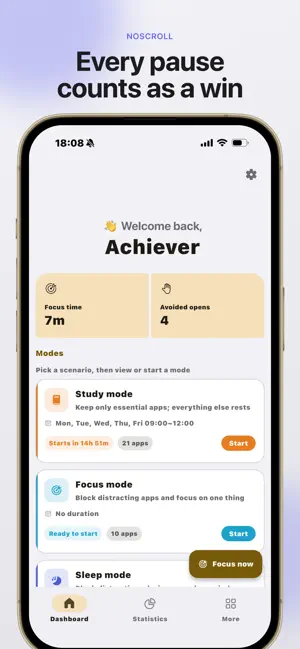
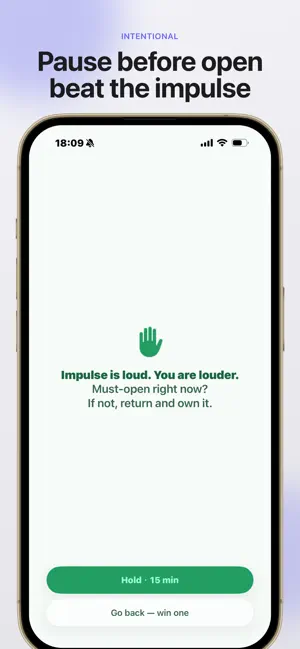
About to open a short-video or social app? Pause first. Returning counts as a real win. NoScroll is a screen time control app for people who already set limits but still tap Ignore when willpower is low. It adds friction before the app opens, then turns avoided opens and focus time into progress you can actually feel, not another anxious screen-time leaderboard. System limits usually show up after you are already scrolling. NoScroll moves the reminder to the moment you open the app: pause first, then return or continue with intention. It is a lighter app blocker for autopilot opens, doomscrolling, late-night social feeds, and the habits that pull you out of work or study. HOW IT WORKS 1. Pick the apps that pull you in: short video, shorts, social feeds, Reels-style apps, or any app you open on autopilot 2. Opening those apps shows a pause screen first. Return or continue, your choice in the moment 3. Return counts as an avoided open; Focus adds time you actually settled in. Home keeps those wins visible CORE: INTENTIONAL OPEN Pause before you open. Return is a win; continue brings another reminder later, so "just a bit more" is no longer effortless. WHEN YOU NEED MORE • Focus Mode: lock and block distraction while you work or study, and keep the focus time you earned • Sleep Schedule: auto-limit at bedtime and release in the morning, including overnight schedules • Digital Detox: whitelist-only mode for days when you want to unplug COUNT WINS, NOT HOURS NoScroll does not lead with shame about how long you scrolled. It helps you see how many impulse opens you stopped, how long you stayed focused, and when a mindful pause changed the next minute. STAYS ON YOUR DEVICE Intent events and settings stay on your phone by default. Screen Time selections are managed by the system; we do not get an uploadable feed of what you watched. Privacy Policy: https://noscroll.1024ideas.com/privacy Terms: https://noscroll.1024ideas.com/terms Support: [email protected]
What’s new
Version 1.2.3 · Updated September 30, 2026
Store listing update: subtitle and keywords now emphasize pause-first, short video, and screentime control. Same product: pause before you open, return counts as a win. Focus / Sleep / Detox stay available when you need them. Data stays on device.
App privacy
The developer, 福荣 贺, reported these privacy practices to Apple.
Data Not Collected
The developer does not collect any data from this app.
Alternatives to NoScroll: Pause First
Looking for apps like NoScroll: Pause First? Here are 6 similar apps on the App Store. The highest rated is Sentence: Screen Time Control (5.0/5), and 5 of the 6 are free to download.
-
 Tomato: ADHD Focus Timer
-
 PawseScroll
-
 DetoxBrain: Screen Time, Focus
4.9
DetoxBrain: Screen Time, Focus
4.9
-
 Sentence: Screen Time Control
5.0
Sentence: Screen Time Control
5.0
-
 Time boxing : Habbit Building
1.0
Time boxing : Habbit Building
1.0
-
 Reminder Templates
3.0
Reminder Templates
3.0
| App | Rating | Price | Last updated | Compare |
|---|---|---|---|---|
| NoScroll: Pause First | – | 0.99 USD | September 30, 2026 | |
| Tomato: ADHD Focus Timer | – | Free | Aug 17, 2026 | Compare |
| PawseScroll | – | 0.99 USD | Sep 23, 2026 | Compare |
| DetoxBrain: Screen Time, Focus | 4.9 / 5 (16) | Free | Aug 2, 2026 | Compare |
| Sentence: Screen Time Control | 5.0 / 5 (9) | Free | Jul 13, 2026 | Compare |
| Time boxing : Habbit Building | 1.0 / 5 (1) | Free | Oct 14, 2024 | Compare |
| Reminder Templates | 3.0 / 5 (2) | Free | Feb 2, 2026 | Compare |