

GenVid: AI Video Generator
Kajal Darji Photo & Video iPhoneiPadiPod touch
GenVid: AI Video Generator is a free Photo & Video app for iPhone and iPad by Kajal Darji. Requires iOS 15.0. Updated October 19, 2026.
- Price
- Free
- on the App Store
- Size
- 45 MB
- Age 12+
- Updated
- Oct 19
- 2026 · v1.1
Screenshots
About GenVid: AI Video Generator
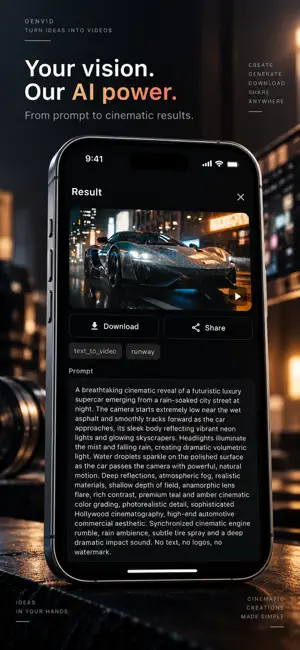
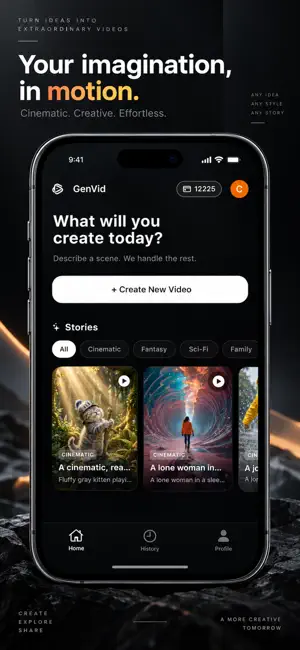
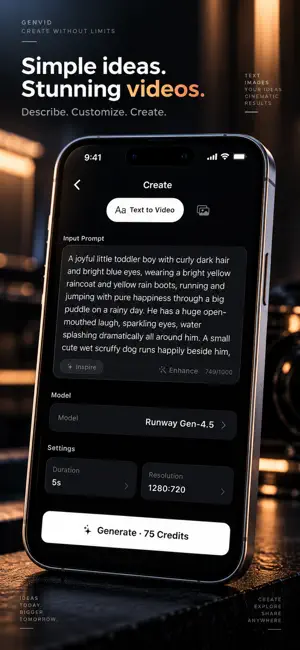
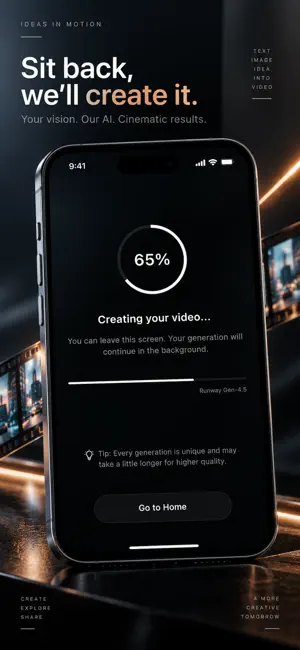
Turn text prompts and photos into AI-generated videos with GenVid Studio. Create cinematic video concepts from your imagination or bring a still image to life with AI animation. Choose from multiple AI video models, customise available generation settings, and save or share your results. **CREATE AI VIDEOS** **Text to Video** - Turn natural-language prompts into AI-generated videos. - Describe a scene, subject, action, or visual style. - Choose from available AI models and supported generation settings. **Image to Video** - Upload a photo and crop it before generation. - Animate a still image into a moving video. - Explore creative motion and cinematic scene ideas. **TOOLS FOR YOUR CREATIVE WORKFLOW** - Enhance prompts with the optional prompt-enhancement tool. - Explore Inspire suggestions and ready-made Stories prompt templates. - Adjust video duration and output resolution where supported by the selected model. - Track Running, Completed, and Failed generations in History. - Retry failed generations and copy prompts. - Save generated videos to Photos or share them directly. - Receive optional push notifications when generations finish. - Choose Light, Dark, or System appearance. - Sign in with Apple, Google, or continue as a Guest. **SIMPLE, TRANSPARENT CREDITS** GenVid Studio uses one-time, consumable credit packs—no subscriptions or recurring charges. - Review the credit cost before starting a generation. - Credit usage depends on the selected model and settings. - Failed generations do not deduct credits. - Purchase additional credit packs whenever you need them. - Track your balance and purchases in Wallet and Payment History. **YOUR ACCOUNT, YOUR GENERATIONS** - Explore the app as a Guest or sign in with Apple or Google. - Your generations are private to your account; there is no public gallery or social feed. - Prompts and uploaded images are processed on our servers to generate videos. - Delete your account from the Profile screen. - Access the Privacy Policy and Terms of Use inside the app. **BEFORE YOU START** An internet connection is required. AI video generation runs on remote servers and may take several minutes, depending on the selected model and settings. You can leave the generation screen while processing continues. Please follow our Content Guidelines. Prohibited content includes adult content, extreme violence, hate speech, copyright infringement, and unauthorised use of real people's likenesses.
What’s new
Version 1.1 · Updated October 19, 2026
Improved the App Store presentation and refined the creative experience. Explore AI video generation from text and images, multiple supported models, and a streamlined workflow for managing your creations.
App privacy
The developer, Kajal Darji, reported these privacy practices to Apple.
Data Linked to You
The following data, which may be collected and linked to your identity, may be used for the following purposes:
- Diagnostics: Crash Data
- Purchases: Purchase History
- Contact Info: Email Address, Name
- User Content: Photos or Videos, Other User Content
- Identifiers: User ID, Device ID
Used for: Analytics, App Functionality
Alternatives to GenVid: AI Video Generator
Looking for apps like GenVid: AI Video Generator? Here are 6 similar apps on the App Store. The highest rated is Capto: AI photo stories for IG (5.0/5), and all 6 are free to download.
-
 GenVid AI
-
 Editora: Face & Photo AI
-
 Capto: AI photo stories for IG
5.0
Capto: AI photo stories for IG
5.0
-
 AI Photo Generator Editor -bai
4.0
AI Photo Generator Editor -bai
4.0
-
 Video Ai Generator
-
 AI Video Generator – Reels
| App | Rating | Price | Last updated | Compare |
|---|---|---|---|---|
| GenVid: AI Video Generator | – | Free | October 19, 2026 | |
| GenVid AI | – | Free | Feb 6, 2026 | Compare |
| Editora: Face & Photo AI | – | Free | Nov 3, 2025 | Compare |
| Capto: AI photo stories for IG | 5.0 / 5 (1) | Free | Nov 8, 2025 | Compare |
| AI Photo Generator Editor -bai | 4.0 / 5 (2) | Free | Jul 2, 2025 | Compare |
| Video Ai Generator | – | Free | May 14, 2026 | Compare |
| AI Video Generator – Reels | – | Free | Jun 20, 2026 | Compare |