

Kids Routine: Visual Schedule
Ronak Vakhariya Productivity iPhoneiPadiPod touch
Kids Routine: Visual Schedule is a free Productivity app for iPhone and iPad by Ronak Vakhariya. Requires iOS 17.6. Updated September 22, 2026.
- Price
- Free
- on the App Store
- Size
- 9 MB
- Age 4+
- Updated
- Sep 22
- 2026 · v1.2
Screenshots
About Kids Routine: Visual Schedule
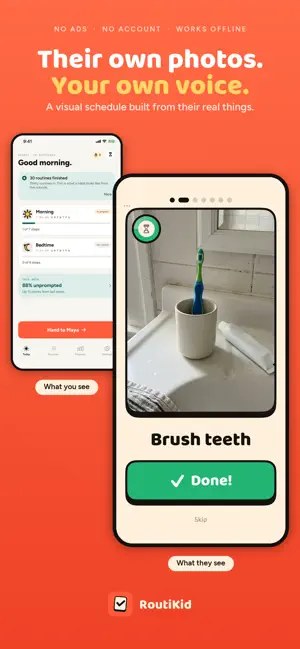
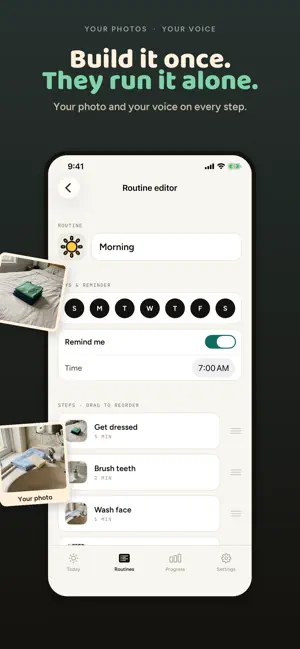
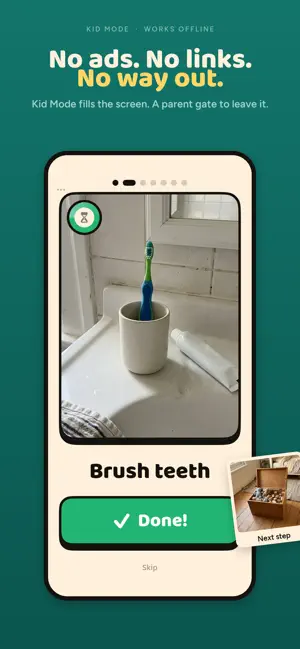
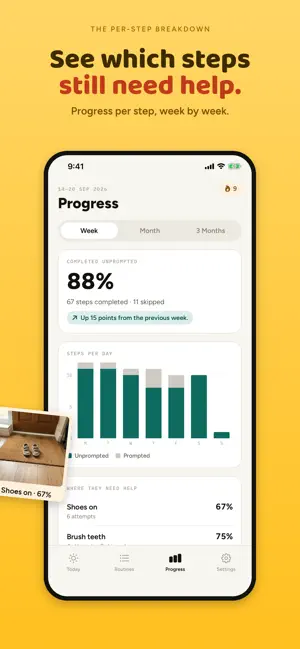
A visual schedule your child can follow on their own — built from photographs of their real toothbrush, their real backpack, their real shoes. Take the photos. Record the prompt in your own voice. Hand them the phone and stop repeating yourself. Made for children with autism (ASD), ADHD or a speech delay, and for any young child who isn't reading yet — anyone who does better with a picture than a spoken list of instructions. Key Features: → Photo Routine Chart: Build a daily checklist from photographs of your child's own things. One picture, one short label, one enormous Done button. → Kid Mode: A full-screen task board with no tabs, no menus, no adverts and no links. The only way out is a parent gate — hold to exit, or a quick sum. → Your Voice on Every Step: Record a short prompt for any task so the reminder comes from you, even when you're in the next room. → Gentle Timers, No Numbers: Give a step a timer and your child sees a calm ring drain — no countdown digits, no alarm, no pressure. A standalone timer covers the waits between routines: leaving the house, five more minutes. → Stars, Not Scores: Finishing a routine earns one star per step as a reward. Never a percentage, never a grade, never a comparison with another child. → Morning, Bedtime and Beyond: Build as many routines as the day needs — morning, after school, chore time, bedtime — each on its own days. A Monday-to-Friday routine stays quiet on a Sunday. → Reminders That Fit: One quiet daily nudge per routine, only on the days it actually runs. → See Where They Need Help: A per-step breakdown showing which tasks go smoothly, which ones still need prompting, and how that has changed over the weeks. → The Independence Report: A dated one-page PDF you can hand to a teacher, an OT, or take into a support meeting — a plain record of what happened, ready to print or send. → Skip Without Shame: Some days they genuinely can't. Skipped steps are recorded but never counted against them. → Private by Design: No account, no email address, no sign-up. Everything stays on your device, and the app works offline. → Private iCloud Sync: Keep their routines on your iPhone and iPad through your own iCloud. We never see them. Download RoutiKid and give them a planner they can actually read. Important: RoutiKid is a routine, chore and habit chart for families. It is not a medical device, and it does not diagnose, treat, cure or prevent autism, ADHD or any other condition. Those words describe the families who commonly find visual schedules useful. The Independence Report is a plain record of what the app observed — it is not a clinical assessment and must not be used as one. Always speak to a qualified professional about your child's health or development. About Premium Subscription: The free version includes one child and one routine, with photo steps, voice notes, timers, Kid Mode and the last seven days of progress. RoutiKid Pro unlocks unlimited children and routines, progress over a month or three months, the per-step breakdown, the Independence Report PDF, and private iCloud sync. RoutiKid Pro is an auto-renewing subscription: $2.99 per month or $9.99 per year (US pricing; Apple shows your local price before you confirm). Monthly and yearly plans both start with a 1-week free trial for new subscribers. Payment is charged to your Apple Account at confirmation of purchase. Your subscription renews automatically unless auto-renew is turned off at least 24 hours before the end of the current period, and your account is charged for renewal within 24 hours before the period ends. You can manage or cancel your subscription in your Apple Account settings after purchase. Any unused portion of a free trial is forfeited when you buy a subscription. Privacy Policy: https://sites.google.com/view/routikid/privacy-policy Terms of Use: https://sites.google.com/view/routikid/terms-conditions Support: https://sites.google.com/view/routikid/support
What’s new
Version 1.2 · Updated September 22, 2026
- Bug fixes & Improvements
App privacy
The developer, Ronak Vakhariya, reported these privacy practices to Apple.
Data Not Linked to You
The following data, which may be collected but is not linked to your identity, may be used for the following purposes:
- Usage Data: Product Interaction
Used for: Analytics
Alternatives to Kids Routine: Visual Schedule
Looking for apps like Kids Routine: Visual Schedule? Here are 6 similar apps on the App Store. The highest rated is Sidekick: Kids Routine Reward (5.0/5), and all 6 are free to download.
-
 VisualDay Daily Planner
-
 AuraPlan: ADHD Visual Timer
-
 KidPomo - Kids Routine Plan
-
 Steady: Neurospicy Tools
-
 Kids Timer:Daily Routine Clock
-
 Sidekick: Kids Routine Reward
5.0
Sidekick: Kids Routine Reward
5.0
| App | Rating | Price | Last updated | Compare |
|---|---|---|---|---|
| Kids Routine: Visual Schedule | – | Free | September 22, 2026 | |
| VisualDay Daily Planner | – | Free | Sep 22, 2026 | Compare |
| AuraPlan: ADHD Visual Timer | – | Free | Sep 8, 2026 | Compare |
| KidPomo - Kids Routine Plan | – | Free | Jun 20, 2026 | Compare |
| Steady: Neurospicy Tools | – | Free | Jun 24, 2026 | Compare |
| Kids Timer:Daily Routine Clock | – | Free | Apr 17, 2026 | Compare |
| Sidekick: Kids Routine Reward | 5.0 / 5 (1) | Free | Oct 11, 2026 | Compare |