

HandyNest: Offline Tools
鹏宇 陈 Utilities iPhoneiPadiPod touch
HandyNest: Offline Tools is a free Utilities app for iPhone and iPad by 鹏宇 陈. Rated 5.0/5 from 1 ratings. Requires iOS 17.0. Updated September 8, 2026.
- Rating
- 5.0
- 1 ratings
- Price
- Free
- on the App Store
- Size
- 3 MB
- Age 4+
- Updated
- Sep 8
- 2026 · v1.2
Screenshots

About HandyNest: Offline Tools
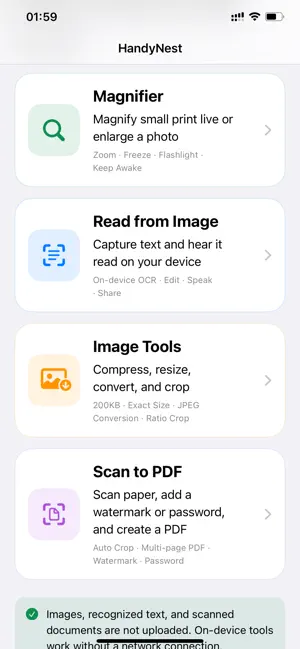
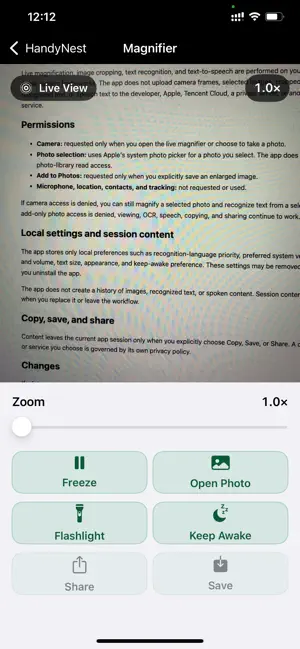
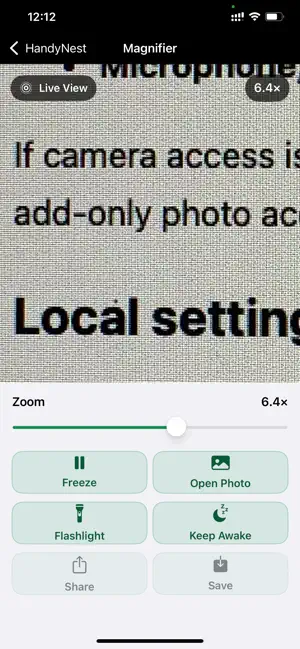
HandyNest brings four practical iPhone tools together in one privacy-first app: document scanning, magnification, image-to-speech, and image preparation. Scan documents • Capture paper with automatic edge detection and perspective correction. • Import multiple pages, then reorder, rotate, enhance, or remove them. • Adjust brightness and contrast, or choose a clarity preset. • Add centered or tiled text watermarks with page range, color, angle, and opacity controls. • Create a multi-page PDF, preview every page, and optionally protect it with an opening password. • Save to Files, share with another app, or attach the PDF to an email. Magnify small details • Magnify a live camera view or a selected photo. • Adjust zoom, freeze the view, use the flashlight, and keep the screen awake. • Pan, zoom, save, or share a frozen image. Read text from images • Take or choose a photo and crop the text area. • Recognize English, Simplified Chinese, Traditional Chinese, and Japanese directly on your iPhone. • Edit, copy, share, and read recognized text aloud with an installed system voice. Prepare images • Compress JPEG images to a target file size. • Resize by width, height, longest edge, or exact dimensions without stretching. • Convert PNG or HEIC images to JPEG and choose a background for transparent areas. • Crop freely or use common aspect ratios. • Save results to Photos or Files, or share them with another app. Scanning, page editing, PDF creation, watermarks, password protection, and in-app preview are free. Save to Files, Share, and Email are Professional PDF export features. You can try five exports free; a one-time purchase unlocks unlimited PDF exports. Core processing happens on your iPhone. HandyNest requires no account, contains no ads, third-party analytics, or tracking, and does not upload your images, documents, PDFs, recognized text, watermark text, or passwords.
What’s new
Version 1.2 · Updated September 8, 2026
Version 1.2 adds a complete on-device document scanning and PDF workflow. • Automatic paper-edge detection and perspective correction • Multi-page import, reordering, rotation, deletion, and visual enhancement • Brightness, contrast, grayscale, black-and-white, and clarity controls • Centered or tiled text watermarks with page and appearance settings • Multi-page PDF creation with selectable quality • Optional PDF opening-password protection • Full PDF preview with page navigation and zoom • Save to Files, system sharing, and email export • Five free PDF exports, followed by an optional one-time Professional unlock • Improved privacy protection and temporary-file cleanup during document processing
App privacy
The developer, 鹏宇 陈, reported these privacy practices to Apple.
Data Not Collected
The developer does not collect any data from this app.
Alternatives to HandyNest: Offline Tools
Looking for apps like HandyNest: Offline Tools? Here are 6 similar apps on the App Store. The highest rated is Magnifying Glass - MagniClara (5.0/5), and all 6 are free to download.
-
 Moon Phases: Lunar Tracker
-
 Magnifying Glass - MagniClara
5.0
Magnifying Glass - MagniClara
5.0
-
 Magnifier: Zoom, Light & Read
-
 Magnifying Glass: Read & Zoom
-
 ++Timer
3.8
++Timer
3.8
-
 Gixie Clock
| App | Rating | Price | Last updated | Compare |
|---|---|---|---|---|
| HandyNest: Offline Tools | 5.0 / 5 (1 rating) | Free | September 8, 2026 | |
| Moon Phases: Lunar Tracker | – | Free | Oct 9, 2026 | Compare |
| Magnifying Glass - MagniClara | 5.0 / 5 (1) | Free | Aug 14, 2026 | Compare |
| Magnifier: Zoom, Light & Read | – | Free | Aug 30, 2026 | Compare |
| Magnifying Glass: Read & Zoom | – | Free | Apr 14, 2026 | Compare |
| ++Timer | 3.8 / 5 (4) | Free | Dec 31, 2024 | Compare |
| Gixie Clock | – | Free | Aug 11, 2026 | Compare |