

Strich
Dominik Meierhofer Productivity iPhoneiPadiPod touch
Strich is a free Productivity app for iPhone and iPad by Dominik Meierhofer. Requires iOS 18.0. Updated October 26, 2026.
- Price
- Free
- on the App Store
- Size
- 4 MB
- Age 4+
- Updated
- Oct 26
- 2026 · v3.0
Screenshots


About Strich
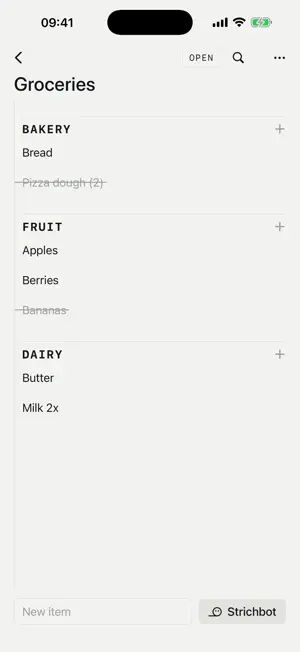
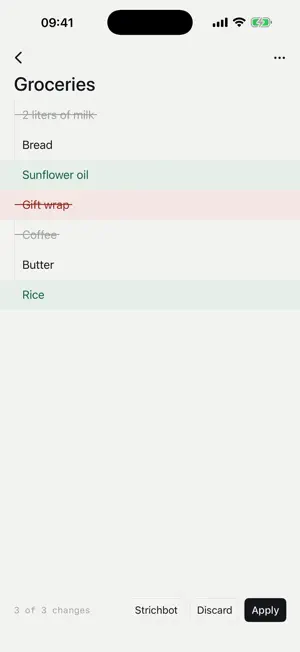
Strich is an app for keeping lists. Nothing else. No reminders, no due dates, no priorities, no tags, no statistics. The restraint is the product. A list in Strich is a permanent catalog, not a throwaway note: strike things off as you go, then reset the list with one gesture and use it again. Packing lists, grocery runs, routines, rituals: anything you do more than once. And if you like, Strichbot lends a hand: with Apple Intelligence, no account and no key. WHY STRICH • Strike, don't check. Done items get a single clean stroke, the app's namesake ("Strich" is German for stroke). • Reusable by design. Reset a finished list and it's ready for next time. The list is permanent, the checkmark is temporary. • Topics hold what belongs together: the vacation with its packing list, kids' gear and paperwork, each topic with as many lists as you need. • A bench instead of a trash can. Whatever you take off the list waits on the bench below it and comes back with a tap. Nothing is lost, nothing gets added twice. • Sections keep long lists readable. Type a chip or a colon prefix to file new items where they belong, or turn any line into a heading. • Ruled paper, not another sterile productivity app. STRICHBOT WITH APPLE INTELLIGENCE Every topic and every list has a chat. Strichbot reads your lists and proposes changes: add the usual suspects to a grocery list, group a long list into sensible sections, tidy things up. From the topics overview it creates whole topics, or merges two into one without duplicates. • No account, no key. From iOS 27, on devices with Apple Intelligence, Strichbot runs on Apple Private Cloud Compute, with a daily quota. • A photo of the note. Snap a shopping list on paper or a recipe, and Strichbot turns it into items. • An empty chat suggests what fits the list. • Stop it at any time, and right after applying, undo the whole proposal with one tap. It only ever proposes. You see your real list in its future state, tap away the changes you don't want, and apply the rest. Nothing happens automatically. Prefer another model? Use your own API key, from Anthropic for example, stored securely in your device's Keychain. Strichbot is entirely optional. Strich has no servers of its own, no account, no tracking. WIDGETS, SIRI AND THE LOCK SCREEN • Widgets in two sizes, for one list or two. Tap an item to strike it. • Siri and Shortcuts: “Add to Groceries in Strich”, strike, reset, hear what is still open. • The next open items on the Lock Screen and in the Dynamic Island, struck without unlocking. • A “New Item” button in Control Center, on the Lock Screen or on the Action button. • Open any list from Search on the Home Screen. ON ALL YOUR DEVICES, AND WITH THE PEOPLE YOU SHARE WITH Your lists follow you across iPhone and iPad through your own iCloud account. Switch phones and everything is simply there. And when a list is not only yours: share a single list or a whole topic by link. The other person opens it in their Strich, and from then on you write the same list: they strike an item, it is struck for you. The shopping list for two, without a group chat. If you like, Strich lets you know when someone adds or crosses off something. Or share it view-only, so others can read but not write. What others share with you gathers under "Shared with me", and you can leave a share whenever you want. Your chat with Strichbot stays on your own device. EVERYTHING ELSE • iPhone and iPad, every orientation on the pad • Import from any app via the iOS share sheet • Export and share your lists as text • Search within any list • Duplicate topics and lists: a good list becomes a template • Send all done items to the bench at once, reset a whole topic at once • English, German, Spanish, French, Japanese and Portuguese (the system language or the one you pick), light and dark • No account, no sign-up, no ads • Your data lives on your device and in your own iCloud, never on servers of ours
What’s new
Version 3.0 · Updated October 26, 2026
Strichbot without a key of your own On devices with Apple Intelligence the assistant now runs on Apple Private Cloud Compute, with no account and no key. There is a daily quota, a larger one with iCloud+. A key of your own keeps working. Notifications for shared lists When someone adds or crosses off something on a shared list, Strich lets you know. Tap the struck-through bell at the top of the list to turn notifications on for it. Your own changes never trigger a notification. Ask, stop and undo Strichbot An empty chat suggests what fits the list. While Strichbot writes, the stop button halts it. Right after applying, "Undo" takes the whole proposal back, and the history shows what became of each proposal. A photo of the note Take a photo of a shopping list on paper or a recipe, and Strichbot turns it into items. The photo goes along with that one message only and is not kept.
App privacy
The developer, Dominik Meierhofer, reported these privacy practices to Apple.
Data Not Collected
The developer does not collect any data from this app.
Alternatives to Strich
Looking for apps like Strich? Here are 6 similar apps on the App Store. The highest rated is Local Grocery List (5.0/5), and all 6 are free to download.
-
 Notebook Lists
-
 Listiy: Shared Grocery List
-
 Local Grocery List
5.0
Local Grocery List
5.0
-
 MyListMaker
4.1
MyListMaker
4.1
-
 Checklist: Get things done
3.7
Checklist: Get things done
3.7
-
 Checklist+: Daily To Do & Task
4.4
Checklist+: Daily To Do & Task
4.4
| App | Rating | Price | Last updated | Compare |
|---|---|---|---|---|
| Strich | – | Free | October 26, 2026 | |
| Notebook Lists | – | Free | Jun 17, 2026 | Compare |
| Listiy: Shared Grocery List | – | Free | Oct 14, 2026 | Compare |
| Local Grocery List | 5.0 / 5 (3) | Free | Aug 22, 2026 | Compare |
| MyListMaker | 4.1 / 5 (9) | Free | Feb 5, 2025 | Compare |
| Checklist: Get things done | 3.7 / 5 (18) | Free | Oct 26, 2026 | Compare |
| Checklist+: Daily To Do & Task | 4.4 / 5 (7,890) | Free | Jan 29, 2026 | Compare |
Compare Strich with the top alternatives: ratings, updates, ASO score and keyword gaps →