

CCD — Y2K Digicam Camera
changhyeon lee Photo & Video iPhoneiPadiPod touch
CCD — Y2K Digicam Camera is a free Photo & Video app for iPhone and iPad by changhyeon lee. Rated 5.0/5 from 1 ratings. Requires iOS 18.0.
- Rating
- 5.0
- 1 ratings
- Price
- Free
- on the App Store
- Size
- 8 MB
- Age 4+
- Updated
- Oct 12
- 2026 · v1.4.0
Screenshots

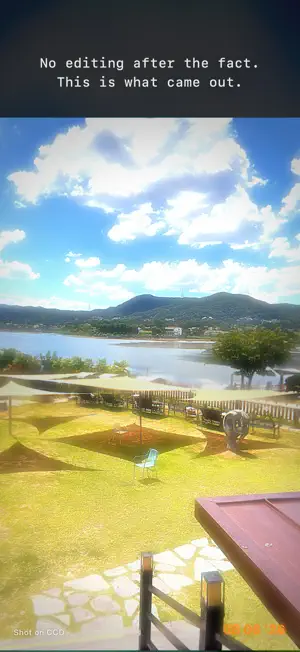


About CCD — Y2K Digicam Camera
Your phone takes photos that are too clean. CCD is not an app that decorates your pictures. It rebuilds an early-2000s compact digital camera inside your phone. You don't pick a filter. You turn on a camera. ■ Not a filter. A sensor. Most retro apps paint an effect on after the shot is taken. CCD doesn't. The moment you look at the viewfinder, it is already 2005. Oversaturated skies, skin that runs warm, greens that push too hard. Blown highlights, coarse sensor noise, sharpening turned up too far. Lenses that go soft toward the corners, color that drifts at the edges. All of it is what those cameras actually produced. Instead of making a good image, we rebuilt exactly the image of that era. ■ An object you operate Power it on and the boot screen runs. Half-press to focus. Press all the way and it clicks twice. Then "Saving..." holds for a moment. Nothing is instant here. The power-on chime, the focus beep, the shutter, the flash charging — the sounds those cameras made are all here. A battery meter, the date burned into the corner. The small things are what make the era. ■ What's inside · 12M / 8M / 5M / 3M / 2M resolutions Lowering the megapixels is a feature, not a compromise · 4:3 · 16:9 · 1:1 aspect ratios · W/T zoom lever, up to 3× Hold it down and it keeps moving, just like the real lever · Flash — subject blown white, background dropped to black. That party-photo look · Date imprint — orange or yellow, two formats · Watermark — on or off, your call · Scene modes — AUTO / PORTRAIT / LANDSCAPE / NIGHT / INDOOR The mode dial those cameras had, doing what it actually did · White balance — daylight, cloudy, tungsten, fluorescent · Exposure compensation — ±2.0 EV in 1/3 steps When the highlights blow out more than you wanted, pull it down · Self timer (10s) and continuous shooting (3 frames) · A built-in gallery and sharing · PRINT — any photo on 4×6 paper or a 9:16 story layout · Three cameras — CCD-01 (2005, vivid) · CCD-02 (2007, calm) · CCD-03 (2006, portrait). Switch with the button by the shutter · IMPORT — run up to 5 photos you already took through the same sensor pipeline, then save ■ Not a phone. A camera. The whole time you hold it, it shouldn't feel like a phone. So we didn't use the usual app interface. There is no filter list anywhere. No intensity slider. What you adjust are camera settings. ■ Free, and fully unlocked Everything above is open from the very first launch. No in-app purchases. No subscription. No locked features. No limit on how many photos you can take, and no trial period. The app is free and supported by ads. They appear only in the gallery and settings screens, plus one short ad when you save imported photos — never while you are shooting. Turn on a camera from 2005. --- Contact: [email protected]
What’s new
Version 1.4.0 · Updated October 12, 2026
A third camera, and your old photos. · CCD-03 — a 2006 portrait camera. The lightest touch of the three: faces stay clear, skin stays bright, and the CCD look is still there. · IMPORT — in the gallery, tap IMPORT to run up to 5 photos you already took through the same sensor pipeline. Pick the camera, see the result, then save. Saving plays one short ad. · Switching cameras now shows what each one is for. · Pick your first camera when you set up the app. Everything is free, with no unlocks and no limits.
App privacy
The developer, changhyeon lee, reported these privacy practices to Apple.
Data Used to Track You
The following data may be used to track you across apps and websites owned by other companies:
- Location: Coarse Location
- Identifiers: Device ID
- Usage Data: Product Interaction, Advertising Data
- Diagnostics: Crash Data, Performance Data
Data Linked to You
The following data, which may be collected and linked to your identity, may be used for the following purposes:
- Location: Coarse Location
- Identifiers: Device ID
- Usage Data: Product Interaction, Advertising Data
- Diagnostics: Crash Data, Performance Data
Used for: Third-Party Advertising
Alternatives to CCD — Y2K Digicam Camera
Looking for apps like CCD — Y2K Digicam Camera? Here are 6 similar apps on the App Store. The highest rated is Vinta - Vintage Film Camera (5.0/5), and all 6 are free to download.
-
 Y2KCam2026
3.0
Y2KCam2026
3.0
-
 Vinta - Vintage Film Camera
5.0
Vinta - Vintage Film Camera
5.0
-
 Pixira - Film Camera & Digicam
-
 OldCam - Vintage Camera
-
 Y2KCam: Vintage Film Digicam
5.0
Y2KCam: Vintage Film Digicam
5.0
-
 Y2K Cam: Retro VHS Camera
4.8
Y2K Cam: Retro VHS Camera
4.8
| App | Rating | Price | Last updated | Compare |
|---|---|---|---|---|
| CCD — Y2K Digicam Camera | 5.0 / 5 (1 rating) | Free | October 12, 2026 | |
| Y2KCam2026 | 3.0 / 5 (1) | Free | May 17, 2026 | Compare |
| Vinta - Vintage Film Camera | 5.0 / 5 (1) | Free | Oct 12, 2026 | Compare |
| Pixira - Film Camera & Digicam | – | Free | Oct 6, 2026 | Compare |
| OldCam - Vintage Camera | – | Free | Oct 6, 2026 | Compare |
| Y2KCam: Vintage Film Digicam | 5.0 / 5 (6) | Free | Sep 18, 2026 | Compare |
| Y2K Cam: Retro VHS Camera | 4.8 / 5 (11) | Free | Aug 29, 2026 | Compare |