

Voxtext: Meeting Transcripts
Hiroomi Kubo Productivity iPhoneiPadiPod touch
Voxtext: Meeting Transcripts is a free Productivity app for iPhone and iPad by Hiroomi Kubo. Requires iOS 26.0. Updated November 26, 2026.
- Price
- Free
- on the App Store
- Size
- 34 MB
- Age 4+
- Updated
- Nov 26
- 2026 · v1.5.3
Screenshots
Save to Pinterest


About Voxtext: Meeting Transcripts
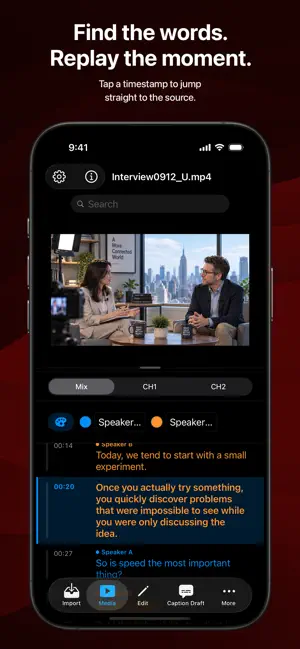
A transcript is more useful when you can jump back to the moment it came from. Voxtext turns meetings, interviews, and recorded conversations into searchable transcripts that stay connected to the original video or audio. Wondering exactly how something was said? Instead of replaying the entire recording, find the line in the transcript and jump straight back to that moment. Read the meeting. Replay the moment. Transcribe video and audio with timestamps. Read through the conversation first, then replay only the parts that matter. For long meetings and interviews, your transcript becomes a practical index to the recording. Find what you need Search the transcript for a word, topic, or statement. Add speaker names and colors to make conversations easier to follow and review. Instead of scrubbing through an hour-long recording, search first and listen only when you need to verify the source. Get the big picture, then check the source On supported devices, Apple Intelligence can summarize longer transcripts. See the key points first, then return to the original wording or recording whenever something deserves a closer look. Translation keeps your text connected to its original timestamps, making multilingual meetings and interviews easier to review. Turn the record into something you can use Export transcripts as TXT, Markdown, Word, or Excel. Create SRT and VTT subtitle files. Save projects with transcripts, speakers, translations, and summaries so you can continue later. And when you need video captions Use the same transcript to create styled captions for your video. Adjust line breaks, punctuation, fonts, colors, outlines, spacing, and speaker styles, then preview the result. Caption design is free to use. A one-time purchase removes ads and unlocks export of your finished captions as numbered transparent PNG images. Transcribe the meeting. Find the important moment. Keep a useful record. And when you need it, take the same words into video production. Voxtext turns transcription into something you can actually use. Speech recognition runs on your device. Downloads for language models and translation data may require an internet connection. Transcription and translation language availability varies by system. Summaries require a compatible device, language, and settings with Apple Intelligence available.
What’s new
Version 1.5.3 · Updated November 26, 2026
Added German, Simplified Chinese, Spanish and Portuguese (Brazil) as display languages.
App privacy
The developer, Hiroomi Kubo, reported these privacy practices to Apple.
Data Not Linked to You
The following data, which may be collected but is not linked to your identity, may be used for the following purposes:
- Identifiers: Device ID
- Usage Data: Advertising Data
Used for: Third-Party Advertising
Alternatives to Voxtext: Meeting Transcripts
Looking for apps like Voxtext: Meeting Transcripts? Here are 6 similar apps on the App Store. The highest rated is Echo Chamber: AI Transcription (5.0/5), and all 6 are free to download.
-
 PDF Combine, Split and Sign
-
 Echo Chamber: AI Transcription
5.0
-
 AI Video Chat & Transcript
-
 Clone Voice Translator
-
 Cadence: AI Transcription
5.0
-
 Find Clarity
| App | Rating | Price | Last updated | Compare |
|---|---|---|---|---|
| Voxtext: Meeting Transcripts | – | Free | November 26, 2026 | |
| PDF Combine, Split and Sign | – | Free | Aug 12, 2026 | Compare |
| Echo Chamber: AI Transcription | 5.0 / 5 (3) | Free | Oct 11, 2026 | Compare |
| AI Video Chat & Transcript | – | Free | Mar 16, 2026 | Compare |
| Clone Voice Translator | – | Free | Nov 8, 2026 | Compare |
| Cadence: AI Transcription | 5.0 / 5 (1) | Free | Nov 21, 2026 | Compare |
| Find Clarity | – | Free | Sep 18, 2026 | Compare |