

KrubKa – LINE Thai Translator
Gustav Segerstedt Productivity iPhoneiPadiPod touch
KrubKa – LINE Thai Translator is a free Productivity app for iPhone and iPad by Gustav Segerstedt. Requires iOS 16.4. Updated October 5, 2026.
- Price
- Free
- on the App Store
- Size
- 51 MB
- Age 4+
- Updated
- Oct 5
- 2026 · v1.0.4
Screenshots

About KrubKa – LINE Thai Translator
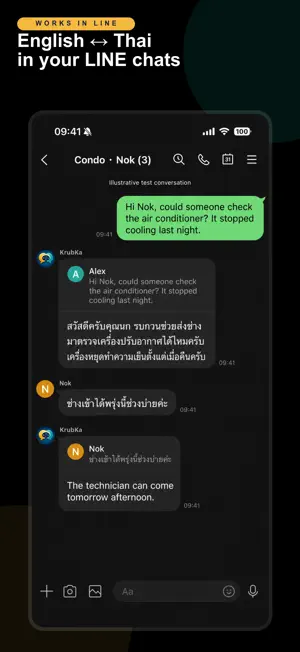
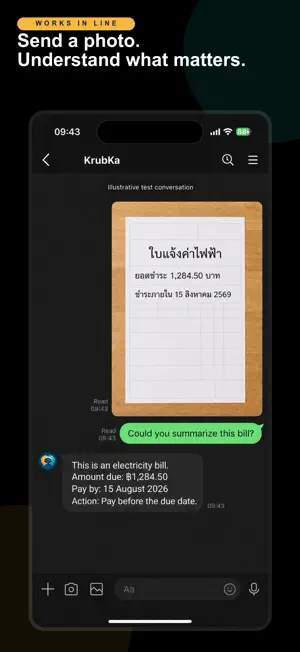
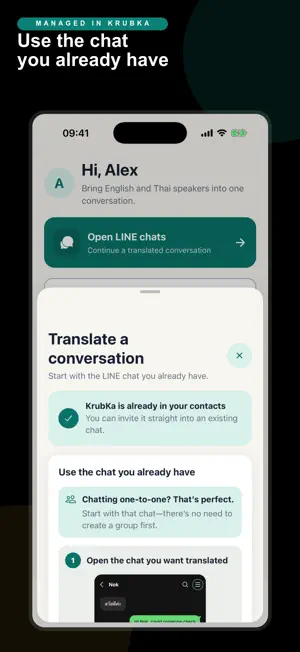
KrubKa translates between English and Thai, typed or voice, right inside LINE, the messenger everyone in Thailand already uses. No copy-pasting into Google Translate, and nothing for the other person to install. Talking to your Thai partner, your landlord, a colleague or your partner's family? Invite KrubKa into the chat you already have with them — no need to make a group. You write English, they read natural Thai, and their Thai replies come back to you in English. It works the same way in group chats. HOW TO START 1. Add KrubKa on LINE (@858tccji) 2. Open your chat with them, tap the menu icon at the top right, then Invite, select KrubKa and tap Next — LINE turns it into a shared conversation for the three of you (works in groups too) 3. Send one new message, then chat normally. Every message, typed or voice, is translated both ways, live WHY KRUBKA • Natural, polite Thai with the right ending (ครับ or ค่ะ — you choose), and a more formal tone for landlords, offices and businesses • Understands everyday Thai: slang, particles and casual phrasing • Voice messages are translated too, both ways (beta): KrubKa replies with what it heard and the translation • Numbers, dates, prices and names are kept exactly • Replies quote the original message, so it's always clear what was translated • Send a photo of a Thai bill, notice or form in your private chat with KrubKa and it explains it in plain English THE APP • Connect your LINE account in one tap • Choose your Thai polite ending (ครับ/ค่ะ) • See your translation usage • Subscribe to KrubKa Unlimited FREE TO START Every account gets a free monthly allowance of translations. KrubKa Unlimited removes the cap on your personal translations and sponsors generous usage in every chat you've added KrubKa to, so the people you talk to never need an account or the app. I built KrubKa because I live in Thailand and needed it myself. — Gustav Subscriptions renew automatically unless cancelled at least 24 hours before the end of the current period, and can be managed any time in your App Store account settings. Terms of Service: https://api.krubka.grond.dev/legal/terms Privacy Policy: https://api.krubka.grond.dev/legal/privacy
What’s new
Version 1.0.4 · Updated October 5, 2026
New: KrubKa now translates LINE voice messages too, both ways (beta). Send a Thai or English voice message in any chat with KrubKa and it replies with what it heard and the translation. Each voice message counts as one translation.
App privacy
The developer, Gustav Segerstedt, reported these privacy practices to Apple.
Data Linked to You
The following data, which may be collected and linked to your identity, may be used for the following purposes:
- Usage Data: Product Interaction
- Purchases: Purchase History
- Contact Info: Email Address, Name
- Identifiers: User ID
- Diagnostics: Crash Data, Other Diagnostic Data
Used for: Analytics, App Functionality
Alternatives to KrubKa – LINE Thai Translator
Looking for apps like KrubKa – LINE Thai Translator? Here are 6 similar apps on the App Store. The highest rated is Saydo AI (5.0/5), and all 6 are free to download.
-
 TimeBoxing_ToDo
-
 Saydo AI
5.0
Saydo AI
5.0
-
 Install by SmartSense
5.0
Install by SmartSense
5.0
-
 Plutio: Freelance Work App
3.5
Plutio: Freelance Work App
3.5
-
 Emery: Daily Planner
4.2
Emery: Daily Planner
4.2
-
 Thai Translator Offline
5.0
Thai Translator Offline
5.0
| App | Rating | Price | Last updated | Compare |
|---|---|---|---|---|
| KrubKa – LINE Thai Translator | – | Free | October 5, 2026 | |
| TimeBoxing_ToDo | – | Free | Aug 24, 2025 | Compare |
| Saydo AI | 5.0 / 5 (6) | Free | Oct 16, 2026 | Compare |
| Install by SmartSense | 5.0 / 5 (1) | Free | Oct 20, 2026 | Compare |
| Plutio: Freelance Work App | 3.5 / 5 (38) | Free | Oct 10, 2026 | Compare |
| Emery: Daily Planner | 4.2 / 5 (29) | Free | Sep 1, 2026 | Compare |
| Thai Translator Offline | 5.0 / 5 (9) | Free | Jun 11, 2026 | Compare |