

SketchLab: Learn to Draw
Connor Champane Graphics & Design iPhoneiPadiPod touch
SketchLab: Learn to Draw is a free Graphics & Design app for iPhone and iPad by Connor Champane. Rated 5.0/5 from 3 ratings. Requires iOS 18.5.
- Rating
- 5.0
- 3 ratings
- Price
- Free
- on the App Store
- Size
- 16 MB
- Age 4+
- Updated
- Oct 15
- 2026 · v1.5
Screenshots


About SketchLab: Learn to Draw
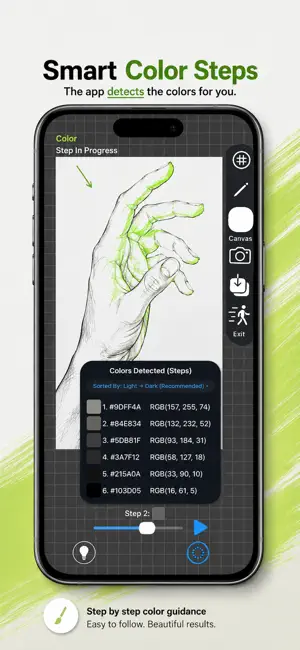
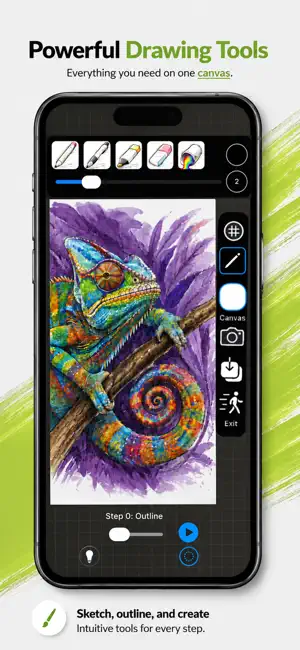
Got a photo? SketchLab can teach you how to draw it — literally. Pull any picture from your camera roll, and SketchLab turns it into a personal, step-by-step drawing lesson built just for that image. It doesn't matter what's in the photo or what style it's in — photorealistic portraits, anime, cartoons, landscapes, pets, your own artwork, anything. If you've got a picture of it, SketchLab can show you how to draw it. SketchLab breaks your photo down into a clean, guided outline you trace stroke by stroke, then teaches you how to build up color the way real artists do — layer by layer, one color at a time, until the full picture comes together. HOW IT WORKS -Choose any photo from your camera roll -SketchLab automatically converts it into a clean line-art outline -Watch the outline draw itself stroke by stroke in real time, or scrub through it manually at your own pace with the progress slider -Step forward and backward through the drawing one stroke at a time whenever you want to slow down -Turn on the grid overlay to keep your proportions accurate, with a standard grid or a finer 2x grid for detailed work — the classic grid drawing method artists have used for centuries A REAL CANVAS, NOT JUST A TRACING LAYER The canvas is yours to use however you want — it's not locked to just tracing over the reference sketch. Freehand a sketch from scratch, add your own shading and details on top of a guided drawing, or use it as a standalone space to draw whatever you want. Your full toolset includes: -Pen — two tip styles, including a tapered fountain-pen stroke -Pencil — two tip styles, including a soft, fuzzy-edge realistic pencil texture -Marker -Highlighter -Paint bucket — flood-fill any enclosed area with a single tap -Eraser Every tool supports adjustable stroke width and full color selection, so you're never locked into one look. TRACE OVER YOUR OWN CAMERA Switch on the live camera view and trace your outline directly over a real-time feed — perfect for working on paper or another physical surface while SketchLab guides your hand in real time. LEARN COLOR LIKE AN ARTIST SketchLab extracts every color from your source photo and walks you through applying them one at a time. Sort your color steps the way that makes sense to you: -Light to dark -Dark to light -By dominance (biggest color areas first) -By hue family Each layer builds on the last, so you see exactly how real depth, shading, and blending come together — the same way traditional layered coloring works. BUILT-IN DRAWING COACH Stuck on a step? SketchLab's on-device coach gives short, specific tips for exactly what you're drawing right now — pressure, blending, and edge control tailored to the exact color and region you're working on, not generic advice. SAVE AND DOWNLOAD YOUR WORK Every project saves automatically, so your canvas, color progress, and tool choices are all exactly where you left them next time you open the app. When you're ready, download your original sketch or your finished canvas artwork straight to Photos — completely free, no limits, no watermarks. Free to start: turn any photo into a guided grayscale sketch and use the full drawing canvas, completely free. SketchLab Pro ($4.99, one-time): unlock full color sketching — extract, sort, and layer every color from your photos, forever. One purchase, no subscription, yours for good.
What’s new
Version 1.5 · Updated October 15, 2026
-Improved App Store Information -New Icon
App privacy
The developer, Connor Champane, reported these privacy practices to Apple.
Data Not Collected
The developer does not collect any data from this app.
Alternatives to SketchLab: Learn to Draw
Looking for apps like SketchLab: Learn to Draw? Here are 6 similar apps on the App Store. The highest rated is Photo to Sketch: AI AR Drawing (4.9/5), and all 6 are free to download.
-
 DrawCue: Learn to Draw
-
 Drawlio - AR Draw & Trace
-
 Photo to Sketch: AI AR Drawing
4.9
Photo to Sketch: AI AR Drawing
4.9
-
 Sketch Steps: AI Loomis Draw
4.1
Sketch Steps: AI Loomis Draw
4.1
-
 Translucent: AR Trace & Draw
3.7
Translucent: AR Trace & Draw
3.7
-
 Learn How to Draw Tutorials
4.4
Learn How to Draw Tutorials
4.4
| App | Rating | Price | Last updated | Compare |
|---|---|---|---|---|
| SketchLab: Learn to Draw | 5.0 / 5 (3 ratings) | Free | October 15, 2026 | |
| DrawCue: Learn to Draw | – | Free | Oct 29, 2026 | Compare |
| Drawlio - AR Draw & Trace | – | Free | Oct 26, 2026 | Compare |
| Photo to Sketch: AI AR Drawing | 4.9 / 5 (12) | Free | Oct 16, 2026 | Compare |
| Sketch Steps: AI Loomis Draw | 4.1 / 5 (168) | Free | Oct 20, 2026 | Compare |
| Translucent: AR Trace & Draw | 3.7 / 5 (26) | Free | Oct 3, 2026 | Compare |
| Learn How to Draw Tutorials | 4.4 / 5 (1,533) | Free | Oct 29, 2026 | Compare |