

Next Inning: Baseball Lineups
EMJAY747 Enterprises LLC Sports iPhoneiPadiPod touch
Next Inning: Baseball Lineups is a free Sports app for iPhone and iPad by EMJAY747 Enterprises LLC. Rated 4.8/5 from 6 ratings. Requires iOS 15.1.
- Rating
- 4.8
- 6 ratings
- Price
- Free
- on the App Store
- Size
- 53 MB
- Age 4+
- Updated
- Oct 2
- 2026 · v0.4.5
Screenshots



About Next Inning: Baseball Lineups
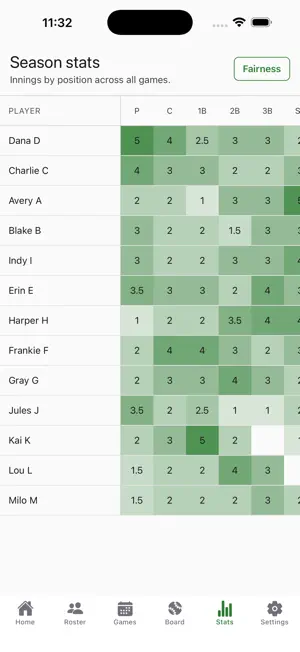
Next Inning is a lineup, fielding, and playing-time app for youth baseball coaches. It is the top of the third. Your left fielder wants to pitch, a parent is asking why their kid sat two innings in a row, and you are holding a dry-erase board in one hand and a lineup card in the other. Next Inning replaces both. It is built for the innings you are coaching, not the recap afterward. PLAN THE GAME Build the fielding rotation in a grid: players down the side, innings across the top, tap a cell to set a position. Or start from a generated plan: Next Inning fills every inning of fielding around your rules, each player's position preferences, and who has been sitting. You set the batting order yourself, by dragging it into shape (in continuous batting order) or copying it from a prior game. Enter your limits once (minimum field innings, consecutive bench innings, pitcher innings, pitch caps, rest days) or start from a league preset, with a per-game override for tournaments. Enter pitch counts after an outing and Next Inning helps you track them: it flags a plan that breaks one of your rules and still lets you make the call. RUN THE DUGOUT The dugout view is the point of the app: one screen, big type, high contrast, readable at a glance in direct sun from a few feet away. Tap a name, tap a position, and the inning is set. One tap steps to the next inning and the positions redraw. Mark a player unavailable, mark an injury from an inning, or sub a player out; the batting order and fielding plan route around them. Position changes, swaps, and sub-outs have an undo, so a mis-tap costs you a second, not an inning. On a tablet in landscape the batting order sits beside the field; on a phone you switch between the two, so the tablet can stay in the dugout while you coach from the baseline. Super-bright mode holds the screen at full brightness for noon games, and it stays awake between pitches. WORKS OFFLINE Ball fields have bad service. Sign in once with your email; after that the dugout runs on the device. Every tap writes locally first and syncs when a connection comes back, so a dead zone at the back field behaves like full signal. SHOW YOUR WORK Season totals per player: innings played, innings at each position, bench innings, pitch counts, games played, and a fairness score that rises when innings and infield time are spread evenly and nobody sits two innings in a row. Export the season fairness report as a PDF to print or bring to the playing-time conversation. It is a document instead of a memory, which is usually all that conversation needs. YOU AND YOUR ASSISTANTS Invite an assistant coach with a six-character code. They sign in on their own phone and see the same lineup, fielding plan, and inning, usually within seconds when you both have signal. ALSO IN THE APP - Multiple teams; copy roster instead of retyping names each season - Roster with jersey numbers, preferred positions, and positions to avoid - Bullpen and on-deck planning, plus the pitching order - Per-game availability, designated hitter, game summary with the score - Schedule with opponent, home or away, field on a map, and game-time forecast - Printable lineup card as a PDF for the umpire and scorekeeper - Fractional innings, so a mid-inning swap counts honestly - Coaching-staff chat per team and per game, with mute and report WHAT IT DOES NOT DO Next Inning does not score the game, stream video, or broadcast to families. Other apps do that well and you can keep using them. This one helps you decide who plays where, and shows your work when someone asks. Free to use. No ads. We never sell or rent player data, and a roster is visible only to the coaches you invite. Next Inning is built for coaches. Head coaches and assistant coaches use it, and it stores roster information, so it is not designed for players to use. Support: [email protected] nextinning.app
Ratings & reviews
4.8
6 ratings
What’s new
Version 0.4.5 · Updated October 2, 2026
A game clock, softball lineups, and ultra rotation. Game clock. For timed games, start a countdown from the dugout. You get an alert at 5 and 1 minutes left, and the time shows on a scoreboard beside the score. Choose Alarm, Chime or no sound, and whether time-up rings once or until you stop it. Softball lineups. In Team settings, choose how many of your lineup bat: softball bats 9, or 10 with an Extra Player, and the rest play defense. In the dugout, hold a batter to sub someone in without moving anyone else in the order. DP, EP and FLEX labels show in the batting order. Re-enter once, the softball substitution rule, joins the others under Substitutions. Your team's Substitutions setting now applies in every game, tournaments included, and picking a pitching preset no longer changes it. The dugout warns you before a batting sub that breaks your rule. Ultra rotation, in Team rules. Suggested lineups move every player one place each inning, the way a dugout board does, so nobody plays the same position twice in a game and everyone swaps between the infield and the outfield. Pitchers rotate too, so expect one-inning outings. Import season hitting stats from a CSV export instead of typing them in. Share team settings. A head coach can now let an individual assistant coach change team settings. Reset game. Put a live game back to the lineup you marked final. In the fielding plan, positions already taken that inning are struck through. On iPad, the dugout now turns reliably between portrait and landscape. Plus: a new team offers every team setting up front, a tidier game form, Invite a coach now sits beside your team members, and fixes for Sign in with Apple and Google, the chat unread badge, long team names in the header, and a batting order that could lose a player when you went back to setup.
App privacy
The developer, EMJAY747 Enterprises LLC, reported these privacy practices to Apple.
Data Linked to You
The following data, which may be collected and linked to your identity, may be used for the following purposes:
- Location: Precise Location
- Contact Info: Email Address, Name
- User Content: Customer Support, Other User Content
- Identifiers: User ID
Used for: App Functionality
Data Not Linked to You
The following data, which may be collected but is not linked to your identity, may be used for the following purposes:
- Diagnostics: Crash Data
Used for: App Functionality
Alternatives to Next Inning: Baseball Lineups
Looking for apps like Next Inning: Baseball Lineups? Here are 6 similar apps on the App Store. The highest rated is Diamond Planner (5.0/5), and all 6 are free to download.
-
 CoachCall Baseball
-
 SeamCall
4.3
SeamCall
4.3
-
 HeyBLU: Baseball Strike Zone
4.9
HeyBLU: Baseball Strike Zone
4.9
-
 Diamond Planner
5.0
Diamond Planner
5.0
-
 Rizzler Sports : Team Manager
3.8
Rizzler Sports : Team Manager
3.8
-
 Dominant Hitters App
5.0
Dominant Hitters App
5.0
| App | Rating | Price | Last updated | Compare |
|---|---|---|---|---|
| Next Inning: Baseball Lineups | 4.8 / 5 (6 ratings) | Free | October 2, 2026 | |
| CoachCall Baseball | – | Free | Sep 15, 2026 | Compare |
| SeamCall | 4.3 / 5 (6) | Free | Sep 26, 2026 | Compare |
| HeyBLU: Baseball Strike Zone | 4.9 / 5 (19) | Free | Oct 8, 2026 | Compare |
| Diamond Planner | 5.0 / 5 (2) | Free | Oct 17, 2026 | Compare |
| Rizzler Sports : Team Manager | 3.8 / 5 (6) | Free | Oct 13, 2026 | Compare |
| Dominant Hitters App | 5.0 / 5 (3) | Free | Sep 15, 2026 | Compare |