

Camera Sun - Pro Camera
ZAHIR MIRZA Photo & Video iPhoneiPadiPod touch
Camera Sun - Pro Camera is a paid Photo & Video app for iPhone and iPad by ZAHIR MIRZA. Requires iOS 18.0. Updated October 30, 2026.
- Price
- 2.99 USD
- on the App Store
- Size
- 7 MB
- Age 4+
- Updated
- Oct 30
- 2026 · v1.4
Screenshots


About Camera Sun - Pro Camera
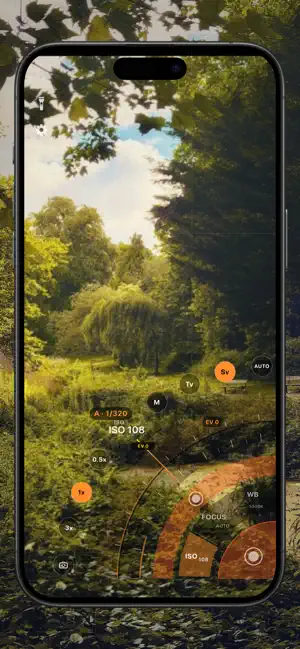
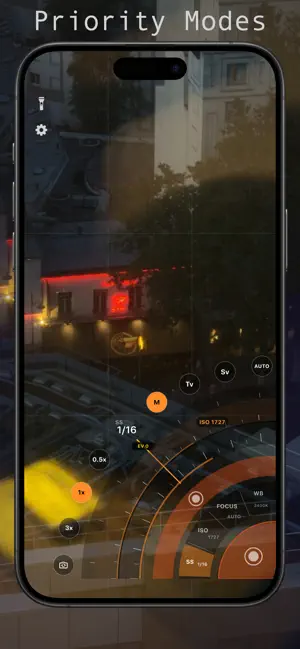
We've all struggled trying to get the perfect exposure for a shot, trying to get the photo right, while balancing a phone about to fall out out finger tips, shutter out of reach, just before we drop it and miss the shot. Our twisty fingers never had a chance. Enter Camera Sun - The app designed to be the best way of being a real photographer on your phone. Developed by a real DSLR photographer. Made for Humans like us. The revolutionary dials and slide to shoot shutter are made to feel as if you are taking pictures with a real photography tool. Simply slide to adjust the controls you want, and without lifting a finger, swipe your thumb to the shutter area to nail the shot. TOP FEATURES - Designed for how we actually hold our phones. - Shutter speed, ISO, focus and white balance on dials under your thumb. - Press, or slide onto, the shutter arc to shoot. Precise, intuitive control. - A real manual camera, one-handed plus an AUTO mode with one giant shutter. - An always-on readout shows your shutter speed and ISO in one fixed spot: white means you set it, orange means the camera is adjusting it live. QUICK START Everything lives on concentric dials anchored to the corner of the screen, right under your thumb. - Turn the rings to set shutter speed, ISO, focus and white balance. - Haptic clicks, just like a real dial. - M, Tv (shutter priority), Sv (ISO priority) and AUTO. - A live exposure meter. Tap it to zero your exposure. - The inner ring adjusts the selected setting; the outer ring drives EV compensation — or the second exposure parameter in full manual (M). - Left-hand mode in Settings flips everything. TAKING A PHOTO Press the red shutter arc, or just slide your thumb onto it. It fires when you touch it. The volume keys and the Action button fire it too. Adjust, Shoot, re-adjust, shoot: take a shot, slide back to the dials to change a setting, then slide onto the arc again. One photo per touch, all without lifting your thumb. In AUTO the whole corner becomes one big shutter. Slide onto it to shoot; slide out and back in to shoot again. CHOOSING YOUR LEVEL OF CONTROL AUTO - point and shoot. Tap the screen to focus. Camera Sun handles the rest. Tv - you choose the shutter speed (freeze or blur motion); the app adjusts ISO live. Sv - you choose the ISO (how sensitive the camera is to light); the app adjusts the shutter speed live. M - Manual. You control both shutter speed and ISO. If you get stuck, tap the light meter and Camera Sun balances the exposure for you. FOCUSING Tap anywhere on the screen to focus on that spot. Prefer to focus by hand? Tap FOCUS to switch to manual, then turn the inner dial, just like the focus ring on a lens. Tap FOCUS again to go back to autofocus. WHITE BALANCE Turn the WB dial to lock a colour temperature. Tap WB again to hand it back to auto. BURST Turn on "Burst on hold" in Settings, then keep holding the shutter arc: the count ticks up as each frame saves. Burst not available in AUTO. Reviewing your shots After your first photo, a thumbnail appears in the opposite corner. Tap to browse pics you've taken this session. Camera Sun never looks through your photo library - older photos stay safely in the iPhone's Photos app. SETTINGS - Fire on pull turn slide-to-shoot off if you'd rather only press. - Burst on hold - Corner shutter button — add a second shutter button in the corner of the dials - Left-hand mode - Reach - resize the dials PRIVACY FIRST Camera Sun can only ADD photos to your library; it never reads it. No account, no tracking, no analytics. One-time purchase, no subscription. We do not collect any data. Note Zoom modes depend on the devices inbuilt camera
What’s new
Version 1.4 · Updated October 30, 2026
iPhone Duo Support
App privacy
The developer, ZAHIR MIRZA, reported these privacy practices to Apple.
Data Not Collected
The developer does not collect any data from this app.
Alternatives to Camera Sun - Pro Camera
Looking for apps like Camera Sun - Pro Camera? Here are 6 similar apps on the App Store. The highest rated is Editable: AI Photo Editor (5.0/5), and all 6 are free to download.
-
 Camera.exe
-
 Flare Camera
-
 Editable: AI Photo Editor
5.0
-
 SLR Assist - Light Meter
1.0
-
 SnapCam: Manual RAW Camera
4.3
-
 Mavis Camera: Pro Capture
4.4
| App | Rating | Price | Last updated | Compare |
|---|---|---|---|---|
| Camera Sun - Pro Camera | – | 2.99 USD | October 30, 2026 | |
| Camera.exe | – | Free | Jun 13, 2026 | Compare |
| Flare Camera | – | Free | Oct 27, 2026 | Compare |
| Editable: AI Photo Editor | 5.0 / 5 (3) | Free | Sep 23, 2026 | Compare |
| SLR Assist - Light Meter | 1.0 / 5 (1) | Free | Aug 21, 2026 | Compare |
| SnapCam: Manual RAW Camera | 4.3 / 5 (15) | Free | Oct 21, 2026 | Compare |
| Mavis Camera: Pro Capture | 4.4 / 5 (747) | Free | Oct 13, 2026 | Compare |