

Receiptly: Receipt Scanner
Muhammed Furkan Kfrevi Finance iPhoneiPadiPod touch
Receiptly: Receipt Scanner is a free Finance app for iPhone and iPad by Muhammed Furkan Kfrevi. Rated 5.0/5 from 1 ratings. Requires iOS 18.0.
- Rating
- 5.0
- 1 ratings
- Price
- Free
- on the App Store
- Size
- 2 MB
- Age 4+
- Updated
- Aug 6
- 2026 · v1.0
Screenshots
About Receiptly: Receipt Scanner
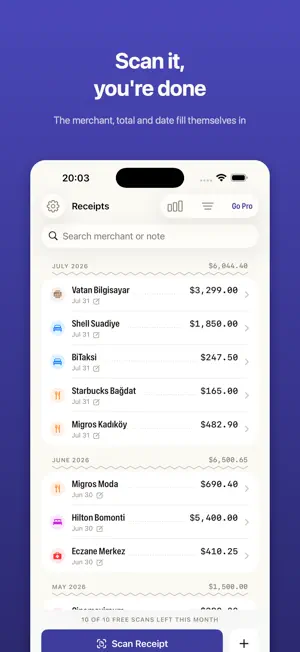
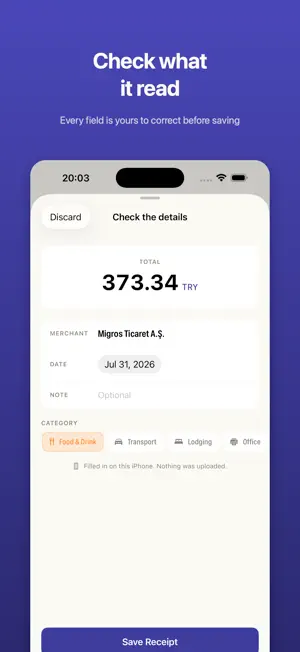
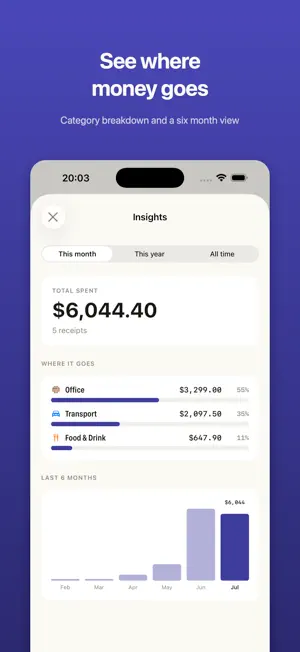
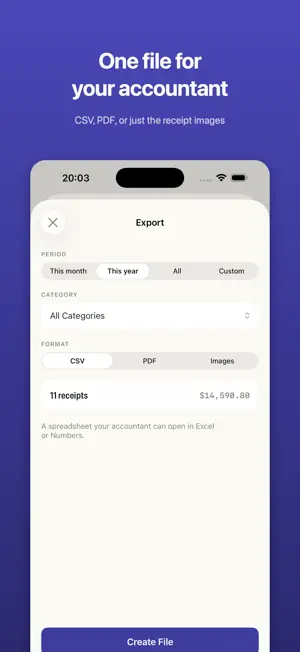
Receipts pile up in a drawer, a wallet, a camera roll. Then it's tax time, or an expense claim is due, and you spend an evening sorting through them. Receiptly turns that evening into a few seconds per receipt. Point the camera, and the merchant, total, date and category fill themselves in. Check the numbers, tap save, done. EVERYTHING STAYS ON YOUR IPHONE There is no account to create and no server of ours to sign in to. Your receipts and their images never leave the device. If you want a backup, you can turn on syncing through your own iCloud, and even then it is your iCloud, not ours. BUILT FOR ONE PERSON, NOT A FINANCE DEPARTMENT Most receipt apps are cut down versions of corporate expense software: approval flows, team seats, per user pricing, an account you have to maintain. If you are a freelancer, a contractor, a sole trader or someone who just needs their own receipts in order, all of that is in the way. Receiptly has one flow: capture, check, save. WHAT IT DOES - Scan with the camera, import from Photos, or type a receipt in by hand when there is no paper - Reads the merchant, total, currency, date and category automatically - Scan several receipts in one session - Search by merchant or note, filter by category - See where your money goes: category breakdown and a six month comparison - Export to CSV for your spreadsheet or accountant - Export to PDF with a summary table and every receipt image attached - Export images only, one receipt per page, when that is all that is asked for - Pick any date range, or just this month, this year, everything - Home screen widget with the month's running total - Works fully offline - English and Turkish ABOUT THE AUTOMATIC READING On iPhone 15 Pro and newer, Receiptly uses Apple's on device intelligence to pull the details out of a receipt. Nothing is sent anywhere to make that happen. On older iPhones the app reads receipts with on device text recognition instead, so it still works, it is just less clever about unusual layouts. Either way you see what was read before anything is saved, and you can correct any field. Receiptly does not give tax or accounting advice and does not decide what is deductible. It records what is printed on the receipt. What you do with it is between you and your accountant. FREE AND PRO Ten scans a month are free, and receipts you type in by hand never count against that. Pro removes the limit and unlocks CSV and PDF export. Pro is one price, not a menu: a yearly plan, or a single payment if you would rather never think about it again. Terms of Use (EULA): https://www.apple.com/legal/internet-services/itunes/dev/stdeula/ Privacy Policy: https://furkankufrevi.github.io/legal/receiptly/
App privacy
The developer, Muhammed Furkan Kfrevi, reported these privacy practices to Apple.
Data Not Collected
The developer does not collect any data from this app.
Alternatives to Receiptly: Receipt Scanner
Looking for apps like Receiptly: Receipt Scanner? Here are 6 similar apps on the App Store. The highest rated is Zcan Lite - Receipt Scanner (5.0/5), and all 6 are free to download.
-
 ReceiptFlow - Scan Receipts
-
 Zcan Lite - Receipt Scanner
5.0
Zcan Lite - Receipt Scanner
5.0
-
 Receiptly: Receipt Scanner Tax
-
 Receiptly - Expense Tracker
-
 Flexi Expense Tracker : Budget
5.0
Flexi Expense Tracker : Budget
5.0
-
 ReceiptHQ
5.0
ReceiptHQ
5.0
| App | Rating | Price | Last updated | Compare |
|---|---|---|---|---|
| Receiptly: Receipt Scanner | 5.0 / 5 (1 rating) | Free | August 6, 2026 | |
| ReceiptFlow - Scan Receipts | – | Free | Jul 30, 2026 | Compare |
| Zcan Lite - Receipt Scanner | 5.0 / 5 (1) | Free | Sep 23, 2026 | Compare |
| Receiptly: Receipt Scanner Tax | – | Free | Sep 12, 2026 | Compare |
| Receiptly - Expense Tracker | – | Free | Sep 12, 2025 | Compare |
| Flexi Expense Tracker : Budget | 5.0 / 5 (2) | Free | Apr 16, 2026 | Compare |
| ReceiptHQ | 5.0 / 5 (1) | Free | Sep 28, 2026 | Compare |