

CalculateMap: GPS Area Measure
Bhavik Solanki Utilities iPhoneiPadiPod touch
CalculateMap: GPS Area Measure is a free Utilities app for iPhone and iPad by Bhavik Solanki. Requires iOS 17.0. Updated October 18, 2026.
- Price
- Free
- on the App Store
- Size
- 25 MB
- Age 4+
- Updated
- Oct 18
- 2026 · v1.6
Screenshots


About CalculateMap: GPS Area Measure
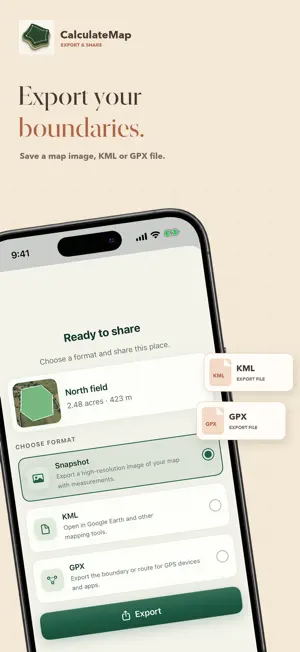
Know your land before you plan your next step. Measure fields, fences and walking routes, then save, compare and share your work with CalculateMap. MEASURE THE WAY YOU WORK • Tap boundary points on the map, position a crosshair, draw freehand, enter latitude and longitude, or walk with GPS. • See area, perimeter and distance update as you measure. Create circles to check radius and circumference, or save a location marker. • Move points and use undo or redo while drawing to refine the shape before saving. WALK A BOUNDARY OR ROUTE Record points as you walk, pause and resume, close a boundary and review your result before saving. View GPS accuracy and choose recording settings to suit your walk. Keep the app open while recording. USE THE MAP AND UNITS YOU NEED Search for places or coordinates. Switch between standard, satellite and hybrid maps to understand the ground. View results in acres, hectares, square meters, square feet and other supported metric or imperial units. SEE HOW A PLACE HAS CHANGED Explore available historical satellite imagery from 2014 onward and compare it with the latest available view. Check changes around fields, buildings or access routes. Coverage and capture dates vary by location and provider; daily imagery loading limits apply. KEEP EACH SITE TOGETHER Save measurements in named, color-coded projects. Search and filter your saved places by project or measurement type, then view a project's shapes together on the map. With Plus, rename saved places, add notes and edit boundaries instead of starting again. MEASURE WITH YOUR CAMERA Plus includes AR tools for camera-based distance and area measurements on compatible devices. Keep a camera snapshot with the saved result. On a compatible LiDAR-equipped iPhone, scan a room to review floor area, perimeter, wall area and ceiling height, and export its 3D model as USDZ. IMPORT, EXPORT AND SHARE With Plus, bring in KML or GPX files and export individual map measurements in either format. Share several files in a project-organized ZIP archive, or share a map snapshot to make a measurement easier to explain. SAVE ON YOUR DEVICE, SYNC WITH ICLOUD Your measurements are stored on your device and can sync through your private iCloud database when iCloud is available. No separate CalculateMap account is required. START FREE. CHOOSE PLUS FOR REPEAT FIELDWORK. The free plan includes up to 10 saved places, 2 custom projects in addition to Default, 1 saved GPS walk, and the Now and 2016 imagery options where available. CalculateMap Plus removes the saved-place, project and GPS-walk limits. It also unlocks the available historical years and Compare, saved-place editing, KML/GPX import and export, ZIP sharing, AR measurement and compatible LiDAR room scans. Why upgrade? Keep more sites organized, refine existing boundaries, compare changes and take your files into other mapping tools. Spend less time rebuilding measurements and more time planning your next fence, field task or site visit. Map, GPS and camera measurements are estimates, not legal property boundaries or a professional survey. Results depend on map data, GPS conditions and device capabilities. Plus is a paid subscription; plans and eligible trials are shown before purchase. Subscriptions renew automatically unless canceled. Manage or cancel in your Apple Account settings. Terms: https://sites.google.com/view/inovexa/terms-and-conditions Privacy: https://sites.google.com/view/inovexa/privacy-policy Apple EULA: https://www.apple.com/legal/internet-services/itunes/dev/stdeula/
What’s new
Version 1.6 · Updated October 18, 2026
Bugs fixed, Localise in 14 languages.
App privacy
The developer, Bhavik Solanki, reported these privacy practices to Apple.
Data Not Collected
The developer does not collect any data from this app.
Alternatives to CalculateMap: GPS Area Measure
Looking for apps like CalculateMap: GPS Area Measure? Here are 6 similar apps on the App Store. The highest rated is Field Maps with Area Measure (5.0/5), and all 6 are free to download.
-
 CleanUp: Duplicate Cleaner App
1.0
CleanUp: Duplicate Cleaner App
1.0
-
 Land Area Finder with MAP
-
 Field Area Measurement: FAMeas
-
 Field Maps with Area Measure
5.0
Field Maps with Area Measure
5.0
-
 Coordinates Lite
2.2
Coordinates Lite
2.2
-
 Easy BMS
1.0
Easy BMS
1.0
| App | Rating | Price | Last updated | Compare |
|---|---|---|---|---|
| CalculateMap: GPS Area Measure | – | Free | October 18, 2026 | |
| CleanUp: Duplicate Cleaner App | 1.0 / 5 (1) | Free | Oct 17, 2026 | Compare |
| Land Area Finder with MAP | – | Free | Jan 1, 2024 | Compare |
| Field Area Measurement: FAMeas | – | Free | Feb 15, 2026 | Compare |
| Field Maps with Area Measure | 5.0 / 5 (1) | Free | Sep 24, 2026 | Compare |
| Coordinates Lite | 2.2 / 5 (17) | Free | Jul 14, 2026 | Compare |
| Easy BMS | 1.0 / 5 (1) | Free | Oct 24, 2026 | Compare |