

Filevale: File Converter & QR
Van Hiet Ho Utilities iPhoneiPadiPod touch
Filevale: File Converter & QR is a free Utilities app for iPhone and iPad by Van Hiet Ho. Requires iOS 26.0. Updated October 19, 2026.
- Price
- Free
- on the App Store
- Size
- 7 MB
- Age 4+
- Updated
- Oct 19
- 2026 · v2.2
Screenshots

About Filevale: File Converter & QR
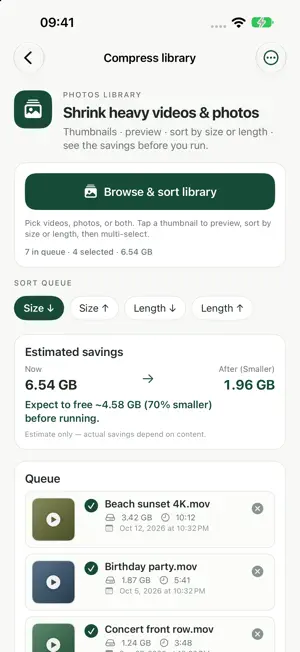
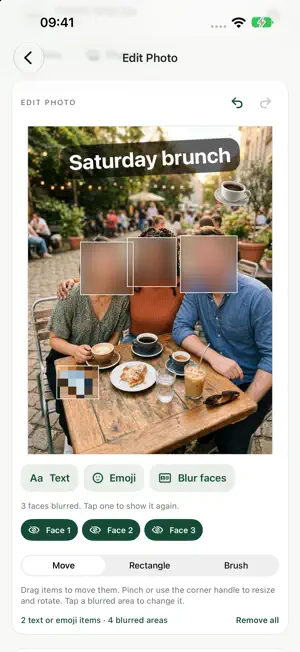
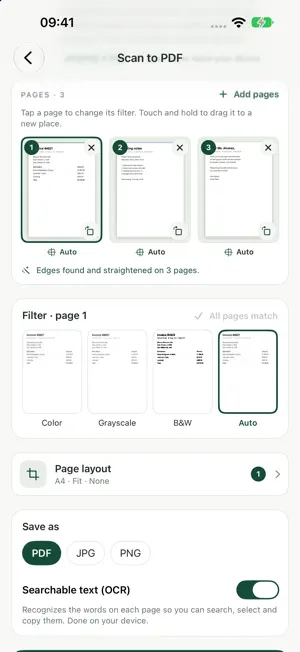
Filevale turns any file into the file you need: more than 100 free tools for PDFs, documents, archives, images, video, audio and QR codes, plus the video compressor that frees up space on your iPhone. Formerly VidZip: same app, same tools, new name. Everything runs on your iPhone. Nothing is uploaded, ever. No account, no ads, no subscriptions, no in-app purchases. COMPRESS VIDEOS IN YOUR LIBRARY - Browse your Photos library sorted by size or length and find the heaviest videos and photos (iCloud originals included) - Select many at once, see the estimated savings before you start - Choose Balanced, Smaller or Smallest: Filevale compresses with modern HEVC and shows the before and after size - The smaller copy is saved to Photos; deleting the original is optional and always asks you first REDUCE FILE SIZE - One tool to shrink photos, PDFs, videos, audio, documents and archives, even down to a target size, so they fit in an email or chat PDF, SCAN & SIGN - Merge PDFs and images into one PDF: reorder, rotate, select or remove pages - Split, compress, rotate and crop PDFs; add page numbers, stamps and watermarks - Scan to PDF: capture paper documents with the camera, edges found automatically, searchable text (OCR) on the device - Sign PDF: draw, type or import your signature, add the date and text - PDF to JPG, PNG, text, Word, Excel or PowerPoint; images to PDF DOCUMENTS & DATA - Word, Excel, PowerPoint, RTF, Markdown, HTML and text files to PDF or images - Convert between CSV, TSV, JSON and Excel; JSON formatter ARCHIVES - Extract ZIP, RAR, 7Z, TAR, GZ, BZ2 and XZ files: browse the contents and pick the files you need - Password-protected ZIP files open with their password - Create ZIP (optional AES-256 password), 7Z and TAR.GZ archives PHOTO EDITOR - Add text and emoji: drag, pinch and rotate; choose the font, colour and style - Blur or pixelate any area with a rectangle or a brush, or blur every face with one tap (on-device face detection) - Undo and redo, then save at full resolution as JPG, PNG or HEIC, without location or camera details IMAGES - HEIC to JPG or PNG, PNG to JPG, WebP and AVIF to JPG; save as JPG, PNG, HEIC, AVIF, TIFF, GIF, BMP or PDF - Resize, compress and crop images, make animated GIFs, remove photo metadata (location, camera details) VIDEO & AUDIO - MOV to MP4, compress, trim and mute video, video to GIF, video to MP3 - Convert MP3, M4A, WAV, AIFF, FLAC, OGG and Opus audio; trim, speed and volume QR CODES - QR code generator for links, text, Wi-Fi, contacts, email, SMS and more, with your own logo; PNG, JPG or SVG - QR code scanner HOW IT WORKS - Tap Choose file, pick anything from Files or Photos, and Filevale suggests the right tool with your file loaded. - Process many files at once and export the results as one ZIP. - Search finds any tool by name or file format (try "heic", "rar" or "docx"). PRIVATE BY DESIGN Every conversion runs on your iPhone, even offline. No account, no analytics, no ads; temporary copies are deleted automatically. The camera is used only to scan documents and QR codes, and the images are processed on the device. On a computer? The same tools are in your browser at filevale.com (Settings > Web version). Questions or feedback: [email protected]
What’s new
Version 2.2 · Updated October 19, 2026
New: Photo editor — add text & emoji, blur any area, one-tap face blur. - Find it on Home > "Edit photo", or search "blur" - Everything stays on your iPhone: faces are detected on the device, photos are saved at full resolution - Free, like every Filevale tool: no account, no ads
App privacy
The developer, Van Hiet Ho, reported these privacy practices to Apple.
Data Not Collected
The developer does not collect any data from this app.
Alternatives to Filevale: File Converter & QR
Looking for apps like Filevale: File Converter & QR? Here are 6 similar apps on the App Store. The highest rated is Velo by Velo Tech Service (4.8/5), and all 6 are free to download.
-
 PCTransfer
-
 Fileroom
-
 Compressly: Video Compressor
-
 Files - Documents Manager
-
 Velo by Velo Tech Service
4.8
Velo by Velo Tech Service
4.8
-
 Doggygo VPN Fast & Secure
4.0
Doggygo VPN Fast & Secure
4.0
| App | Rating | Price | Last updated | Compare |
|---|---|---|---|---|
| Filevale: File Converter & QR | – | Free | October 19, 2026 | |
| PCTransfer | – | Free | Aug 17, 2026 | Compare |
| Fileroom | – | Free | Oct 15, 2026 | Compare |
| Compressly: Video Compressor | – | Free | Jun 18, 2026 | Compare |
| Files - Documents Manager | – | Free | Oct 17, 2026 | Compare |
| Velo by Velo Tech Service | 4.8 / 5 (1,082) | Free | Sep 24, 2026 | Compare |
| Doggygo VPN Fast & Secure | 4.0 / 5 (170) | Free | Oct 12, 2026 | Compare |