

Pockeo
Mohamed Konate Finance iPhoneiPadiPod touch
Pockeo is a free Finance app for iPhone and iPad by Mohamed Konate. Requires iOS 16.4. Updated October 2, 2026.
- Price
- Free
- on the App Store
- Size
- 86 MB
- Age 4+
- Updated
- Oct 2
- 2026 · v1.0.6
Screenshots

About Pockeo
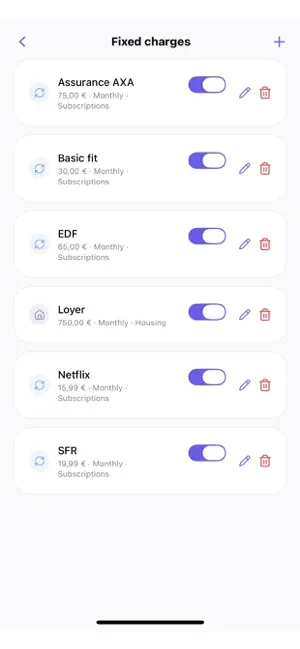
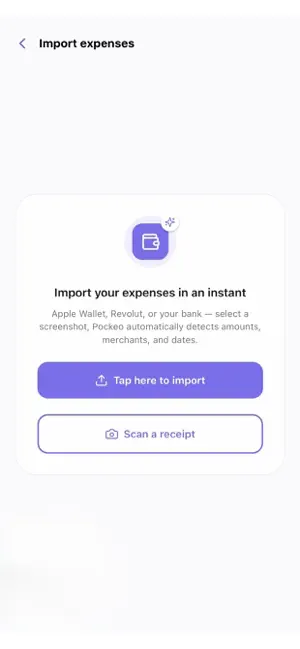
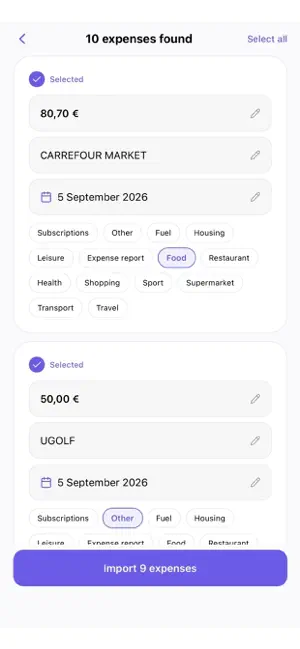
Pockeo tells you exactly how much you can spend today — after your bills, expenses, and savings. No more apps that just show your balance. Pockeo answers the real question: how much can I spend today without compromising the rest of my month — or my goals? SMART IMPORT One Apple Wallet, Revolut, or bank screenshot is enough. Pockeo automatically detects the merchant, amount, and date — no more manual entry. Confirm with one tap, nothing is ever added without your approval. ONE SINGLE CALCULATION ENGINE Salary, fixed charges, savings, projects — one single calculation chain, never two different truths for the same question. You always know exactly where you stand. YOUR GOALS BECOME REAL Trip, car, apartment — Pockeo tells you whether your current savings pace will actually get you there on time. CLEAR STATISTICS A simple view, category by category, to understand exactly where your money goes. PDF REPORTS Generate an expense summary by category in one tap — handy for your personal records. PRIVACY AND SECURITY Face ID / Touch ID lock, privacy mode to hide your amounts anytime, encrypted and protected data. AVAILABLE IN FRENCH, ENGLISH, AND SPANISH Pockeo is free and lets you manage your budget completely: unlimited expenses, categories, statistics, PDF export, savings projects. Premium adds unlimited automatic expense import from screenshots. Terms of Use (Apple standard EULA): https://www.apple.com/legal/internet-services/itunes/dev/stdeula/ Privacy Policy: https://pockeo.fr/privacy.html
What’s new
Version 1.0.6 · Updated October 2, 2026
• **Improved transaction imports:** Easily edit the merchant, date, and amount with a single tap. • **More reliable receipt scanning:** Improved amount detection and support for receipts containing “Payment,” “Paiement,” or “Pago.” • **New “Rollover” budget mode:** Carry your unspent budget over from one day to the next. The “Daily” mode is still available. • Discover and switch between budget modes directly from the home screen or settings. • **New: Pockeo widget:** Add the Pockeo widget to your home screen to quickly check your available budget without opening the app. • Improved display of amounts and currencies in categories. • Performance improvements and bug fixes, particularly after changing settings. • Expanded user guide and FAQ to help you get the most out of Pockeo.
App privacy
The developer, Mohamed Konate, reported these privacy practices to Apple.
Data Linked to You
The following data, which may be collected and linked to your identity, may be used for the following purposes:
- Financial Info: Other Financial Info
- Contact Info: Email Address, Name
- Identifiers: User ID
Used for: App Functionality
Data Not Linked to You
The following data, which may be collected but is not linked to your identity, may be used for the following purposes:
- Contact Info: Name
Used for: Product Personalization
Alternatives to Pockeo
Looking for apps like Pockeo? Here are 6 similar apps on the App Store. The highest rated is BalanceCast, Budget & Forecast (5.0/5), and all 6 are free to download.
-
 Kalendo: Budget Calendar
-
 BalanceCast, Budget & Forecast
5.0
BalanceCast, Budget & Forecast
5.0
-
 SpendLens: Budget Envelopes
-
 Alliance Compta Services
-
 Caisso Manual Budget
-
 Budget Left: Expense Tracker
| App | Rating | Price | Last updated | Compare |
|---|---|---|---|---|
| Pockeo | – | Free | October 2, 2026 | |
| Kalendo: Budget Calendar | – | Free | Sep 29, 2026 | Compare |
| BalanceCast, Budget & Forecast | 5.0 / 5 (1) | Free | Oct 5, 2026 | Compare |
| SpendLens: Budget Envelopes | – | Free | Aug 3, 2026 | Compare |
| Alliance Compta Services | – | Free | Oct 22, 2024 | Compare |
| Caisso Manual Budget | – | Free | Aug 5, 2026 | Compare |
| Budget Left: Expense Tracker | – | Free | Oct 1, 2026 | Compare |
Compare Pockeo with the top alternatives: ratings, updates, ASO score and keyword gaps →