

Video Compressor - LeanVid
Hyungsung Kim Photo & Video iPhoneiPadiPod touch
Video Compressor - LeanVid is a free Photo & Video app for iPhone and iPad by Hyungsung Kim. Rated 5.0/5 from 2 ratings. Requires iOS 18.0.
- Rating
- 5.0
- 2 ratings
- Price
- Free
- on the App Store
- Size
- 30 MB
- Age 4+
- Updated
- Sep 28
- 2026 · v1.1.4
Screenshots



About Video Compressor - LeanVid
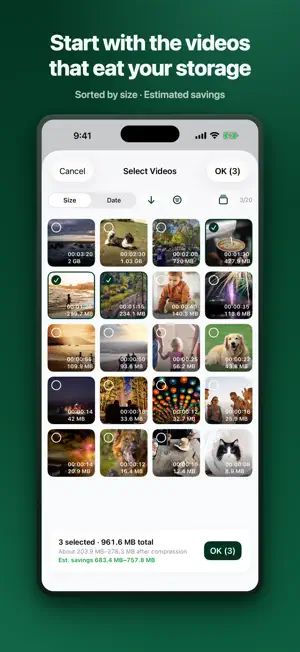
Your videos are eating your storage. Deleting them hurts, and cloud plans add up — LeanVid opens a third way. It compresses videos by lowering only the bitrate while preserving quality (resolution, frame rate, color, HDR, and every track), then safely replaces the originals — but only after each result passes an integrity check. ■ MADE FOR YOU IF • You keep seeing "iPhone Storage Almost Full" • You can't bring yourself to delete family or travel videos • You'd rather not add another monthly fee just for more cloud storage ■ COMPRESSION THAT PROTECTS QUALITY • Lowers only the bitrate — resolution and frame rate stay untouched • Best-effort preservation of HDR (HDR10, HLG, Dolby Vision compatible) and color information • Audio, subtitle, and metadata tracks are copied as-is (only audio that MP4 can't hold is converted to AAC) • Compare before and after with side-by-side, top-bottom, or slider playback — see for yourself, then decide • Detailed spec comparison: codec, bitrate, HDR, frame rate, and more ■ VIDEOS OUTSIDE YOUR PHOTO LIBRARY, TOO • Pick videos from the Files app (On My iPhone, iCloud Drive) and compress them • Files your iPhone can't play are handled by the built-in converter — MKV, WebM, AVI, WMV, FLV, TS, MPG and VOB files with VP9, AV1, VP8, MPEG-1/2/4, DivX, Xvid, WMV or Motion JPEG video • Their audio (AAC, MP3, AC-3, Opus, Vorbis, WMA, PCM) is converted along with the video; subtitle tracks and iPhone spatial audio are not carried over • Replace the original file or save the result to your photo library ■ SAFEGUARDS FOR YOUR ORIGINALS • Replacement proceeds only after the result passes integrity verification • Deleting originals goes through the iOS system confirmation, and they stay in Recently Deleted for 30 days • A recovery journal safely rolls back interrupted work if the app quits mid-task • Compression history lets you re-compare or export anytime ■ SAVINGS THAT REPEAT EVERY MONTH • A lighter library lowers your cloud usage too • Once usage drops below a plan tier, downgrading one step saves you money automatically every month • Not a one-time cleanup — savings that show up on every bill ■ NO WAITING AROUND • Compression continues in the background (iOS 26+ devices; earlier versions pause and auto-resume) • Track progress from the Lock Screen and Dynamic Island with Live Activities • Sort by size to start with the videos that free up the most space • Videos stored in iCloud are downloaded and processed automatically ■ PRIVACY • Everything happens on your device — no data about your videos is ever collected or transmitted • No contradiction: an app that cuts your cloud fees never uploads your videos to a cloud of its own • No account required About the permission it asks for LeanVid needs access to your photo library to find compressible videos and to replace originals after verification. Originals are deleted only with your confirmation. Videos from the Files app need no extra permission — only the files you pick are accessed.
What’s new
Version 1.1.4 · Updated September 28, 2026
Minor fixes.
App privacy
The developer, Hyungsung Kim, reported these privacy practices to Apple.
Data Used to Track You
The following data may be used to track you across apps and websites owned by other companies:
- Identifiers: Device ID
Data Linked to You
The following data, which may be collected and linked to your identity, may be used for the following purposes:
- Location: Coarse Location
- Identifiers: Device ID
- Usage Data: Product Interaction, Advertising Data
Used for: Third-Party Advertising, Analytics, App Functionality
Data Not Linked to You
The following data, which may be collected but is not linked to your identity, may be used for the following purposes:
- Diagnostics: Performance Data, Other Diagnostic Data, Crash Data
Used for: Third-Party Advertising, Analytics, App Functionality
Alternatives to Video Compressor - LeanVid
Looking for apps like Video Compressor - LeanVid? Here are 6 similar apps on the App Store. The highest rated is Video Compressor: Size Down (5.0/5), and all 6 are free to download.
-
 Video Compressor: Size Down
5.0
-
 Keepr: Photo Clean up & Vault
4.4
-
 Media Den - Private Vault
5.0
-
 Lumenist: Gallery Organizer
5.0
-
 VideoSlim - Reduce Video Size
-
 VideoCompressor - Shrink Clip
| App | Rating | Price | Last updated | Compare |
|---|---|---|---|---|
| Video Compressor - LeanVid | 5.0 / 5 (2 ratings) | Free | September 28, 2026 | |
| Video Compressor: Size Down | 5.0 / 5 (1) | Free | Oct 3, 2026 | Compare |
| Keepr: Photo Clean up & Vault | 4.4 / 5 (7) | Free | Oct 21, 2026 | Compare |
| Media Den - Private Vault | 5.0 / 5 (5) | Free | Aug 20, 2026 | Compare |
| Lumenist: Gallery Organizer | 5.0 / 5 (2) | Free | Aug 25, 2026 | Compare |
| VideoSlim - Reduce Video Size | – | Free | Oct 13, 2026 | Compare |
| VideoCompressor - Shrink Clip | – | Free | Sep 26, 2026 | Compare |