

TFR Browser
Eric Thurber Navigation iPhoneiPadiPod touch
TFR Browser is a free Navigation app for iPhone and iPad by Eric Thurber. Rated 5.0/5 from 1 ratings. Requires iOS 17.6. Updated August 15, 2026.
- Rating
- 5.0
- 1 ratings
- Price
- Free
- on the App Store
- Size
- 2 MB
- Age 4+
- Updated
- Aug 15
- 2026 · v1.0.1
Screenshots



About TFR Browser
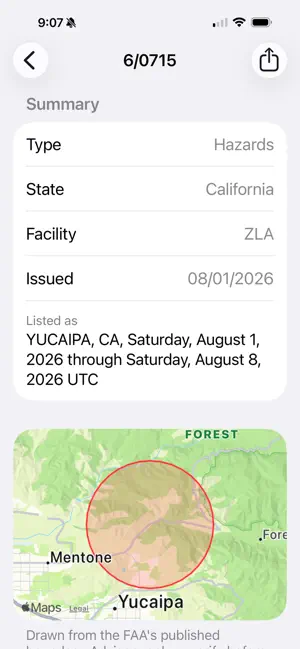
Most TFR violations aren't defiance. They're pilots who simply didn't know. Temporary Flight Restrictions appear with little warning — wildfires, VIP movements, sporting events, security operations — and checking for them means remembering to go and look. TFR Browser removes that step. Choose the states you fly in, and you'll be notified when a new restriction is published there. WHAT IT DOES - Alerts you when a new TFR is published in your selected states - Checks the FAA's public TFR feed every 15 minutes - Includes nationwide restrictions regardless of which states you pick - Shows the affected airspace on a map, drawn from the FAA's published boundary - Gives you effective times, altitude limits, the governing regulation, and who to contact - Links straight to the official FAA record for any restriction - Share a TFR with another pilot in a couple of taps BUILT FOR HOW DRONE PILOTS ACTUALLY FLY Most airspace tools alert you when a flight you've planned conflicts with a restriction. That doesn't help if you fly opportunistically and never file anything. TFR Browser watches for new restrictions being published, whether or not you've planned a flight. FREE, WITH NO ACCOUNTS AND NO TRACKING No sign-up, no subscription, no advertising, no analytics. The app never asks for your location. IMPORTANT TFR Browser is an independent app. It is not produced, endorsed, or verified by the FAA. It is advisory only and is not a substitute for an official preflight check. Alerts may be delayed or missed, and receiving no notification does not confirm that no restriction applies to your flight. Always verify at tfr.faa.gov before you fly. Compliance with all airspace restrictions remains the pilot's responsibility.
What’s new
Version 1.0.1 · Updated August 15, 2026
- New Game Days tab — see when stadium TFRs apply at pro games in your states - Tapping an alert now opens that TFR directly - Fixed the first-launch screen not dismissing after acknowledging
App privacy
The developer, Eric Thurber, reported these privacy practices to Apple.
Data Not Linked to You
The following data, which may be collected but is not linked to your identity, may be used for the following purposes:
- Identifiers: Device ID
- Other Data: Other Data Types
Used for: App Functionality
Alternatives to TFR Browser
Looking for apps like TFR Browser? Here are 6 similar apps on the App Store. The highest rated is DroneSense OpsHub (5.0/5), and all 6 are free to download.
-
 Drone Scout: Flight Simulator
4.2
-
 AeroNOTAM
3.6
-
 Tailvision by ADS-B Exchange
3.3
-
 DroneSense OpsHub
5.0
-
 Dronetag
2.7
-
 DroneSense
4.6
| App | Rating | Price | Last updated | Compare |
|---|---|---|---|---|
| TFR Browser | 5.0 / 5 (1 rating) | Free | August 15, 2026 | |
| Drone Scout: Flight Simulator | 4.3 / 5 (8) | Free | Aug 25, 2026 | Compare |
| AeroNOTAM | 3.6 / 5 (21) | Free | Jun 11, 2026 | Compare |
| Tailvision by ADS-B Exchange | 3.3 / 5 (22) | Free | Oct 13, 2026 | Compare |
| DroneSense OpsHub | 5.0 / 5 (3) | Free | Oct 1, 2026 | Compare |
| Dronetag | 2.7 / 5 (9) | Free | Sep 14, 2026 | Compare |
| DroneSense | 4.6 / 5 (32) | Free | May 15, 2024 | Compare |
Compare TFR Browser with the top alternatives: ratings, updates, ASO score and keyword gaps →