

SoundTick
Sankalita Das Music iPhoneiPadiPod touch
SoundTick is a free Music app for iPhone and iPad by Sankalita Das. Requires iOS 17.0. Updated September 5, 2026.
- Price
- Free
- on the App Store
- Size
- 28 MB
- Age 4+
- Updated
- Sep 5
- 2026 · v1.0.1
Screenshots


About SoundTick
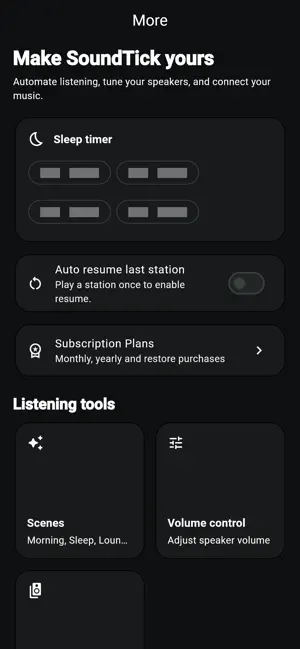
SoundTick is an independent app for compatible Bose SoundTouch Wi-Fi speakers. Discover internet radio stations from around the world, play them directly on your speakers, save favourites and presets, and control multiple speakers from your iPhone. SoundTick communicates with compatible SoundTouch speakers on your local network, making it simple to continue enjoying internet radio on speakers you already own. INTERNET RADIO • Search and browse internet radio stations from around the world • Play stations directly on compatible Bose SoundTouch speakers • Quickly return to stations you listen to regularly • Save unlimited favourite stations PRESETS & FAVOURITES Keep your favourite listening choices close at hand. • Create and manage up to 10 SoundTick presets • Save unlimited favourite stations • Quickly select the station you want to play SOUNDTOUCH SPEAKER CONTROL SoundTick automatically looks for compatible speakers on your local network. • Automatically discover compatible SoundTouch speakers • Control playback • Adjust speaker volume • Discover and control multiple speakers from one app MULTIROOM CONTROL Have SoundTouch speakers in more than one room? • Discover multiple compatible speakers • Group and ungroup speakers • Control grouped speakers from one place • Adjust group volume conveniently from your iPhone 60 DAYS OF COMPLIMENTARY ACCESS SoundTick includes 60 days of complete access when you first obtain the app from the App Store. • No payment details are required to begin • No subscription is started automatically • No automatic renewal during the complimentary-access period • Explore all SoundTick features before deciding whether to subscribe After the 60-day complimentary period ends, a monthly or yearly subscription is required to continue using SoundTick. Subscriptions are purchased through your Apple Account and can be managed or cancelled at any time in your App Store subscription settings. COMPATIBILITY SoundTick currently supports compatible Bose SoundTouch Wi-Fi speakers. Your iPhone and SoundTouch speakers must be connected to the same local network for speaker discovery and control. Compatibility and functionality may vary depending on: • SoundTouch speaker model and firmware • Local Wi-Fi and network configuration • Internet connectivity • Availability and compatibility of third-party radio streams A compatible Wi-Fi speaker and internet connection are required. INDEPENDENT APP SoundTick is an independent application and is not affiliated with, endorsed by, sponsored by, or developed by Bose Corporation. Bose and SoundTouch are trademarks of their respective owners. Terms of Use (EULA): https://www.apple.com/legal/internet-services/itunes/dev/stdeula/
What’s new
Version 1.0.1 · Updated September 5, 2026
Setting up your SoundTouch speaker just got easier. SoundTick can now help set up compatible Bose SoundTouch speakers and connect them to your chosen Wi-Fi network—all from within the app. • Set up a compatible SoundTouch speaker • Select and connect it to your home Wi-Fi • Discover the speaker once setup is complete • Start listening with SoundTick We've also included reliability and performance improvements.
Alternatives to SoundTick
Looking for apps like SoundTick? Here are 6 similar apps on the App Store. The highest rated is ReTouch for SoundTouch (5.0/5), and 4 of the 6 are free to download.
-
 ReTouch for SoundTouch
5.0
-
 TouchStream Radio
-
 SoundBridge Radio
5.0
-
 Mast for SoundTouch speakers
-
 ST Remote Pro
5.0
-
 Doghouse Psychobilly
4.0
| App | Rating | Price | Last updated | Compare |
|---|---|---|---|---|
| SoundTick | – | Free | September 5, 2026 | |
| ReTouch for SoundTouch | 5.0 / 5 (1) | Free | Oct 22, 2026 | Compare |
| TouchStream Radio | – | 14.99 USD | Oct 14, 2026 | Compare |
| SoundBridge Radio | 5.0 / 5 (1) | Free | Oct 14, 2026 | Compare |
| Mast for SoundTouch speakers | – | 1.99 USD | Oct 28, 2026 | Compare |
| ST Remote Pro | 5.0 / 5 (4) | Free | Oct 15, 2026 | Compare |
| Doghouse Psychobilly | 4.0 / 5 (1) | Free | Jun 8, 2026 | Compare |
Compare SoundTick with the top alternatives: ratings, updates, ASO score and keyword gaps →