

BigDot Wallet
InstaCiti Business iPhoneiPadiPod touch
BigDot Wallet is a free Business app for iPhone and iPad by InstaCiti. Requires iOS 15.0. Updated October 6, 2026.
- Price
- Free
- on the App Store
- Size
- 42 MB
- Age 4+
- Updated
- Oct 6
- 2026 · v1.3.1
Screenshots


About BigDot Wallet
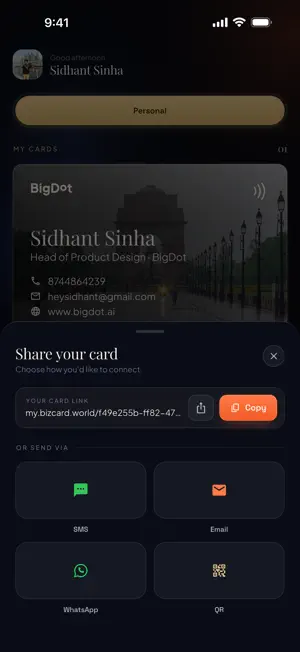
BigDot Wallet turns the business cards you collect into contacts you can actually use — and replaces the card you hand out with one you can share instantly. SCAN A CARD, KEEP THE CONTACT Point your camera at any paper business card. BigDot Wallet reads it and fills in the name, company, job title, phone, email, website and address for you. Check the details, make any correction, and save. No typing a card out by hand ever again. You can also pick a card photo from your gallery, or enter a contact manually when you prefer. YOUR OWN CARD, ALWAYS WITH YOU Build a digital business card with your name, designation, company, phone, email, website and photo. Choose from a range of card designs to match how you want to present yourself. Keep separate personal and business cards and switch between them. SHARE IN A TAP Show your QR code and let someone scan it — it works even when you are offline. Or send your card by SMS, by email, as a copied link, or through the iPhone share sheet. The person receiving it does not need the app. EVERY CONTACT IN ONE PLACE Saved cards and leads live in a searchable vault. Open any contact to call, message or email them straight away. Edit details whenever they change. WORKS THE WAY YOU DO Sign in with your phone number or email — a one-time code is all you need, no password to remember. Choose your country and language during setup. BigDot Wallet is free to download and use. Questions or feedback? Contact us through the support link on this page.
What’s new
Version 1.3.1 · Updated October 6, 2026
• Choose your look: Dark & Glossy, or the new Light & Minimal. Switch instantly in Settings. • New Compact layout keeps Show QR and Share in the dock, with Contacts and Settings a tap away. Prefer actions under your card? Pick Expanded. • Your cover photo now appears on your card, and your full profile opens right from it. • Faster start-up that works offline: your card and contacts load from your phone first. • Refreshed app icon and launch screen. • Sign-in and privacy fixes.
App privacy
The developer, InstaCiti, reported these privacy practices to Apple.
Data Linked to You
The following data, which may be collected and linked to your identity, may be used for the following purposes:
- Contact Info: Physical Address, Email Address, Name, Phone Number, Other User Contact Info
- User Content: Photos or Videos
- Identifiers: User ID, Device ID
- Usage Data: Product Interaction
Used for: App Functionality
Data Not Linked to You
The following data, which may be collected but is not linked to your identity, may be used for the following purposes:
- Diagnostics: Crash Data
Used for: App Functionality
Alternatives to BigDot Wallet
Looking for apps like BigDot Wallet? Here are 6 similar apps on the App Store. The highest rated is eduteck (5.0/5), and all 6 are free to download.
-
 Field Service - TAQNIX
-
 IT FinderHub
-
 eduteck
5.0
eduteck
5.0
-
 Rezi: Job Search & Auto Apply
5.0
Rezi: Job Search & Auto Apply
5.0
-
 AlignBooks: ERP & Accounting
5.0
AlignBooks: ERP & Accounting
5.0
-
 Dodo Payments
3.0
Dodo Payments
3.0
| App | Rating | Price | Last updated | Compare |
|---|---|---|---|---|
| BigDot Wallet | – | Free | October 6, 2026 | |
| Field Service - TAQNIX | – | Free | Dec 20, 2025 | Compare |
| IT FinderHub | – | Free | Oct 5, 2026 | Compare |
| eduteck | 5.0 / 5 (2) | Free | Oct 28, 2026 | Compare |
| Rezi: Job Search & Auto Apply | 5.0 / 5 (1) | Free | Oct 30, 2026 | Compare |
| AlignBooks: ERP & Accounting | 5.0 / 5 (1) | Free | Oct 22, 2026 | Compare |
| Dodo Payments | 3.0 / 5 (4) | Free | Sep 11, 2026 | Compare |
Compare BigDot Wallet with the top alternatives: ratings, updates, ASO score and keyword gaps →