

File Manager : Documents
Yuvraj Solanki Utilities iPhoneiPadiPod touch
File Manager : Documents is a free Utilities app for iPhone and iPad by Yuvraj Solanki. Rated 1.0/5 from 1 ratings. Requires iOS 15.6.
- Rating
- 1.0
- 1 ratings
- Price
- Free
- on the App Store
- Size
- 58 MB
- Age 4+
- Updated
- Sep 9
- 2026 · v1.0
Screenshots

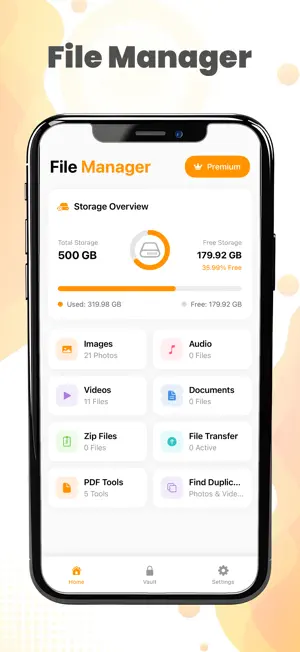
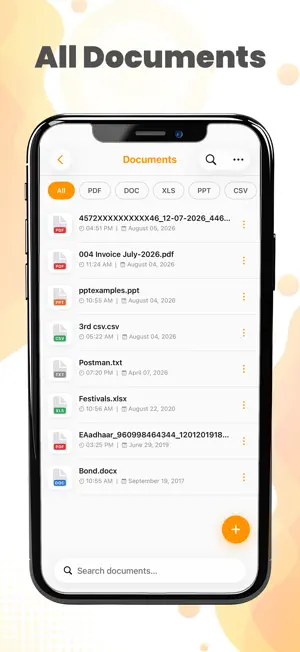

About File Manager : Documents
File Manager – Organize, Manage & Secure Your Files Take full control of your files with File Manager, the smart and easy-to-use file management app for iPhone and iPad. Organize documents, photos, videos, audio files, and folders in one convenient place while keeping your content secure and accessible. Whether you need to browse files, manage storage, transfer documents, or protect private content, File Manager provides powerful tools with a clean and intuitive experience. ## Features ### File Organization * Organize your content with an easy-to-use folder structure * Quickly search and find files when you need them ### Document Management * View and manage PDFs, text files, spreadsheets, presentations, and more * Open and organize documents from various sources * Share files with other apps easily ### Media Management * Browse photos, videos, and audio files * Play supported media directly within the app * Sort files by name, date, size, or type ### Secure Storage * Protect private files * Keep documents organized and secure * Access your important files whenever you need them ### Easy File Sharing * Import files from supported apps and services * Export and share files with friends, family, or colleagues * Save and organize attachments for quick access ### User-Friendly Experience * Clean and modern interface * Fast file browsing and navigation * Optimized for both iPhone and iPad ## Why Choose File Manager? File Manager helps you stay organized by bringing your important files together in one place. Whether you're managing work documents, personal files, photos, videos, or downloads, the app makes file management simple, efficient, and secure. Download File Manager today and enjoy a smarter way to organize your digital content. – Subscription Terms - Video Player offers weekly, monthly, or annual subscription plans, billed according to the selected option. A one-time purchase option may also be available and is separate from the subscription plans. - Payment will be charged to your iTunes account upon confirmation of purchase. - Subscriptions automatically renew unless auto-renew is turned off at least 24 hours before the end of the current billing period. - Your account will be charged for renewal within 24 hours prior to the end of the current period. The renewal cost will match your selected plan. - You can manage your subscription and turn off auto-renewal by going to your Account Settings after purchase. - Any unused portion of a free trial, if offered, will be forfeited when you purchase a subscription. You can view our End User License Agreement (EULA) at: https://yuvrajsolanki07.blogspot.com/2024/10/terms-and-conditions.html Our Privacy Policy is available at: https://yuvrajsolanki07.blogspot.com/2024/10/privacy-policy.html
App privacy
The developer, Yuvraj Solanki, reported these privacy practices to Apple.
Data Not Collected
The developer does not collect any data from this app.
Alternatives to File Manager : Documents
Looking for apps like File Manager : Documents? Here are 6 similar apps on the App Store. The highest rated is Downloora (5.0/5), and all 6 are free to download.
-
 TS File Explorer
-
 Downloora
5.0
Downloora
5.0
-
 Ange Gardien - Famille
-
 Unzip: ZIP, RAR & 7z Extractor
-
 PicOrg - Photo Organizer
-
 My Work Documents
| App | Rating | Price | Last updated | Compare |
|---|---|---|---|---|
| File Manager : Documents | 1.0 / 5 (1 rating) | Free | September 9, 2026 | |
| TS File Explorer | – | Free | Oct 5, 2026 | Compare |
| Downloora | 5.0 / 5 (1) | Free | Oct 7, 2026 | Compare |
| Ange Gardien - Famille | – | Free | Sep 28, 2026 | Compare |
| Unzip: ZIP, RAR & 7z Extractor | – | Free | Sep 18, 2026 | Compare |
| PicOrg - Photo Organizer | – | Free | Mar 25, 2026 | Compare |
| My Work Documents | – | Free | Sep 19, 2026 | Compare |