

Rutimo: Routine Timer & Habits
sanghwa park Productivity iPhoneiPadiPod touch
Rutimo: Routine Timer & Habits is a free Productivity app for iPhone and iPad by sanghwa park. Requires iOS 16.4. Updated November 16, 2026.
- Price
- Free
- on the App Store
- Size
- 58 MB
- Age 4+
- Updated
- Nov 16
- 2026 · v1.1.4
Screenshots
Save to Pinterest


About Rutimo: Routine Timer & Habits
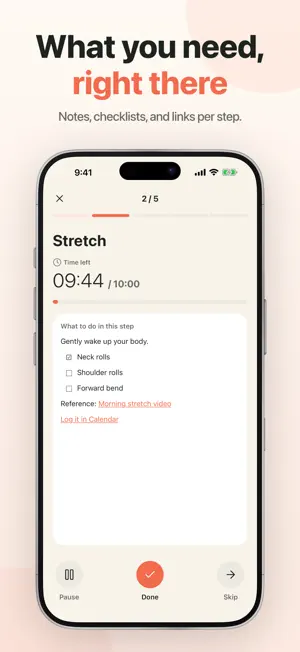
Turn everyday activities into routines with a clear order and time for each step. Rutimo helps you follow through with step-by-step timers for morning preparation, exercise, bedtime habits, and more. STEP-BY-STEP ROUTINE TIMERS • See remaining time, overtime, the next step, and your expected finish time. • Complete or skip steps and pause whenever you need. • Keep the screen awake during a routine and hear completion and pause sounds. • Resume an ongoing routine after the app closes. DETAILS FOR EVERY STEP • Add an estimated duration and description. • Use paragraphs, checklists, and links that you can view while running your routine. TIME AND LOCATION REMINDERS • Choose weekdays and a time for routine reminders. • Receive a reminder when you arrive at or leave a saved place. • Choose notifications or alarms. Alarm mode requires iOS 26 or later. LOOK BACK AT YOUR PROGRESS • Browse your routine history in monthly and weekly calendars. • Review start and finish times, planned versus actual duration, and completed or skipped steps. MAKE IT YOURS • Light, dark, and system themes with six accent colors. • Choose step completion and pause sounds. • Review app permissions in one place. • Export routines to a file and import them again. NO ACCOUNT REQUIRED • Start without signing up or logging in. • Your routines, places, and run history are stored on your device. OPTIONAL PERMISSIONS • Notifications: routine reminders and progress updates. • Location: saving places and detecting arrival or departure for routines with location conditions. • Alarms: ringing at the scheduled time for routines using alarm mode. You can create and manually run routines without granting these permissions. Privacy and optional permissions Usage analytics and diagnostics are off by default. Enable or withdraw consent in Settings > Usage & Diagnostics without affecting routine or location features. Typing an address does not require location permission; selecting Use Current Location requests it. Privacy Policy, Terms of Service, and Support are available in Settings > App Info.
What’s new
Version 1.1.4 · Updated November 16, 2026
- Long-press and drag routines on Home to reorder them. - Skip just the next reminder from Home or routine details. - History now shows routines you partially completed. - Improved reminder reliability and app stability.
App privacy
The developer, sanghwa park, reported these privacy practices to Apple.
Data Not Linked to You
The following data, which may be collected but is not linked to your identity, may be used for the following purposes:
- Location: Coarse Location
- Identifiers: Device ID
- Usage Data: Product Interaction
- Diagnostics: Other Diagnostic Data, Crash Data
Used for: Analytics, App Functionality
Alternatives to Rutimo: Routine Timer & Habits
Looking for apps like Rutimo: Routine Timer & Habits? Here are 6 similar apps on the App Store. The highest rated is Roundi: Visual Focus Timer (5.0/5), and all 6 are free to download.
-
 Rilmio: Routine & Task Timer
-
 Rundle: ADHD Routine & Timer
-
 Lento Routine
-
 Roundi: Visual Focus Timer
5.0
-
 Routine Checklist & Planner
4.0
-
 Routineday Daily Habit Tracker
4.8
| App | Rating | Price | Last updated | Compare |
|---|---|---|---|---|
| Rutimo: Routine Timer & Habits | – | Free | November 16, 2026 | |
| Rilmio: Routine & Task Timer | – | Free | Nov 8, 2026 | Compare |
| Rundle: ADHD Routine & Timer | – | Free | Aug 22, 2026 | Compare |
| Lento Routine | – | Free | Nov 7, 2026 | Compare |
| Roundi: Visual Focus Timer | 5.0 / 5 (6) | Free | Nov 21, 2026 | Compare |
| Routine Checklist & Planner | 4.0 / 5 (2) | Free | Nov 20, 2026 | Compare |
| Routineday Daily Habit Tracker | 4.8 / 5 (9) | Free | Oct 25, 2026 | Compare |